Posted by popetardo on July 8, 2008 at 1:53pm
| Project: | Tabbed Block |
| Version: | 6.x-1.x-dev |
| Component: | Code |
| Category: | bug report |
| Priority: | normal |
| Assigned: | Unassigned |
| Status: | postponed (maintainer needs more info) |
Issue Summary
When use a block-view, tabbeb-block titlte only work on front page.
Comments
#1
sorry, can you provide more information?
what kinds of block you embedded?
I cannot reproduce the bug at all
#2
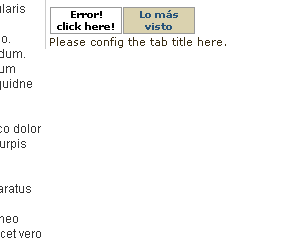
I'm sorry, my english is very bad. I've taken some screenshots.
#3
how about other non-views block?
do they work?
#4
Yes.
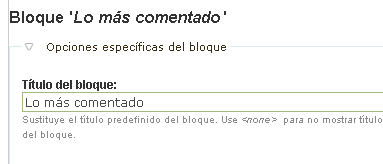
Lo más comentado (the most commented) is a view block, and Lo más visto (popular content block, core block). The titles work fine on front-page for two blocks, but on page-node only show title for non view block.
Thank's
#5
take this default build-in "Archive" view as example:
http://localhost/drupal6/admin/build/views/edit/archive
in "Default" or "Block", you have to enter "Title" in "basic settings" in order to have a title displayed in the block.
#6
I have the title. The title only work fine on front-page, that's the problem.
#7
possible duplicate of http://drupal.org/node/189149?
#8
I have the same problem. When using the Tabbed block module, my block titles are not visible. The title tags are not rendering. Here a code snippet
<div class="tabbed-block"><ul class="tabbed_block-nav"><li class="tabbed_block-selected"><a href="#" id="fragment0-0">Geef uw reactie</a></li><li><a href="#" id="fragment0-1">WeekMenu</a></li></ul><div class="tabbed_block-container" id="content-fragment0-0"><form action="/biosnew/comment/reply/1" accept-charset="UTF-8" method="post" id="comment-form">
<div><div class="form-item">
<label>Uw naam: </label>
<a href="/biosnew/user/1" title="Gebruikersprofiel weergeven.">admin</a>
</div>
<div class="form-item" id="edit-comment-wrapper">
<label for="edit-comment">Reactie: <span class="form-required" title="Dit veld is verplicht.">*</span></label>
<div class="resizable-textarea"><span><textarea cols="60" rows="15" name="comment" id="edit-comment" class="form-textarea resizable required textarea-processed"></textarea><div style="margin-right: -2px;" class="grippie"></div></span></div>
</div>
<fieldset class=" collapsible collapsed"><legend class="collapse-processed"><a href="#">Invoerformaat</a></legend><div class="fieldset-wrapper"><div class="form-item" id="edit-format-1-wrapper">
<label class="option" for="edit-format-1"><input id="edit-format-1" name="format" value="1" checked="checked" class="form-radio" type="radio"> Filtered HTML</label>
<div class="description"><ul class="tips"><li>Adressen van webpagina's en e-mailadressen worden automatisch naar links omgezet.</li><li>Toegelaten HTML-tags: <a> <em> <strong> <cite> <code> <ul> <ol> <li> <dl> <dt> <dd></li><li>Regels en paragrafen worden automatisch gesplitst.</li><li>Internal paths in double quotes, written as "internal:node/99", for example, are replaced with the appropriate absolute URL or relative path.</li><li>HTML tags will be transformed to conform to HTML standards.</li></ul></div>
</div><div class="form-item" id="edit-format-2-wrapper">
<label class="option" for="edit-format-2"><input id="edit-format-2" name="format" value="2" class="form-radio" type="radio"> Full HTML</label>
<div class="description"><ul class="tips"><li>Adressen van webpagina's en e-mailadressen worden automatisch naar links omgezet.</li><li>Regels en paragrafen worden automatisch gesplitst.</li></ul></div>
</div><p><a href="/biosnew/filter/tips">Meer informatie over formaatmogelijkheden</a></p></div>
</fieldset>
<input name="form_build_id" id="form-c2198f531ad80bea1e0647b78b3ea21f" value="form-c2198f531ad80bea1e0647b78b3ea21f" type="hidden">
<input name="form_token" id="edit-form-token" value="5667018a282c1f87f83893c29207023f" type="hidden">
<input name="form_id" id="edit-comment-form" value="comment_form" type="hidden">
<input name="op" id="edit-submit-1" value="Opslaan" class="form-submit" type="submit">
<input name="op" id="edit-preview" value="Voorbeeldweergave" class="form-submit" type="submit">
</div></form>
</div><div class="tabbed_block-container tabbed_block-hide" id="content-fragment0-1"><ul class="menu"><li class="leaf first week"><a href="/biosnew/biostop10/week-25-2010">Week 25 - 2010</a></li>
<li class="leaf week"><a href="/biosnew/biostop10/week-24-2010">Week 24 - 2010</a></li>
<li class="leaf last week"><a href="/biosnew/biostop10/week-26-2010">Week 26 - 2010</a></li>
</ul></div></div>
#9
re#8
but the HTML said you got 2 tabs?
may be a css probem? try switch to garland to test css first.
#10
I patched the .module file a little. This is my code:
(line: 106// tabbed_block.module)
//use this function to get the block content,
//instead of hard code
//example: array( 'module' => 'comment' , 'delta' => '0' , 'override_title' => 0 , 'override_title_text' => '' ),
$temp = tabbed_block_output_content_block( array( 'module' => $name , 'delta' => $delta , 'override_title' => 0 , 'override_title_text' => '' ) );
//tab headers
//catch potential empty block, redirect user to overide title
if ( $temp->subject ) {
$tab_subject .= "<li><a href='#' id='fragment". $module_delta ."-". $i ."'>". $temp->subject ."</a></li>";
//tabe content
if ( $temp->content ) {
$tab_content .= "<div id='content-fragment". $module_delta ."-". $i ."'><h3>". $temp->subject ."</h3> ". $temp->content ."</div>";
}
else{
$tab_content .= "<div id='content-fragment". $module_delta ."-". $i ."'>Nothing here.</div>";
}
}
else{
$tab_subject .= "<li><a href='#' id='fragment". $module_delta ."-". $i ."'>Error! click here!</a></li>";
$tab_content .= "<div id='content-fragment". $module_delta ."-". $i ."'>". l("Please config the tab title here." , "admin/build/block/configure/". $name ."/". $delta) ."</div>";
}
$i++;
}
$tab_subject .= "</ul>";
}
You can view the result here: http://www.biostop10.nl/film/inception
On the right, under the Youtube player.