I noticed in the default zen install, there was some whitespace below my footer in firefox.
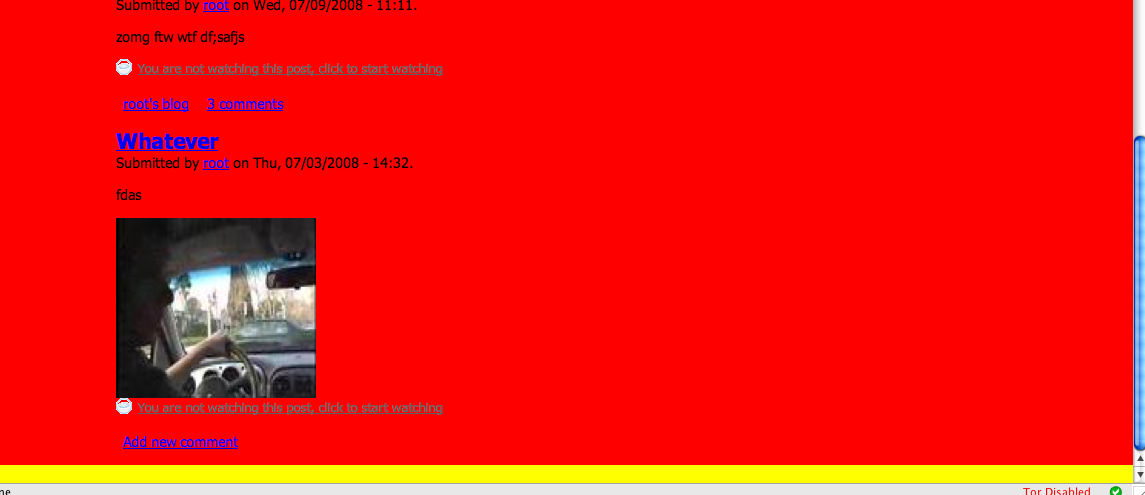
Please note the screenshot I have attached. I made a quick modification to the theme by making the body background-color set to yellow and removing the zen default of padding: 10px;. I also set #page to back a background color of red.
It seems that all the floats were not being cleared for some reason. adding a class clear-block to page didn't completely solve the problem but appeared to help reduce the space.
I found that setting #page to have the property "overflow: hidden;" solved the problem. This probably needs some additional research and testing. I unfortunately do not have an IE box right right now to investigate this further.


Comments
Comment #1
johnalbinBefore you start doing all sorts of CSS contortions, I HIGHLY recommend getting firebug. It will show you in about 5 seconds why an element has the padding it does. http://getfirebug.com/
I'm thinking you didn't remove the default body padding of 10px properly.
Comment #2
kmontyJohn, I have firebug and did remove it properly in firebug by setting it to 0px (if you bothered to look at my screen capture, you would see that firebug is turned on). I spent a significant amount of time trying to figure this out and I do not believe it to be anything I did. As I said, it was a fresh installation of zen.
Do you have a "5 second" suggestion of substance that could explain user error?
I continue to believe it is a bug.
Comment #3
jjeff commentedI've been trying to track down this issue too. I've narrowed it down to having something to do with the .clear-block class on the #main div. I'm guessing that it has something to do with the :after content, but I haven't spent much time with it. I'm also guessing that we're going to need to create our own clear rather than using Drupal's "built-in" .clear-block.
Perhaps those clues will help others track it down.
BTW, I found this problem in v6.x-1.x-dev. Just to make sure we're talking about the same thing, it's basically impossible to make the #page element come all the way to the bottom of the window, right?
Comment #4
johnalbinOk. Overriding the
body { padding: 10px; }means that #page will touch the bottom of the viewport. But only if you have something in the footer.I always have a footer message, so I’ve never seen this bug before. :-\
Even a
in the footer fixes the issue.Suggestions for a CSS based fix?
Bumping this to 6.x, but it happens in 5.x as well.
Comment #5
jjeff commentedAh ha! Interesting. I *rarely* have something in the footer. :-)
Comment #6
kmontyAs it stands, the bug is not a problem with IE 6 or 7. It does effect Opera 9.23, Safari 3.1.x and Firefox 2.x / 3.0
Setting #page to have overflow:hidden; does not seem to effect any of the browsers adversely but does squash the bug.
What are the potential drawbacks of using this method?
I'll continue to look for a more ideal solution...
Comment #7
johnalbinoverflow: hiddenmeans that any extra-long content (like a really wide image) will be hidden. Currently extra-long content just flows past the edge of the content area without breaking the layout.So the cure would be worse than then disease.
Comment #8
johnalbinok, so I spent sometime trying to fix this. And I might have a solution. On a whim, I tried
#page { overflow-y: hidden; }and that fixed both Safari and Firefox. So, I'm going to give you credit in the CHANGELOG, Kevin! :-)That property started out as a IE-only thing, but when I did a google search, I found out it is in the upcoming CSS3 spec. So, yayz!
I need to verify this doesn't screw up anything in IE 6 & 7, but hopefully we will be good to go.
FYI, if anyone wants to test this, get a vanilla Zen installation with liquid layout. Oh, and make sure there's nothing in the footer or footer message. Then add these styles to the end of layout-liquid.css:
That makes the body color (red!) stand out quite clearly between the edge of #page and the viewport.
Comment #9
johnalbinFor posterity's sake, I also tried adding:
But that only work in Safari and not in Firefox.
And I tried adding:
But that only reduced the space in Firefox, but didn't get rid of it completely.
I suppose we could have done:
But that might have unintended consequences and its overkill since the problem only exists for the one .clear-block that touches the bottom of the viewport.
Just thoroughly tested the patch in #8 on IE6 and it doesn't break anything there. Now onto IE7…
Comment #10
johnalbinOk, thoroughly tested in IE7 as well.
I'm committing this, but I'm reluctant.
I've been using this layout method for 4 years and this is the first true bug. Although, technically its a bug in the .clear-block class. However, that means I've put the layout method's CSS through strenuous real-world testing and this patch has not received that much testing. And while this patch doesn't look like it will affect anything, it's seriously freakin' me out, man!
Anyway, committing… and going to bed.
P.S. You're in the CHANGELOG again, Kevin. Thanks!
Comment #11
Anonymous (not verified) commentedAutomatically closed -- issue fixed for two weeks with no activity.
Comment #12
kmontyMaybe we should look at replacing the drupal core's clear-block entirely.
I just noticed this ticket which pointed to this article http://www.trending.us/2008/04/30/clearflow-another-way-to-clear-floats-...
This seems like a better approach to me.
Also, has this issue been brought up in the Drupal Core issue queue yet, as it isn't a zen-specific problem? I couldn't find it there.
Comment #13
johnalbinRe-opening. The overflow-y has been causing occasional scrollbars for some people. ack. :-p
Comment #14
johnalbinI think we may need to comment out the
overflow-y: hiddenline. The scrollbars are worse (and more mysterious) then a couple pixels of space at the bottom of the viewport.However, we should still leave that line (in commented-out form) to let people use it who need it (like JJeff and kmonty).
Comment #15
johnalbinOk. So I commented this line out. It does cause weird scrollbars in under some circumstances. :-( http://drupal.org/cvs?commit=168537
@kmonty: the "clearflow" method has issues too. clearfix/clear-block is still the best method at the moment. And, after doing some googling, I found many others have noticed this same problem with clearfix.
I'm going to leave this open since its documented, but not fixed.
Over in IRC, EclipseGC was saying that you could replace the div.clear-block with a div that was floated. I wonder what this would do to our #main div if we tried that. No time to test now.
Comment #16
kmontyI agree that documenting a possible solution is probably the best approach right now. I suspect the number of effected by the problem is less than the number effected by the solution.
I've since done some research and clearflow seemed to be less ideal than clearfix. Tragic, because I really don't like clearfix.
My time is pretty crunched as well, but whenever I get some free time, I'll look into floating #main and testing it (unless someone gets to it first!)
Comment #17
Lars69 commentedI hade the same problem with my site which is based of the Zen-theme. I got mysterious margins wherever the .clear-block occurred. For example because of this line which created a margin under my logo.
I found I a solution that worked for me. I found it at:
http://perishablepress.com/press/2008/02/05/lessons-learned-concerning-t... (by: Jeff Starr)
He suggested some minor changes to the standard .clearfix hack. And it worked "klockrent" as we say in Sweden. Perhaps something for you guys to try? I changed .clear-block in default.css to the following.
/* zero font-size added to prevent potential layout issues */
.clear-block:after {
content: " ";
display: block;
height: 0;
clear: both;
visibility: hidden;
font-size: 0;
}
Comment #18
todd nienkerk commentedI've verified that Lars69's suggested improvement closes the gap at the bottom of the page. It looks good in in Firefox, Safari, and IE6. Haven't tested in IE7.
HOWEVER, changing the "content" value from "." to " " presents a problem in Firefox. Simply adding this line:
...solves the gap problem
Comment #19
monotaga commentedsubscribing
Comment #20
eagereyes commentedI also just ran into this problem. Lars69's fix seems to work fine. Can this get rolled into the next release?
Comment #21
puddyglumI was using a theme based on Garland and ran into this problem with .clear-block. I used Lars69's idea and it worked perfectly (and avoided the overflow-y: hidden; cautioned by JohnAlbin).
Comment #22
Pierluigi commentedHi,
sorry but font-size :0; on IE7 and IE8 not function.
How will make to resolve the problem ?
Sorry for my English :)
Comment #23
radiocontrolled commentedHello,
Firstly thanks for the zen theme :o)
I think I'm having a similar problem on a site I am building, http://vireotechnologies.com/. I am trying to get my div#main to extend to the bottom of the viewport. I have tried the above suggestions but can't seem to get them to work. Any suggestions?
Comment #24
FreddieK commentedJeff Starrs solution worked for me too. I've been pulling my hairs for two hours until I found this thread. Gotta' love the community...
Comment #25
akalata commented