

Closed (cannot reproduce)
Project:
Content Access
Version:
6.x-1.1
Component:
Code
Priority:
Critical
Category:
Bug report
Assigned:
Unassigned
Reporter:
Created:
11 Jul 2008 at 10:43 UTC
Updated:
25 Sep 2013 at 11:49 UTC
Jump to comment: Most recent, Most recent file


Comments
Comment #1
mschupan commentedI've run into the same problem ... twice.
I'm new to the Drupal scene and have been building what might be considered a loaded system (60+ modules). There have been a few minor irritants, but no significant problems. Shortly after installing Content Access, though, I added an Address field to a Content Profile user type, and my system got trashed (blank white screens after login, and "Access Denied" to the front page for anonymous users. (I suspect a conflict between Content Access and Organic Groups, but I'm just guessing.) After a few days of hunting for a solution, and hacking at the database, I deleted the build and started over.
The current build is much more modest, with only the following modules installed in this order:
- cck-6.x-2.1.tar.gz
- views-6.x-2.1.tar.gz
- token-6.x-1.11.tar.gz
- pathauto-6.x-1.1.tar.gz
- admin_menu-6.x-1.1.tar.gz
- backup_migrate-6.x-1.0.tar.gz
- sitedoc-6.x-1.2.tar.gz
- journal-6.x-1.2.tar.gz
- content_access-6.x-1.0-beta1.tar.gz
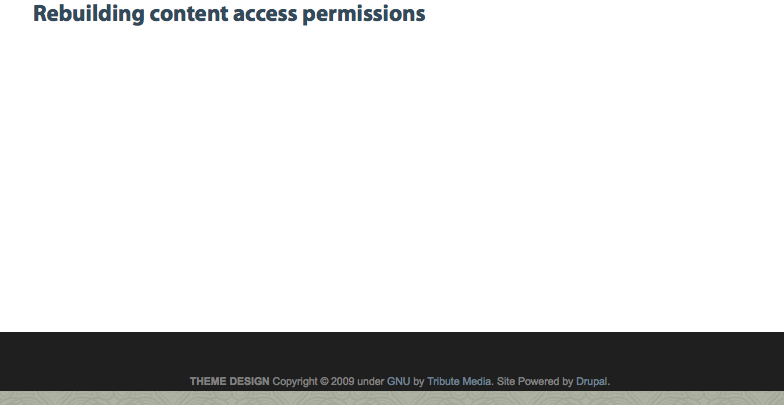
In both builds, the "content access permissions need to be rebuilt. Please visit this page." message appears on all pages immediately after installing Content Access. I've gone to "this page" and after clicking the rebuild button, I get the "Rebuilding content access permissions" message. I manually kicked-off cron, but that doesn't seem to affect anything. The status report does not show any problems, except for the "permissions need to be rebuilt" banner.
In the second build, there are 7 roles defined, first name and last name fields added to the user profile, no users added, and there is 1 page created.
Any insights would be appreciated.
Thanks!
Mike
Comment #2
mschupan commentedUPDATE: I visited the Access Control page on all three defined content types (Book, Pages, Stories), and without changing anything, clicked on the Submit button on the first type (Book) and the "permissions need to be rebuild" message disappeared. Did the same on the 2 other types for good measure without any noticeable differences, since the banner was already gone.
Life seems to be good, at least for now. Would still like to understand if some interaction between Content Access & OG was involved in trashing the first build (wouldn't want to re-live that again!).
Thanks for reading this, anyway!
Mike
Comment #3
salvisThis is weird on several points:
Comment #4
mschupan commentedHi Salvis
1) The message would appear at the top of every page as part if its content ... not as a "residual" part from a previous page. Clicking on the "this page" link and clicking the [Rebuild permissions] button would lead to a new page indicating that permissions were being rebuilt, but there was no progress bar. If I recall correctly, refreshing the page did not produce the same page with the progress bar. (It may have been a different page, or an "Access Denied" page.
2) I don't know what caused the message to disappear, other than clicking [Submit] on the CA page of a Book Page content type. I don't believe that there was a cron process involved, even though I did run cron ... my 2nd rebuild is so small that cron would have PLENTY of time to complete before I navigated to the Book Page screen.
Hope this helps!
Mike
Comment #5
salvisThat kind of message should say something like "Please rebuild permissions!". Once you click on the [Rebuild permissions] button, you should see something like "Rebuilding permissions" on a page of its own, along with a progress bar. That page should automatically refresh as many times as needed, until the process has completed. This is the safe way to rebuild permissions.
Modules should call node_access_needs_rebuild() which sets the site to display the former message, until you go and click the button. CA could presumably clear the message without doing a rebuild, or it could trigger a (non-batched) rebuild, but both would probably be wrong, IMO.
Since your story and my expectations don't match completely, I'm not sure whether my analysis is correct. If you want to pursue this with me, you'd have to post screenshots, so we can see the exact wording of what you get.
Comment #6
benracer commentedSet your theme to one of the drupal cores, such as garland.
If you have any javascript errors the whole thing stops working.
Comment #7
pdcarto commentedI've been having this problem also. The only way I've found to "fix" it is to disable the Organic groups access control module. When I turn it back on, the warning reappears.
I'm not following @mschupan's solution: I have no "access control page" in my content type edit page (for book or any other content type).
Just to be clear on what we're seeing...
Going to /admin/content/node-settings/rebuild shows you this:
After clicking on "Rebuild permissions", there is a brief pause, then the same page simply reloads. It does not show a "rebuilding permissions" page at all. Firefox error console shows no javascript errors.
Comment #8
pdcarto commentedDuh! Nevermind about my previous comment about not having an "access control" page. I found this thread by searching on "rebuild permissions on site content" and failed to notice which project it was filed under! I did not have have the content_access module installed, so obviously, the solution described did not make sense.
After I installed content_access, and then followed the procedure described in #2, the warning message disappeared. However, after disabling content_access again, the problem reappears! (The same process of enabling content_access, followed by opening the Access control tab on any content type and submitting without making in changes, makes it go away.) Strange!
Comment #9
TrinitySEM commentedHad the same issue and editing and saving a content type resolved the issue. Odd.
Comment #10
salvisThis may make the "needs rebuilding" message go away, but I doubt that it
a) results in correct node access data (what rebuilding would do), and
b) corrects whatever problem interferes with rebuilding permissions.
By all means, go to admin/content/node-settings and click on the [Rebuild permissions] button. If this doesn't work, you'll be sorry down the line...
Comment #11
TrinitySEM commentedThank you very much for suggesting this. Fortunately I was able to rebuild the permissions. Your tip also helped in that the node access settings were not functioning. Rebuilding the permissions resolved this issue.
Comment #12
salvis@TrinitySEM: You were able to rebuild manually now, but not before???
That's a big surprise! Do you have any idea why the batch operation suddenly started working?
If all you did is the procedure suggested in #2, then there's a bug in CA after all and we need more information so that fago can find and fix it.
Comment #13
TrinitySEM commented@salvis: Yes, you are correct. I was unable to rebuild prior to editing the content type. Once I edited a content type, bang, the rebuild was successful.
I was also able to add an additional access module "Menu Access" without issue and was able to rebuild this time as well (did this as a precaution and out of curiousity). To triple confirm, I just went to rebuild now and couldn't find the function-somehow lost the location in the 36 hours since I've dealt with it. "A mind is a terrible thing" ;-) The instructions above must be for D5. Do you know where the rebuild function is located in D6?
Comment #14
salvisThe [Rebuild permissions] button is on admin/content/node-settings for D5 and D6, if you have at least one node access module enabled. You don't find it there? Then your installation thinks you have no node access module installed and something is still wrong...
Comment #15
TrinitySEM commentedAhhh. Wasn't thinking in URL terms. Ok. I was able to rebuild. Seems to be working fine as previously described.
Thanks.
Comment #16
salvisGiven TrinitySEM's confirmation in #13, I'm marking this as a bug for CA.
Let me summarize: Installing CA and ACL (and uc_node_access) put your installation into a state where rebuilding permission failed with only CA or with only ACL. Saving the content types (or just one?) with CA installed has fixed the installation.
CA: #429744: Rebuild Permissions: An error occurred. /batch?id=27&op=do
ACL: #430074: Rebuild Permissions: An error occurred. /batch?id=27&op=do
I'm still puzzled about what happened, but apparently, the cure is within the reach of CA...
fago?
Comment #17
fagohm, the rebuild functionality is offered by core - CA does nothing special but activating this feature. So I really wonder where there should be the bug? Does it occur with CA alone too or only in conjunction with ACL?
Comment #18
salvisI wonder, too, but a number of people have reported that they were unable to rebuild permissions until they'd saved one (or more?) content type(s).
Comment #19
innovative95 commentedHi all,
I'm new to drupal, just installed D6. Wanted to share my experience. As I was configuring the modules, I got the
same error message : content access permissions need to be rebuilt.
After reading the messages here, I unselected og access control and saved config. The message went away.
Then I selected og access control again and saved config. The message reappeared.
This time I went ahead and clicked on rebuild. It did a quick rebuild and gave me a page with the following info :
Post settings
The content access permissions have been rebuilt.
Node access status
If the site is experiencing problems with permissions to content, you may have to rebuild the permissions cache. Possible causes for permission problems are disabling modules or configuration changes to permissions. Rebuilding will remove all privileges to posts, and replace them with permissions based on the current modules and settings.
Rebuilding may take some time if there is a lot of content or complex permission settings. After rebuilding has completed posts will automatically use the new permissions.
Comment #20
xingwang commentedI am running same issue. I upgraded few modules, in 6.10, and Keep getting the message that I need to rebuild the content permission, and the message doens't go away. I tried to rebuild the content permission, but no progress bar ever show up. just basically blank content. I have no idea it is done or not.
Comment #21
artbody commentedrunning in the same Problem
first i thought this is a problem from
php.ini
maxtime etc -> so i set this to 96 000
ignore_user_abort = On
max_execution_time = 96000 ; Maximum execution time of each script, in seconds
max_input_time = 12000 ; Maximum amount of time each script may spend parsing request data
memory_limit = 228M
! long and big enough that this could not be the problem
80% CPU on TOP for houres ( now about 12h ) i think i'll kill this by a server restart
syslog = on
May 7 11:23:15 vs163174 drupal: http://drtest.marmorial.de|1241695395|locale|78.43.105.140|http://drtest.marmorial.de/batch?op=start&id=39|http://drtest.marmorial.de/admin/content/node-settings/rebuild|1||Parsed JavaScript file misc/progress.js.
May 7 11:23:15 vs163174 drupal: http://drtest.marmorial.de|1241695395|locale|78.43.105.140|http://drtest.marmorial.de/batch?op=start&id=39|http://drtest.marmorial.de/admin/content/node-settings/rebuild|1||Parsed JavaScript file misc/batch.js.
now i started to switch off the modules
Comment #22
artbody commentedOk i think i have found the answer of this problem
PLESK (i hate this shit)
the VSERVER manager overwrites some parts of the config with a cronjob
and set safe_mode to on
but must be:
php_admin_flag safe_mode off
[solved]
Comment #23
emdalton commentedDid this get patched? I ran into it today -- some of my users were unable to edit pages they should have had permissions for, so I tried to rebuild permissions. I did encounter some problems related to out of date content, which I fixed, but in the end I had to disable and uninstall CA before I was able to rebuild permissions successfully. Our site was down for about 3 hours.
I plan to copy the whole mess to my test server and reinstall CA to see if I can get a better reproducible test case.
Comment #24
salvisNo. It's unclear where the problem is.
If you have problems with permissions, start with installing devel_node_access.
Comment #25
emdalton commentedThanks, I misunderstood what devel_node_access does. I'll try that on the test server to see if I can track down what the problem is. From #22, I thought someone had figured out more of what was causing this than is actually the case, I guess.
Comment #26
salvissafe_mode can cause trouble with files, but I don't think it can affect node access (which is completely inside the database) in any way.
This thread has somewhat degenerated into a collection of various rants. If you do succeed in finding something substantial, it'd probably be a good idea to start a new thread...
Comment #27
webwriter commentedI am dealing with this problem now on a site that hasn't had issues with content access and has been running for over a year.
I get the message about rebuilding content access permissions, I start the batch process and invariably end up with the "content access permissions cannot be rebuilt" message. This has basically set all new content on my site to hidden for anonymous users.
I went into the content types (I have about 30) and was able to save the Access Controls page and have the permissions rebuilt for that type. Everything was functioning normally.
Unfortunately as I neared the end of my list, I noticed some odd permissions on the Access Controls page and edited them before saving. I got a "changes have been saved" message followed by a "you must rebuild access permissions go to this page" warning.
Since then, I've disabled Content Access and ACL, run the batch process, re-enabled them and tried to save the Access Control page at the content type level and nothing works. Permissions are not rebuilt, all recent content on my site is hidden to anonymous users.
If anyone has a solution or even a band-aid, I'll take it. I don't know what else to do to get the permissions correct. Can I edit something directly in the database?
Thanks-
Comment #28
salvisThe batch process works by repeatedly reloading the same page (with an incremented parameter), doing a little bit of work every time. How does it fail? Is it a certain step that takes too long and times out or what?
Comment #29
webwriter commentedIn my case, it didn't fail. It completed with an error message that said it didn't work.
After trying a number of things, I ran uninstall on Content Access and ACL, then deleted the modules. Everything seems ok now.
Comment #30
particle commentedI have this problem on a recent 5.20 to 6.14 upgrade. I run forums across four domain names sharing a single database with 11,000+ common users. Two domains are fine, and two have this error. Turning off ACL on each domain makes the error message go away. CA has never been installed. I tried the button on admin/content/node-settings several times and I tried submitting all the content type and taxonomies. I've uninstalled both ACL and Forum Access per domain and still have the banner when I re-enable them:
* The content access permissions have not been properly rebuilt.
* The content access permissions need to be rebuilt.
I have no idea what to try next.... ideas would be appreciated.
Comment #31
salvisTurning off all (read 'the last') node access module will disable the node access system and remove the need for rebuilding the database. That's normal behavior and does not incriminate ACL in any way.
Four domains sharing a single database? Are you also using domain_access (another node access module)? Are you sure that your multi-domain setup can actually work with node access? Have you tried this on a smaller test installation?
The button on admin/content/node-settings must work — if it doesn't, then your walking on ice that's too thin for a production site. I still haven't been able to extract from any one of the posters how it fails...
I mean, what happens immediately before displaying
* The content access permissions have not been properly rebuilt.
? Does one of the steps time out? The first one? The last one? One in the middle? Always the same one? Or does it proceed all the way to the end and unexpectedly display the message? After how many seconds does it terminate? Study how the process works on your test installation with a few hundred messages and compare that to what happens on your live installation. How does it differ? Where does it go wrong?
Any messages in the watchdog log? Have you tried raising PHP memory and/or timeouts? Does this make any difference in how it fails? Have you tried using another browser?
Since we can't see what you're seeing, we have no way to help you, unless you tell us... Oh, and what are your Drupal and PHP versions?
Comment #32
particle commentedNot using domain_access. The only multi-site module we use is Single Sign-on. Drupal core supports everything else using shared tables. We do use ACL & Forum Access and I just installed Content Access to try and trouble shoot this. Turning off Forum Access with ACL on doesn't change anything. Turning off ACL makes the message go away. In fact turning it off gives me message #1 (the good one):
* Operating in off-line mode.
* Content permissions have been rebuilt.
* The configuration options have been saved.
Turning on Content Access only gives me message #2 (the bad one):
* The content access permissions need to be rebuilt. Please visit this page.
Turning off Content Access gives me message #1 again.
Turning on ACL only gives me message #2 again.
Rebuilding permissions is almost instantaneous with ACL or Content Access off. With either on it takes a few minutes but gives me the moving progress bar and "Remaining 1 of 1". When it completes it returns to the infamous result message:
* The content access permissions have not been properly rebuilt.
* The content access permissions need to be rebuilt.
This happens with both ACL and Content Access installed and either of them enabled on their own gives exactly the same result.
Here's the status details - remember this installation has two sites working fine and two sites with permissions problems:
Drupal 6.14
Database updates Up to date
MySQL database 5.0.86
PHP 5.1.6
PHP memory limit 128M
PHP register globals Disabled
Unicode library PHP Mbstring Extension
Web server Apache/2.2.3 (CentOS)
The only log error I can attribute to running the permissions rebuild is this one (and it may be co-incidental):
Location /batch?id=25&op=do
Referrer /batch?op=start&id=25
Message Invalid argument supplied for foreach() in /../../modules/taxonomy/taxonomy.module on line 1214.
Comment #33
salvisYou #2 "bad" message is not bad. It's the proper behavior. You do need to rebuild permissions at that point.
What's bad is that the rebuilding fails, i.e. the
* The content access permissions have not been properly rebuilt.
message is the bad one.
Also, I'm surprised that you see "Remaining 1 of 1" — I'd expect you to see something like "Remaining N of 234".
When you have "Remaining 1 of 1", does the progress bar sit at 0% for "a few minutes" or at 100%?
What's your browser? Have you tried another one?
When it sits there, try putting the cursor into the address line of the browser and hitting the Enter key again.
Well, that gives us something to work with! The code in taxonomy.module is this:
Change it to
and see what happens...
Comment #34
particle commentedBrowser is Firefox 3.5.5 on OS X 10.6.2.
I don't normally use Content Access so I'll try this with the ACL module first. I uninstalled the ACL module on one of the sites with this error which deleted the ACL tables (acl, acl_node, & acl_user). I re-enabled the module and this created empty tables. I can confirm that the new empty ACL tables are not being repopulated by the permissions rebuild.
When I do the permissions rebuild, the "remaining 1 of 1" progress bar actually chugs across the screen counting percentages as if there were multiple tasks going on in the background. Either that or it's reporting the % of the 1 task being done. It looks normal and takes about 10-15 minutes on the smallest problem site.
Trying that code above gives me the same "remaining 1 of 1" dialog. I've attached a screen shot. But nothing gets written to the ACL tables. They are still empty. Where do I need to look to find out why the tables aren't being written?
Comment #35
salvisThank you for the picture — that looks correct (I was confused about the 1 of 1). Yes, it's the % completed of the one task.
It's correct that the ACL tables are not populated during the permissions rebuild. What's done is to replace the one single record in the {node_access} table with one record per node. At the end of the rebuild, you should have the same number of records in {node_access} as in {node}.
Disabling ACL removes all records in {node_access} and puts back the single one — that's why it's almost instantaneous.
So, it goes all the way to 100%, but in the end you still get
* The content access permissions have not been properly rebuilt.
? Is that what you're seeing?
Comment #36
particle commentedYep, that's exactly what I'm seeing. So allow me to be thoroughly confused here as nothing matches after a permissions rebuild:
Site A:
{node} has 10,394 records
{node_access} has 3,156 records
Site B:
{node} has 16,125 records
{node_access} 11 records
I check some other installs as well which don't show any errors. Are the numbers supposed to stay in sync or do they drift apart over time?
Comment #37
salvisThose results are odd indeed. ACL by itself doesn't do anything (as long as the ACL tables are empty). It only provides services to other node access modules. However, Drupal doesn't know this and treats ACL like any other node access module, meaning it replaces the one 0/0/all/100 record (which allows read access to all nodes) by one nid/0/all/100 record for each node (provided you really don't have any other node access modules installed besides ACL!), to prepare itself for managing per-node access rights.
This process is somewhat time-consuming because Drupal has to load each node and ask whether any module wants to contribute any node access grants. No one answers, so Drupal inserts that one nid/0/all/100 record and goes on to the next node.
The number of records in the {node_access} table will usually be much higher if you actively use node access. For example, if two roles have access to a given node, you'll typically have two records for that one node. If you have less records in {node_access} than in {node}, this normally means that some of your nodes aren't accessible to users without the administer nodes permission.
Try installing the devel_node_access (DNA) module (part of the Devel module). It has a "Node Access Summary" page that may provide some insight.
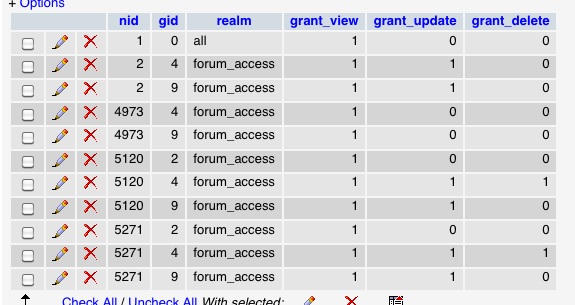
Let's see those 11 records on site B! (Best to post a screenshot in png/jpg/gif format)
Enable DNA's debug mode as well as its second block and look at some of the nodes on site B.
Comment #38
particle commentedThis is /devel/node_access/summary summary for Site B (it doesn't quite tally with the 11):
I'm wondering if some of my tables didn't get upgraded correctly. Is there an integrity check for the database structure of D6.14? Somehow most of the nodes got unhooked.
Here's the node_access screenshot of the 11 records generated by Site B. It's repeatable. I can disable ACL and then re-enable it and rebuild the {node_access} table. The rebuilding results don't vary.
Comment #39
salvisYes, the Schema module does this.
Your screenshot shows Forum Access records. So you're not just enabling and disabling ACL but also Forum Access?
Now, enable DNA debug mode and show us screenshots of the DNA information for node/1, node/2, and some other node that is not on the list (e.g. node/3, if it exists).
Comment #40
particle commentedHmmm... table structure is good. This is what I get now:
ACL off:
{node} 16,125
{node_access} 1
ACL only:
{node} 16,125
{node_access} 3,276
ACL & Forum Access
{node} 16,125
{node_access} 11
The DNA info shows an empty status column. Does this reflect the site being offline or is this the problem?
Comment #41
salvis"empty" is fine; hover your mouse over it to get the explanation.
This must be the case ACL & FA. You said the ACL tables were empty, but there seem to be records in there now, aren't there?
Please also report what you get for ACL-only (for these three nodes).
Comment #42
particle commentedWell... we found a solution that worked for us. We restored the last back-up of 5.20 and let the 5.20 > 6.14 upgrade run it's course again. Now the permissions rebuild properly. Sorry we couldn't troubleshoot it further but this was the quickest solution for us.
Comment #43
salvisThere's one thing I can say for sure: If you uninstall ACL (read: clear its tables), you must do the same for all modules that depend on it, such as Forum Access in your case. This definitely was an admin error on your side, but it doesn't explain why you wouldn't be able to successfully enable only the empty ACL and get a one-to-one correspondence between {node} and {node_access}.
Too bad we'll never know, but at least your up and running again...
Comment #44
particle commentedRight, admin error, of course. Why didn't I think of that? That would have saved a week-long string of expletives.
I can't tell you how many times I uninstalled ACL AND Forum Access ( AND Content Access while I was trouble shooting). Forget emptying them. I disabled, uninstalled and dropped them and then had Drupal recreate them to ensure they had the correct schema (they do, don't they??????). Those numbers above are all based on brand new fresh empty ACL and Forum Access tables.
By the way, thanks for pointing out the Schema module. That helped a lot. Given the schema was right (and that this problem was only happening on two sites in the installation), it seemed that site specific data was corrupted during the 5.20 > 6.14 upgrade. This is why we admin errors make back-ups. To restore things when "stuff" doesn't work in the real world.
I'll keep the rest of my thoughts to myself otherwise I'll be saying really bad things that aren't necessarily applicable to this thread. Thanks for your patience, seriously... ;)
Comment #45
salvisHmm, I'm not quite sure whether you're being sarcastic or not. Somehow I had in mind that you uninstalled ACL but not FA, wiping the former but not the latter. This idea was reinforced by what you showed in #40: no contributions (no '1's) from ACL but some from FA, although I'm puzzled about how ACL was able to say "32: forum_access/11"...
I sure would have liked to find out how this could happen...
Anyway, looking back I see that you clearly stated in #30 that you uninstalled both ACL and FA — sorry about that.
Installing FA does create some records in the {forum_access} table, but if you install only ACL, the ACL table should remain empty, and the result of rebuilding the permissions should be one {node_access} record for each {node} record, like you showed for node/1.
The results that you showed for node/2 and node/2000 cannot come from empty ACL and FA tables. I have no idea where that data could have come from though. Either you have a colleague who's trying to help you out, or a third-party module that does something that you're not aware of.
(Yes, the ACL and FA schemas are running on thousands of known sites and they are correct.)
Comment #46
particle commentedI'd love to have found out why too. But with all the things not making sense, restoring that portion of the installation seemed to make sense as part of the troubleshooting. If you are lost, retrace your steps. And if we got the same results again we'd continue troubleshooting.
Comment #47
seovegasrich commentedI may have a remedy!
Goto: yoursite.com/admin/settings/performance
Disable the following:
Page compression
Optimize CSS files
Optimize JavaScript files
Save the configuration.
Now run the build and Wholla!
I know this isn't "technical" but it worked for me!
Oh, by the way I am running Drupal 6.x
Comment #48
webchickI think I might be experiencing a variation of this as well post the 5 -> 6 upgrade. I'm not totally convinced this is a CA problem, but documenting it here since it's the first place I hit in Google.
I've got a site with OG and Content Access. Part of our custom modules' upgrade path resolves some misconfigured node access priorities on the CA side, and then sets node_access_needs_rebuild(TRUE). This results in the "The content access permissions need to be rebuilt" message at the end. So far, so good...
When I click the Rebuild permissions button and wait the 30+ minutes it takes to convert all ~60K nodes' permissions, the bar gets all the way to 100% and then yields the error "The content access permissions have not been properly rebuilt. The content access permissions need to be rebuilt."
I don't see any messages in watchdog at all that might yield a clue as to where this is coming from. I wanted to run the process through a debugger, but since that'd obviously take forever with 60K nodes, I backed up the node table, deleted all but the last ~20 entries or so, and then ran it again. It took a few seconds as expected, but then produced no errors. :\
It's probably a corrupted entry somewhere or other, but I'm not really sure how to begin paring it down. I tried disabling all caching options as suggested in #47, but this had no effect. I'll read the rest of the issue in more detail to see if there are any other hints.
Comment #49
webchickHm. #471080: Trigger watchdog when node rebuild permissions fails looks like it might be related.
I don't have any nodes in my node table with a nid of 0. But I wonder if some kind of system error (for example, out of memory?) could cause node_load() to fail and return NULL. Nothing in the PHP error log or watchdog, though. :(
Comment #50
salvisSee #471080-9: Trigger watchdog when node rebuild permissions fails for a debugging idea...
Comment #51
webchickOk, since that referenced core issue gave the clue about a failed node_load() causing this issue, I added the following debugging code to _node_access_rebuild_batch_operation():
I discovered that one of the nodes in our system triggered the debug code to run (oddly, the debug info printed twice for the same row. Not sure what's up with that). And I confirmed that a $node = node_load(XXX); var_dump($node); led to 'false' as the result.
Digging further, the record's node.uid column was referring to a user that wasn't there. This caused the query in node_load() to return 0 rows, which in turn caused the node_load() to fail.
At the very least, it seems like core ought to fire a watchdog or something when condition this happens, so you have some semblance of a hope of tracking down what's going on. But in any case, I don't see any bug with Content Access module here at least for my particular problem.
Comment #52
liquidcms commentedhaven't sifted through all this yet.. but... my results:
i do not have ACL (is that a module?)
i enabled CA and it says i need to rebuild permissions - clicking this gives me Remaining 1 of 1 with progress bar at 0%; been about 20 min so far and site only has a few nodes.. pretty sure it has crashed. tried a few times - same result.
will keep reading though this thread.
Comment #53
liquidcms commentedi am still on 1.1
as posted above.. rebuild hangs.
but, i try same thing on copies of my site that are on my local devel system and on a different server - both of those work fine. AFAIK it is the same site on the other server which doesn't work.
I compared status report on both servers and i see the one that is failing has a 32M php mem limit - is it possible CA is hitting a mem limit and silently failing? (the one that works is set to 160M, my devel system is 600M.. lol)
duhh.. i guess i can set devel to 32M and retest...
Comment #54
liquidcms commentedcertainly issues on my devel system if i limit to 32M (even at 50M).. Vista, eh... go figure... but even at 32M it still rebuils fine.
Comment #55
salvisNo, with only a few nodes, memory can't be an issue.
Please try the test in #471080-9: Trigger watchdog when node rebuild permissions fails — that'll tell us whether CA is part of the problem on your site at all. Post your answer both here and there.
Comment #56
liquidcms commented@salvis
thanks for the reply.
i'll give it a shot when i can modify my clients code. At the moment they have deployed to their own server and i don't have ability to alter the code - they are going to try to sort it out on their own first by possibly tweaking server settings (like memory).. which, as you suggested, likely won't do anything.
i can alter code on my server and do the test.. but as i said; works fine on my server.
Comment #57
husztisanyi commentedhttp://drupal.org/node/432938#comment-2667862
Comment #58
BradM commentedI happened to get this message today, and was stumped...several attempts to rebuild node access, although after some time reaching 100% on the progress bar, still resulted in the "need to be rebuilt" message. I happened to have a user relationships node access module installed, not really knowing what it was all about, but it was activated. When I disabled it under the modules list and hit "save configuration," not only was the usual "configuration options have been saved" message presented, it also stated "content permissions have been rebuilt."
To check, I returned to /admin/content/node-settings and attempted another rebuild. No progress appeared, but I was returned to the rebuild page stating that "content permissions have been rebuilt." I checked /devel/node_access/summary, which states "Legacy Nodes: You have 12463 nodes in your node table which are not represented in your node_access table." Should I be worried? All content seems to be displaying as expected to both anon and regular users, and the node_access table has just 1 line. I don't restrict content based on user type, so I guess this makes sense?
Anyway, here are the specifics for the module I deactivated:
UR-Node Access 6.x-1.x-dev
Provides per node access control based on relationship to author
Depends on: UR-API (enabled)
Comment #59
salvis@BradM: You don't have the Content Access module installed, so you should not be posting here in the Content Access module queue.
The behavior you see after disabling the UR-Node Access module is correct, so you don't need to worry. If you intend to use that module and you have problems with it, then please post in that module's issues queue. It is possible that you're suffering from the same issue that's plaguing Content Access and that we're discussing here, so you may want to mention this thread.
Comment #60
ClearXS commentedSame error; my xml sitemap was gone and does not rebuild. The some other errors of other modules. Cleaning the mess up (always the same problems with Drupal in over 3 years not getting a complete site working), unvinking other modules I dont need, cause probelms or can cause problems and removing. Result: need to rebuild permissions, goes to that page and my screen says the page loading is "done", but the permissions apparently aren't rebuild as the same message returns that permissions need to rebuild.
And yes, I had content access, I just unvinked it. How do I get rid of it of that might be the cause and I still can't rebuild my database?
And I never even get the rebuild progress bar, it even never starts, but gets to this page and then says done (my windows screen):
site.org/batch?op=start&id=92
for sitemap it says the same:
site.org/batch?op=start&id=95
(but doesnt exist anymore and won't be regenerated)
OK: finally it worked:
I just eliminated all the caching in /performance and /performance/boost and cleaned all caches there.
How further I dont know, because drupal is unacceptable slow without boosting. I dont know if I should install the uninstalled modules again; not knowing what was th exactly cause or several aspects together causing this.
Comment #61
salvisCleaning the caches was required to allow your batches to proceed, both for sitemap and node access permissions?
I have nothing under /performance — what module lives there?
Comment #62
ClearXS commented/preformance: the standard caching and the "booster" module caching.
And now everything is working well, even reinstalled all the caching with the apropiate .htaccess file (module booster put the standard caching off).
But now I have a new error that doesn't want to go away whatever I do.
Clean URLs is not working anymore. It says that my server supports that, but on vinking to use clean url, it starts processing for a moment, but never changes to that clean url is working.
Clean URL is said to be neccessary for xmlsitemap, thats why I mention it; might be related or not. It was working before. But it's for another topic (though similar topics have been there and never resolved completely).
Comment #63
kayusee commentedseovegasrich,
Your remedy is the only one that worked for me. Thanks for your suggestion.
Comment #64
sparkweb commentedIs there any official response, recommendations, set of instructions from the developers on this issue? I see a number of different issues for a few different people going on here, with various suggestions (some of which are too technical) including: turn off all caching, use a different template, turn modules on and off. Yet there seems to be no clear or definitive answer for anything.
My issue is very similar: I've am getting the "Click here to rebuild Content Access Permission" notice. I run the rebuild, the progress bar appears and climbs up to 91% and hangs there as long as I allow to leave it there. I have maybe 2000 nodes tops. It should not take so long. I have the memory limit set to 96M in settings.php. Wouldn't that be enough?
Anyone can help me out, and make some sense of all of this thread, I and apparently many other people would be quite grateful!
Comment #65
salvisTry #51.
Comment #66
sparkweb commentedSalvis: Thanks for the tip. I had already tried all the other methods, such as reverting to the Garland template, etc.
What I did was just revert the database back to a prior level which did not register any content permission changes.
However, I now recall that this happened a few months ago, it turned out to have something to do with the same user issue mentioned in post #51, and or/ #33 helped out. I don't recall now and I usually write this stuff down but can't find it. I will try it out on a dev site using that database that had been changed.
:)
Comment #67
ClearXS commentedSo there is a fix for over half a year, but still not incorporated in a new release, or how..?
#51: "I added the following debugging code to _node_access_rebuild_batch_operation():"
I looked through the Content_access module, but that's not a file.
Inside the files I don't find that either, only something with names that come into that direction:
content_access.install:
and in content_access.admin.inc:
Comment #68
majorrobot commented@ClearXS:
That function lives in node.module, around line 2375, depending on your Drupal version.
I ran into the same issue described many times above — #51 also worked for me (thanks, webchick!). Nodes created by users that had been deleted would not load and caused the permissions rebuild to hang / fail.
I submit this as a perhaps easier solution to find if this is your problem, as well:
Run this mysql query (thru PHPMyAdmin or whatever):
That should return the nodes that are going to cause you problems.
Comment #69
Encarte commentedsubscribing
Comment #70
chaplin.matt commentedWhen I tried to run the batch permission update, all my permissions got screwed up, and none of these suggestions would fix it. In the end, I had to modify node.module temporarily to successfully run the permissions update and restore my site permissions. I commented out the following if statement on line 764 (Drupal 6.17):
if ($extra = node_invoke_nodeapi($node, 'load')) {
foreach ($extra as $key => $value) {
$node->$key = $value;
}
}
With that statement commented, I was able to run the update successfully, but some content would not display until I uncommented that statement. After that, everything worked great, so that's just what I do whenever I need to rebuild permissions. Not elegant, but it works.
Comment #71
krisrobinson commentedI had this same message, and like others here i didn't actually have the CA module installed but this was where I was directed when searching for this issue.
My solution was to temporarily disable ApacheSolr module, and then enable it again after content permissions were rebuilt.
Comment #72
BenWrighton commentedI clicked on the [Rebuild permissions] button, saw "Rebuilding permissions" on a page of its own, along with a progress bar that just sat on 'Initializing'.
I turned off the JavaScript (cufon) in my theme and it sucessfully rebuild in about 2 seconds.
Running Drupal 6.17.
Cheers to benracer for mentioning this earlier in the thread.
Comment #73
gdf commentedHaving read through all the comments, I guess this has been pretty well beat to death, but I'd like to acknowledge a couple of things:
1) @webchick's analysis of the problem - that the node uid was no longer valid - is spot on in my case.
2) While @salvis correctly points out that this isn't a problem with content_access, I'm wondering where it goes from here. node_access_rebuild needs some kind of fallback mechanism when the uid is bad, because user accounts do get deleted. The rebuild appears to fail without explanation and the "must rebuild" message appears on every page thereafter.
3) The rebuild actually does happen and all nodes that have recognizable access have entries in node_access. It's only the bad-uid ones that are left out. That suggests a couple of solutions. Which is better?
a) reassign the node's uid to a known default value,
b) leave it out of the node_access table but provide some kind of error message to the admin
c) not flag the rebuild as failed
I'd be happy to forward this somewhere where it could be acted on, if anyone has an opinion.
Comment #74
salvis@gdf: Are you sure that deleting users on a plain vanilla D6 installation really leaves nodes with bad $node->uids? If you can reproduce that, then look for a core issue on this subject or open a new one.
Comment #75
gthing commented#2 Seems to have fixed the problem for me as well.
Comment #76
ClearXS commentedThe problems with my site got worse, while different browsers report different problems.
Most problematic is Chrome that does the same as does Google search, reporting:
Fatal error: Call to undefined function db_select() in .../sites/all/modules/migrate/migrate.module on line 366... but that is another error; the other non-logged in browsers do that too (as Anonymous), but only for "http://www." not for "http://"
The browser with what I'm logged-in, doesn't report problems, although I have to rebuild cache and permissions several times before articles go to the front-page. That would be in-acceptable for a production site with many people working on it & I can't leave the test phase before this is over. Maybe part of the problem is that Drupal architecture is in-stable with many modules on a CPU throttling hosting-account.
All other browsers keep reporting the site with no articles (& without the Chrome/Google error)
So this seems to be something with permissions for (Anonymous) visitors. It worked before & I haven't touched it, so wondering what caused changes in these settings or circumstances.
Comment #77
salvis@ClearXS: Install LAMP/WAMP on your own computer, install a new Drupal and slowly add one (current!) module after the other, carefully keeping track of whether things work or break.
Comment #78
good_man commentedComment #79
bsandor commentedI use D7.
Had same problem, couldn't solve it for hours. When I run a cron job. That was my solution somehow...
Comment #80
munyivaTrying #51 after rebuilding permissions multiple times. Found two nodes with no users and deleted them hope that sorts the issue.
Comment #81
shabbir commentedHi,
I have migrated my site from D6 to D7, i don't have any node access module and OG module enabled. There was OG module enabled in D6 but since i have migrated to D7 I havent enabled it. (there are OG tables in database) I have ran update.php after enabling few modules (D7) and everything seems to be showing perfect on status report page.
But at the top "rebuild content access permissions" shows all the time, and like @particle #35 even i get this endless progress bar with 59% done but it never ends. Also i have tried all the steps provided here including #2 and disabling and re-enabling module (everything) but my problem doesnt seem to end.
Please help I am stuck on this for past 2 days.
Regards,
Shabs
Comment #82
salvisLook inside the {node_access} table to find out how far the process goes and at which nid it gets stuck (plus/minus 1). Then check these nodes — one of them may be broken and causing the rebuilding to hang.
This is not guaranteed, but my experience is that nodes are typically processed in nid order. You can dig into the rebuild code and add an ORDER BY clause to ensure that this is the case.
Comment #83
shabbir commentedhey salvis,
Thanks for your reply, but i have around 11084 entries in my node_access table, how can i do check on that. Its nearly impossible to find out which entry it broke, can you please elaborate and let me know as i am not that good with databases.
Thanks,
Shabbir
Comment #84
shabbir commentedHey Salvis,
Also can it be possible that (in node_access table) one 'nid' can have multiple same 'gid' for example i have seen a few occurrence like this in my node_access table.
nid gid
169 9
169 5
171 9
171 10
and so on..
is this any issue, i dont know but i am jus asking. Please help me with this..
Regards,
Shabbir
Comment #85
salvis@Shabbir:
Analyzing and debugging your site (or walking you through doing so and teaching you databases, PHP, and Drupal on the way) is beyond what I can do in the scope of free support.
As stated on my contact page, I will not do any free support by private mail, so please stop trying to pursue that non-option.
Also, you are stretching this issue beyond the reasonable. Start your own issue, and if you cannot get enough free support then offer to hire someone to figure this out.
Yes, it's normal to have multiple gids per nid.