Closed (fixed)
Project:
Framework
Version:
6.x-2.0
Component:
Code
Priority:
Critical
Category:
Bug report
Assigned:
Unassigned
Reporter:
Created:
30 Jul 2008 at 02:21 UTC
Updated:
14 Jul 2012 at 19:21 UTC


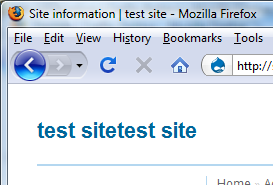
The title displays twice on rendering a page. Here's the source code of a page:
<!DOCTYPE html PUBLIC "-//W3C//DTD XHTML 1.0 Strict//EN"
"http://www.w3.org/TR/xhtml1/DTD/xhtml1-strict.dtd">
<html xmlns="http://www.w3.org/1999/xhtml" xml:lang="en" lang="en">
<head>
<title>Help | test site</title>
<meta http-equiv="Content-Type" content="text/html; charset=utf-8" />
<link rel="shortcut icon" href="/misc/favicon.ico" type="image/x-icon" />
<link type="text/css" rel="stylesheet" media="all" href="/modules/help/help.css?d" />
<link type="text/css" rel="stylesheet" media="all" href="/modules/book/book.css?d" />
<link type="text/css" rel="stylesheet" media="all" href="/modules/node/node.css?d" />
<link type="text/css" rel="stylesheet" media="all" href="/modules/system/admin.css?d" />
<link type="text/css" rel="stylesheet" media="all" href="/modules/system/defaults.css?d" />
<link type="text/css" rel="stylesheet" media="all" href="/modules/system/system.css?d" />
<link type="text/css" rel="stylesheet" media="all" href="/modules/system/system-menus.css?d" />
<link type="text/css" rel="stylesheet" media="all" href="/modules/user/user.css?d" />
<link type="text/css" rel="stylesheet" media="all" href="/modules/forum/forum.css?d" />
<link type="text/css" rel="stylesheet" media="all" href="/sites/[site deleted]/modules/activemenu/activemenu.css?d" />
<link type="text/css" rel="stylesheet" media="all" href="/sites/[site deleted]/themes/framework/style.css?d" />
<script type="text/javascript" src="/misc/jquery.js?d"></script>
<script type="text/javascript" src="/misc/drupal.js?d"></script>
<script type="text/javascript" src="/sites/[site deleted]/modules/jstools/jstools.js?d"></script>
<script type="text/javascript" src="/sites/[site deleted]/modules/activemenu/activemenu.js?d"></script>
<script type="text/javascript">jQuery.extend(Drupal.settings, { "basePath": "/", "jstools": { "cleanurls": true, "basePath": "/" }, "activemenu": { "#block-book-0": "activemenu/book", "#block-menu-primary-links": "activemenu/menu", "#block-menu-secondary-links": "activemenu/menu", "#block-user-1": "activemenu/menu" } });</script>
<!--[if lte IE 7]><link type="text/css" rel="stylesheet" media="all" href="/sites/[site deleted]/themes/framework/fix-ie.css" /><![endif]--><!--If Less Than or Equal (lte) to IE 7-->
</head>
<body class="sidebar-left">
<!-- Layout -->
<div id="wrapper">
<div id="header">
<h1><a href="/" title="test site"><img src="/sites/[site deleted]/themes/framework/logo.png" alt="test site" id="logo" /><span>test site</span> <span id="slogan"></span></a></h1>
<div class="clear"></div>
</div> <!-- /#header -->
<div id="nav">
</div> <!-- /#nav -->
<div id="container">
<div id="sidebar-left" class="sidebar">
<div id="block-user-1" class="block block-user">
<h2>Aren Cambre</h2>
<div class="content">
<ul class="menu"><li class="leaf first even"><a href="/content/content-policy" title="Content policy">Content policy</a></li>
<li class="leaf odd"><a href="/definitions">Definitions</a></li>
<li class="leaf even"><a href="/users/aren-cambre">My account</a></li>
<li class="leaf odd"><a href="/content/types-motorist-abuse" title="Types of motorist abuse">Types of motorist abuse</a></li>
<li class="collapsed even"><a href="/node/add">Create content</a></li>
<li class="leaf odd"><a href="/tracker">Recent posts</a></li>
<li class="expanded active-trail odd"><a href="/admin">Administer</a><ul class="menu"><li class="collapsed first even"><a href="/admin/content" title="Manage your site's content.">Content management</a></li>
<li class="collapsed odd"><a href="/admin/build" title="Control how your site looks and feels.">Site building</a></li>
<li class="collapsed even"><a href="/admin/settings" title="Adjust basic site configuration options.">Site configuration</a></li>
<li class="collapsed odd"><a href="/admin/user" title="Manage your site's users, groups and access to site features.">User management</a></li>
<li class="collapsed even"><a href="/admin/reports" title="View reports from system logs and other status information.">Reports</a></li>
<li class="leaf odd"><a href="/admin/advanced_help">Advanced help</a></li>
<li class="leaf last active-trail even"><a href="/admin/help" class="active">Help</a></li>
</ul></li>
<li class="leaf last even"><a href="/logout">Log out</a></li>
</ul> </div>
</div>
</div> <!-- /#sidebar-left -->
<div id="center">
<div class="breadcrumb"><a href="/">Home</a> » <a href="/admin">Administer</a></div> <h2>Help</h2> <div class="help"><p>This guide provides context sensitive help on the use and configuration of <a href="http://drupal.org">Drupal</a> and its modules, and is a supplement to the more extensive online <a href="http://drupal.org/handbook">Drupal handbook</a>. The online handbook may contain more up-to-date information, is annotated with helpful user-contributed comments, and serves as the definitive reference point for all Drupal documentation.</p>
</div> <h2>Help topics</h2><p>Help is available on the following items:</p><div class="clear-block"><div class="help-items"><ul><li><a href="/admin/help/block">Block</a></li><li><a href="/admin/help/book">Book</a></li><li><a href="/admin/help/color">Color</a></li><li><a href="/admin/help/comment">Comment</a></li><li><a href="/admin/help/contact">Contact</a></li><li><a href="/admin/help/dblog">Database logging</a></li><li><a href="/admin/help/diff">Diff</a></li></ul></div><div class="help-items"><ul><li><a href="/admin/help/filter">Filter</a></li><li><a href="/admin/help/forum">Forum</a></li><li><a href="/admin/help/help">Help</a></li><li><a href="/admin/help/menu">Menu</a></li><li><a href="/admin/help/node">Node</a></li><li><a href="/admin/help/openid">OpenID</a></li><li><a href="/admin/help/path">Path</a></li></ul></div><div class="help-items"><ul><li><a href="/admin/help/pathauto">Pathauto</a></li><li><a href="/admin/help/poormanscron">Poormanscron</a></li><li><a href="/admin/help/profile">Profile</a></li><li><a href="/admin/help/statistics">Statistics</a></li><li><a href="/admin/help/system">System</a></li><li><a href="/admin/help/taxonomy">Taxonomy</a></li><li><a href="/admin/help/tinymce">TinyMCE</a></li></ul></div><div class="help-items help-items-last"><ul><li><a href="/admin/help/tracker">Tracker</a></li><li><a href="/admin/help/update">Update status</a></li><li><a href="/admin/help/upload">Upload</a></li><li><a href="/admin/help/user">User</a></li></ul></div></div> </div> <!-- /#center -->
<div id="footer" class="clear">
<div id="block-system-0" class="block block-system">
<div class="content">
<a href="http://drupal.org"><img src="/misc/powered-blue-80x15.png" alt="Powered by Drupal, an open source content management system" title="Powered by Drupal, an open source content management system" width="80" height="15" /></a> </div>
</div>
</div> <!-- /#footer -->
</div> <!-- /#container -->
<span class="clear"></span>
</div> <!-- /#wrapper -->
<!-- /layout -->
</body>
</html>
I've attached an image showing the page title.
The site's name is "test site."
| Comment | File | Size | Author |
|---|---|---|---|
| title.png | 23.66 KB | aren cambre |

Comments
Comment #1
aren cambre commentedIt's worse. If you have a slogan and select for it to be displayed, it shows up between the duplicated titles in addition to below the titles.
Comment #2
andregriffin commentedI see this is a bug. Go into themes>configure and turn off logo support. That is a fix until i figure out whats wrong with the php in the #header section of page.tpl
Comment #3
woofmang commentedit's doing that because the 'alt' attribute for the logo img tag is being displayed (the template doesn't include a logo image by default). if you put an image called 'logo.png' in the '/sites/[site deleted]/themes/framework' folder, it will be fixed.
if you don't want to use a logo image in your header, just comment out (or delete) the following if statement (from around line 38-40) in 'page.tpl.php' (and 'maintenance-page.tpl.php'):
hope this helps.
Comment #4
andregriffin commentedAnyone care to check the php to add an if statement for displaying the logo and alt attribute?
Comment #5
andregriffin commentedActually, this isn't really a bug that I can tell... You just have a logo enabled, but no logo uploaded, and as woofmang said, it's just displaying the alt attribute from the logo. All you have to do is go to Administration>Themes>Configure and turn off logo support or upload a logo image if you have one.
I once had the code that woofmang posted above commented out by default, but too many people weren't reading the README file, and wondering why their logos weren't showing up. Now the people who don't have logos are wondering why their titles are displaying twice... I'll make another note in the README file about this.
And if anyone knows of a way to not show the alt attribute if no logo is uploaded, that would be super helpful, though not entirely necessary in my opinion.
Comment #6
andregriffin commentedComment #7
Anonymous (not verified) commentedAutomatically closed -- issue fixed for two weeks with no activity.
Comment #8
aren cambre commentedI would like to suggest a fix of including the Drupal logo by default. Then this theme would act like many other themes, and there would be no need to document unintuitive behavior in the readme.
Nobody reads Drupal readmes anyway, so you're asking for more support requests and bug reports if you have to document stuff in that.
Comment #9
andregriffin commentedI think that's probably a good idea. I've done some minor fixes and changes to the theme recently, and I'll consider doing that for the next release.
Comment #10
andregriffin commentedFixed in 2.0 with the inclusion of a logo image by default.
Comment #11
andregriffin commentedComment #12
Anonymous (not verified) commentedAutomatically closed -- issue fixed for two weeks with no activity.