

Closed (duplicate)
Project:
GeSHi Filter for syntax highlighting
Version:
6.x-1.x-dev
Component:
Filtering
Priority:
Normal
Category:
Feature request
Assigned:
Unassigned
Issue tags:
Reporter:
Created:
2 Aug 2008 at 07:05 UTC
Updated:
28 Sep 2011 at 19:59 UTC
Jump to comment: Most recent file

Comments
Comment #1
soxofaan commentedWhat do you mean with "I need my > -signs to stay as they are"?
you can enter ">" as plain text in the textfield,
but in in HTML it's illegal to just use ">" in the markup, that's why it's encoded (in the markup) as ">",
when you view it in you browser however, it will show up as ">" again.
So normally the ">" you enter as text should show up as ">" in your browser view.
are there other input filters in the input format you use?
Do you have by any chance the HTML filter enabled after the GeSHi filter for example?
Comment #2
wpanssi commentedMy browser shows the ">" as ">".
I do have TinyMCE installed. Could that cause the problem? Is it possible to uset both rich text editor and geshifilter when editing a node?
What do you mean HTML filter enabled after the Geshi? The input format of my node's body is geshi.
Comment #3
soxofaan commentedTineMCE is probably the culprit.
Using a rich text editor in combination with a filter like GeShi filter is not something I would recommend.
It's too easy to create a conflict between the two, for example with characters that need proper encoding (like ">", "<", "&", ...).
When you enter ">" in a rich text editor, it usually is translated to ">" client side, before any other server side filtering (like GeSHi filter).
When GeSHi filter gets ">" as input, it can't know if it was intended as ">" or as ">" because it can't know if the rich text editor was active or not. That's why GeSHi assumes nothing and just handles ">" as ">", with the result you're experiencing.
As far as I know, this sort of problems need to be solved in the rich text editors.
So, I'll mark this as "won't fix" for GeSHi filter.
In Drupal you have input formats and input filters.
An input filter does a type of text filtering, like GeSHi filtering, or transforming an URL to a clickable link.
An input format is a set or pipeline of input filters (one or more) that are executed after each other in a certain order.
Node bodies are filtered by input formats, so you can have several input filters active for filtering the text.
That's why I asked if there is a input filter like HTML filter active in your input format.
But anyway, your problem apparently has to do with rich text editing, as noted above
Comment #4
wpanssi commentedOk. I let you know if I figure out someway to deal with this.
Comment #5
chinka commentedI have the same problem with the FCKEditor and I still don't have any solution.
Anyone can help us on this ?
Comment #6
glorinand commentedHi there. About every wysiwyg editor will convert <> to < and > that's the correct behaviour... However geshi itself probably uses check_plain() somewhere thus converting to html entities again... My quick solution was to decode entities and strip tags before sending the text to be highlighted... Anyway - the attached patch does it... I've tested it in FCKEditor and in TinyMCE.
Now, you can certainly use to fix your problem, but I am not quite convinced whether this would be a good thing if you do not use a wysiwyg. Anyway, let the maintainer decide... However - surely this issue needs to be fixed as many sites use wysiwyg editors and that is certainly not a reason for this module to not work for them...
P.S.: There's another thing that you have to do if using a wysiwyg though - configure it so that it does not remove linebreaks from source and it's generally better to disable source formatting as such... I have used such option in both FCKEditor and in TinyMCE, I guess there's something similar for other editors as well.
Comment #7
soxofaan commentedThat depends on what the correct behavior should be.
If the rich text editor (RTE aka WYSIWYG editor) is expected to output valid (X)HTML (because it will be directly inserted in a webpage), it is indeed the correct behavior.
In the case that the RTE is just a part of a longer pipeline (e.g. there is also GeSHi filtering), getting valid (X)HTML from the RTE is not necessarily required, as long as the complete pipeline spits out valid (X)HTML.
The patch from #6 is not a solution because it will fail when there is no RTE active.
The only partial solution for this problem I can can come up with is an option in the GeSHi filter to decode HTML entities before GeSHi filtering.
If there is no RTE active, this option should be off.
If there is a RTE active, it should be on.
But if the RTE is optional (user can switch it on/off), there is a problem as the GeSHi filter can not know if it gets plain content or escaped content (see my comment in #3). GeSHi filter could guess, but that's like opening a can of worms.
And I bet there are also other use cases (with other filters instead of RTEs) where things can get messy.
Anyway, it's a difficult problem to solve in a clean way (also see http://acko.net/blog/safe-string-theory-for-the-web for example) and I think it will only be possible in a structural way when RTE-support in Drupal is a bit more standardized (Drupal 7 I hope).
Comment #8
glorinand commentedYes, you are quite right. This is certainly not the spot that needs to be patched. It would be much better to make the wysiwygs just output plain text without converting to html entities...
This would work nicely for filtered html input type, not for full html though as no conversion to html entities would then occur there... I can't see any way out here - as there is probably no way for geshi to work well for full html, as full html input type will (and should) always have the entities encoded, right? So if wysiwyg does not know about geshi specifically it just has to output entities...
Of course full html is not enabled for regular users but still... an admin would sometimes need to use it so I guess filters like geshi just should work there as well... We really need to think about this carefully. :-)
Comment #9
yyudhistira commentedHi,
I added a new options in geshifilter settings so called "Enable fix for wysiwyg autoformatting." which is a checkbox and can be enabled/disabled globally or input format specific.
Basically what it does is if you tick this options in combination with input filter that support wysiwyg, it does a following :
- similar with check_plain function, but rather than using htmlspecialchars() with $double_encode= true, I use $double_encode= false which will prevent double encoding on already encoded characters by wysiwyg.
- will change
<br />to new line, because<br />also spits out by wysiwyg.Of course site maintainer must make sure that he/she tick this option with wysiwyg enabled for that input filter. In other words, don't use this option in global settings, but use it for input format specific settings. If he/she still insists to use it without wysiwyg, it will still be encoded anyway. This will just prevent double encoding by both wysiwyg and then again by geshifilter.
I hope this is useful.
Comment #10
glorinand commentedVery nice. :-)
Comment #11
Grayside commentedThis is a vast improvement. Now, for some review.
If I start with the WYSIWYG turned off, and enter something like
for( $i=0; $i<count($array); i++ );it drops most of the code block after the less than operator. If I insert a space just before "count" it works.
The WYSIWYG also seems to compress all the linebreaks out of the text.
This discrepancy only appears in the WYSIWYG, not when I save the node:
Also, and again in the PHP highlighting mode, if I have
print "html>body><strong>Width</strong></";*in my sourcecode, I get
print "html>body>Width in the WYSIWYG. Note that the strong tags are not being escaped
Back to source, I have
print "html>body><strong>Width</strong><!--";Note the presence of the HTML comment at the end of the line.
* The strange html>body> text relates to some separate testing of HTML tag behavior that seems to be related to FCKeditor specifically.
Comment #12
Grayside commentedI picked this up again, and somehow the bug with my for-loop seems to have vanished. The HTML artifacts remain.
Comment #13
chinka commentedThank you yyudhistira. I applied your patch and now it works perfectly well...
Comment #14
fizk commentedThe patch helps, but it still doesn't solve the problem completely.
Eg. Using NicEdit Editor + WYSIWYG API module, if I type in:
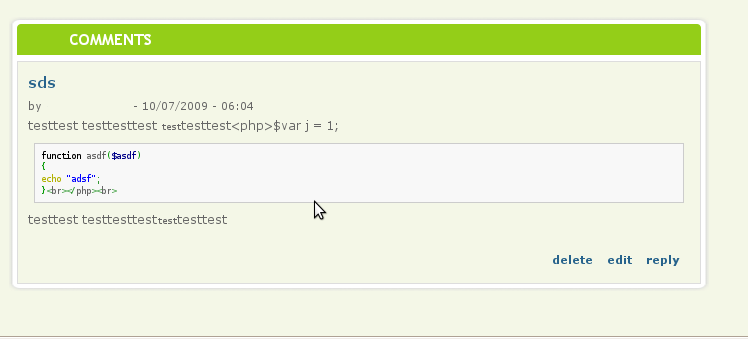
<php>function($asdf) { }</php>the
<php>tag will be printed out as<php>, and the trailing</php>will show up in the highlighted code section.Please see the attached screenshot.
Comment #15
nicholasthompsonI got around this in FCKEditor by adding the following 2 lines to
all/modules/fckeditor/fckeditor.config.js.That basically makes all content between
Comment #16
aren cambre commentedComment #17
aren cambre commentedPer prior comments, the patch needs work.
Comment #18
Slovak commentedIf you use
FCKConfig.ProtectedSource.AddFCKeditor will not show the text in the WYSIWYG format, only in source view. From my experience, all WYSIWYG editors will convert the < > to< >The problem is that GeSHi displays all code as-is. To get around that, look at my 5-line solution of adjusting the GeSHi module code at http://peterpetrik.com/blog/ckeditor-and-geshi-filter - this will work for any WYSIWYG editor.
Comment #19
aren cambre commentedSlovak's patch is being implemented at WYSIWYG - GeSHi bridge.
Comment #20
boombatower commentedComment #21
Grayside commentedDuplicate of what? The referenced module is basically not maintained, and should really part of how Geshi works out of the box.
Comment #22
boombatower commentedany WYSIWYG will have the problem with many filters so really you need some sort of API to plug in filters for WYSIWYG or somesuch. Otherwise you would need special code for each filter and each WYSIWYG as such this really seems out of the scope for a filter.
The duplicate is the module you mentioned. Sure it isn't maintained, but that seems to be the place this will be solved.
Comment #23
vasna sdoeung commentedWell, it took a while googling the web but i found a blog that mentions a fix. Go to http://peterpetrik.com/blog/ckeditor-and-geshi-filter read about GeSHi configuration section. Be sure to clear your cache after following the direction.
It's the only solution i've found to get geshi and wysiwyg to work together nicely.
Comment #24
Slovak commentedGlad it helped you out!
Comment #25
soxofaan commented(just tagging)