

Postponed (maintainer needs more info)
Project:
Addresses
Version:
6.x-1.x-dev
Component:
User interface
Priority:
Normal
Category:
Support request
Assigned:
Reporter:
Created:
3 Aug 2008 at 12:38 UTC
Updated:
4 Feb 2010 at 07:06 UTC
Jump to comment: Most recent file

Comments
Comment #1
brmassa commentedKris,
the form and the display follow different orders. And mainly because the new display system (i just commited on CVS and soon on the next release), i dont know how i can make the same to form fields...
regards,
massa
since its probably a no-solution situation, i will mark it as fixed. be free to reopen it if you wish (i will do this if i find a solution).
Comment #2
kriskd commentedThank you for your prompt reply, brmassa.
I'm not necessarily looking to have the input fields be in the same order as they are displayed, but rather a logical order. If this can't be done at this time, I understand as ultimately the output is more important anyway.
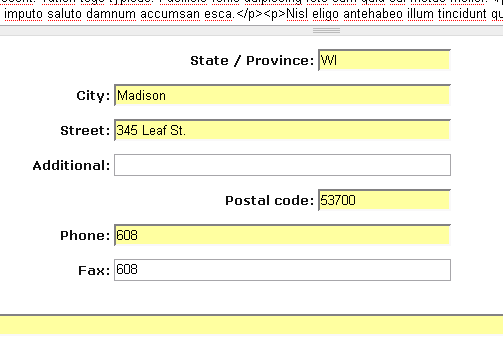
I used some CSS to clean up the input display a little bit and added a screen capture to show what I'm seeing. Thanks for anything you can do now or in the future to adjust the order of these fields.
And thanks again for an awesome mod!
Comment #3
brmassa commentedKris,
i will TRY to put the main addresses fields into some desc order (country-state-city-street).
regards,
massa
Comment #4
kriskd commentedThanks, Massa. Preference would be opposite of what you said:
Street
City, State
Zip
Country
I appreciate the effort, and certainly no rush. Since I was able to change the display with a little CSS, I think my users can live with the odd order for now. :-)
Comment #5
brmassa commentedKris,
the display should be like this, but forms might be better if inverted. its because some features depend on the higher level options. For example, i want to implement State autocomplete, but i must know what country it is first. The same if someone implement the city autocomplete. Postal code might trigger the autocomplete for the entire state-city-street fields, so it might be interesting to put it on top too.
of course, all this might be changed thru theme functions and CSS.
regards,
massa
Comment #6
Anonymous (not verified) commentedAutomatically closed -- issue fixed for two weeks with no activity.
Comment #7
jrefano commentedThis great module is quickly seeming like a non-option with all the fields showing in the wrong order for user input (and no way to re-order them). Any update on this?
Comment #8
profjk commentedWell it first appeared weird to me too. But, with drop down menus and dependencies, what is done is logical.
A feature request: Add a field for Cell number. On my site I had to relabel Fax to Cell!
Comment #9
brmassa commentedGuys,
im happy to say that its a problem from the past. i just got it working. soon on the next release.
regards,
massa
Comment #10
zmove commentedHi,
The fields order are not the same for all country.
For example, in france, we ask that fields in that order :
Address
Postal code
City
Province
Country
So the only solution I find to make this module versatile for all countries is to allow users to order as they want that fields, by providing a weight selection. In d6, it should be good to use the Javascript Drag & Drop system.
Comment #11
brmassa commentedAlexandre,
that was the way i implemented.
regards,
massa
Comment #12
brmassa commented:P
Comment #14
akolahi commentedI can't for the life of me figure out how to reorder the address fields on the form. I have "phone" in the middle of address fields, which makes no sense to me. Tried both 1.05 and 1.x-dev.
Comment #15
codycraven commented@akolahi, try downloading Addresses from CVS. It should fix your problem and allow re-ordering via drag and drop.
Comment #16
torgospizzaIs there a dev release with this functionality yet? I looked through CVS and didn't see any commit messages regarding drag and drop reordering. Is there a specific tag we should download? Or can you release these changes in the dev branch? (I downloaded the dev branch, and there were no drag handles for the address fields.)
EDIT: Aha! Found it. I was expecting it to be in the node's Manage Fields form, but instead it was in Settings at admin/settings/address. Thanks!