

Closed (fixed)
Project:
View reference
Version:
6.x-1.1
Component:
User interface
Priority:
Normal
Category:
Feature request
Assigned:
Unassigned
Reporter:
Created:
5 Aug 2008 at 15:10 UTC
Updated:
6 Jul 2009 at 02:59 UTC
Jump to comment: Most recent file


Comments
Comment #1
danielb commentedYes that would be great, I will add this on the next update.
Comment #2
danielb commentedI have added this. Of course it will only work if you have an active path for the view - otherwise it will just spit out the title with no link.
Comment #3
nadid commentedGreat! , thanks :)
Comment #4
Anonymous (not verified) commentedAutomatically closed -- issue fixed for two weeks with no activity.
Comment #5
gavin_o commentedHi. I'm just setting this up - had a few other issues with the module, as detailed in http://drupal.org/node/325157, but I would really like to do exactly what this post proposes (just link to the view rather than embed it).
I have updated to version 6.x-2.18 but the trouble is I can see no option to set this anywhere - it's still just embedding the views. I do have a path set up for the view I'm trying to link to (under Page display type).
My ultimate aim is to have your module output a link just as the "Node Reference" CCK field does.
Maybe I have missed something obvious?
-----------
Running Apache 2.2.11 Win 32 Vista, PHP Version 5.2.9-2, MySQL 5.1.35, Drupal 6.13, Module 6.x-2.18
Comment #6
danielb commentedWell it should be there under the 'display fields' tab when you manage fields in the content type.
Comment #7
gavin_o commentedYou got it :) I guess that was the one place I hadn't yet looked! There sure are a lot of places you can alter options in Drupal.
I got this result having altered the option:
user warning: BLOB/TEXT column 'field_view_ref_arguments' can't have a default value query: ALTER TABLE content_type_menu_item ADD `field_view_ref_arguments` LONGTEXT DEFAULT '' in ... \includes\database.mysql-common.inc on line 298.
There is no such column in the specified table. Should I just manually add it with the ability to be NULL? Thanks (for the very quick response also).
Comment #8
danielb commentedSee here where you brought it up #325157: Hmm - strange error - and can't uninstall module and go back to working
Comment #9
gavin_o commentedOK - it's just that the column isn't even in the table this time. I'll add it and set it to accept NULL. Thanks.
Comment #10
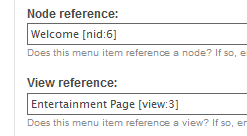
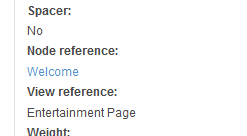
gavin_o commentedOk, just to let you know, I changed the display properties to be as per the screenshot, and saved the content type. I've found the title of the View comes out (just as with Node Ref) but it is not hyperlinked. This for existing items and new ones (not sure if the link is added on the way in, or on the way out of the DB? Guess on the way out).
There is a working path defined for this view, in its Page display type.
Is this an error my end which I can correct, or shall I wait for the next module version? Thanks.
Comment #11
danielb commentedYou saved the content type - ok. You do not mention saving the actual node though?
Comment #12
gavin_o commentedYep, I saved the node. Hope the attached screenshots help - they show the edit mode for the node then the view mode for it - also show Node Ref working as expected.
Again, perhaps I'm missing something, just not sure what it could be.
Comment #13
danielb commentedYeah sorry there was another bug. I'm really shocked.
Comment #14
gavin_o commentedNo problem - I'm grateful people make these modules at all!
Let us know what you'll do..
I notice it also outputs "Entertainment Page" as the title - wonder if it could output the just the title of the Page instead? As far as I can gather, it seems to be getting the link text from the View name (which can't be changed) then the Display type (Page).
On a totally different issue, my signature doesn't seem to be showing up here. Weird!
Comment #15
danielb commentedThe link should work in the new version of the module. If there are other issues please do not post them here, this is a closed issue, you're lucky I even saw your post here in the first place. Start a new issue per each topic. This makes it a lot easier to track down things in the future and avoid further problems just like this one.
Comment #16
gavin_o commentedOK - will do. I just thought continuing the thread would re-open it and didn't want to create superflous thread - just getting used to the system here..
Will look out for your updated release.