

Closed (fixed)
Project:
Golden Hour
Version:
5.x-2.2
Component:
Miscellaneous
Priority:
Normal
Category:
Support request
Assigned:
Unassigned
Reporter:
Created:
7 Aug 2008 at 01:53 UTC
Updated:
9 Aug 2008 at 06:29 UTC
Jump to comment: Most recent file


Comments
Comment #1
jwolf commentedNot a bug w/ the theme... have you tried update.php?
Comment #2
toptxs1 commentedno. It's actually a 100% fresh install not a migration or update. so new server, new db, newer php & mysql, drupal 5.9, new fedora core. manually copied settings & content from old install. Should I run update.php under that scenario?
Wes.
Comment #3
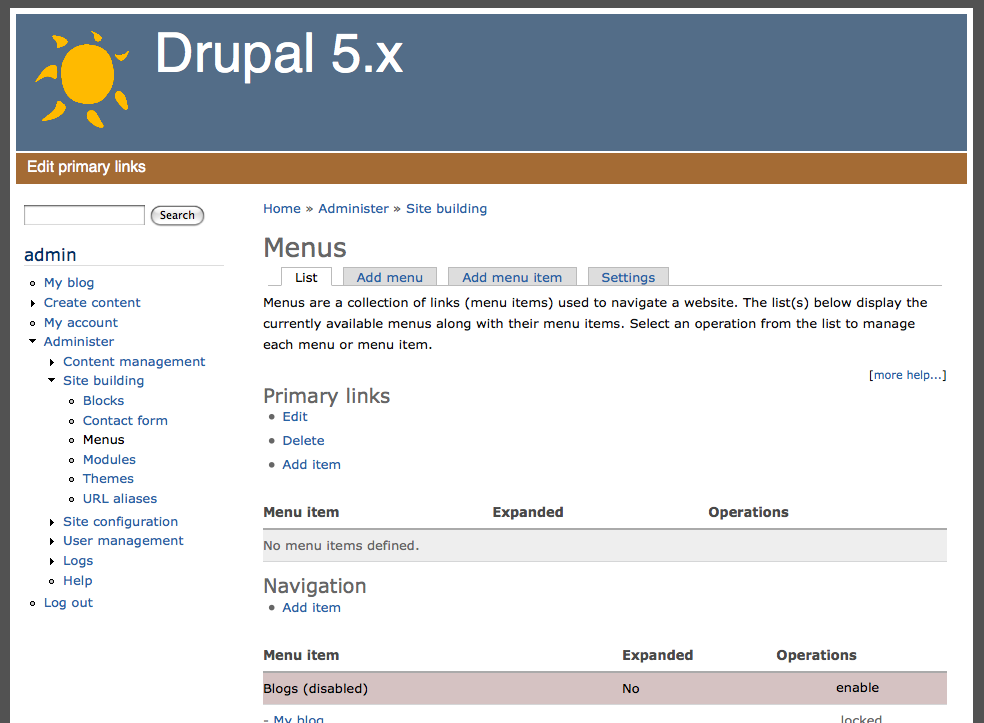
jwolf commentedWhen you write "there are no primary link options & no primary link in the menu list", does that mean you can't create a "Primary links" menu on the add menu page (admin/build/menu/menu/add)?
I did a fresh install of drupal 5.9 and installed Golden Hour 5.x-2.2 and have none of the problems that you mention. Clicking on "Edit primary links" brings me to the menu admin page and I can add menu items to the Primary links menu.
See attached screenshots.
Comment #4
toptxs1 commentedCorrect I was able to click on "edit primary links" which took me to the admin page. there was no primary links menu there initially -( I could have sworn there was the first install - i.e. menu-admin.png version occurred "naturally" ) nor one in blocks. I added one. then added an item called "test" the brown bar above mission statement did not change. I went to blocks and found newly created primary links in there and enabled it to top - of course it appeared not in the brown bar but in between the mission statement and the content. I deleted the item "test", then the menu item i created called primary links. now the brown bar was gone too. I switch to garland, deleted the theme folder from site/all/themes/. download again, then ftp'd into themes folder re-enabled and the brown bar is till gone. It was so simple the first time. Now it's screwed up. Sorry for the trouble.
Comment #5
toptxs1 commentedI found the answer in an April 2007 post. As I was thinking, creating a primary link menu was only a title. using the admin menu settings allows one to associate a menu item with the "real" primary links. Not sure how it ever got un-associated but it did.
golden-hour is nice looking theme jwolf. Sorry for the trouble & appreciate the time you spent.