
Installation
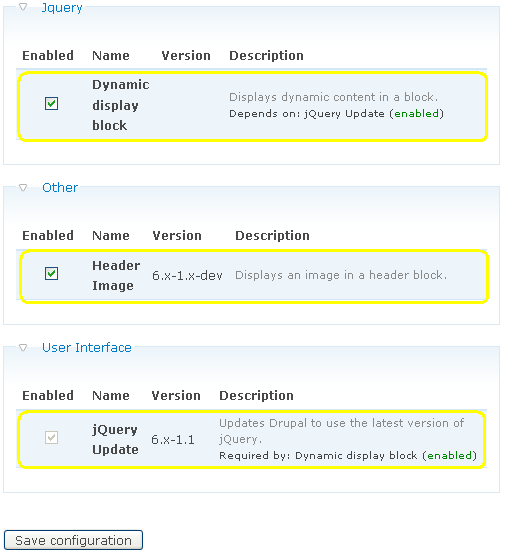
The dynamic display block module depends on the jQuery update module so we have to install this module and the dynamic display block module.
Note: Drupal 6.4 already has the jQuery 1.2.6., but still we prefer to install jQuery update module for future versions of jQuery.
- Go to http://drupal.org/project/jquery_update and download the jQuery update module.
- Go to http://drupal.org/project/ddblock and download the dynamic display block module.
- Extract the jquery_update folder and the ddblock folder and drop them into the /sites/all/modules/ folder.
- Navigate to Administer > Site building > Modules and enable the jQuery Update module and the dynamic display block module by selecting the check boxes next to "JQuery Update" and “Dynamic display block”.
- Click the save configuration button.
Optional:
COLLABORATION WITH OTHER MODULES
The dynamic display block module can work together with all modules that provide blocks. The content of the block can be displayed dynamically (one by one width transition effects) if the content consist of e.g. Images, A list of listitems, A table with tablerows, etc.
Example modules and blocks you can use
| Module | blocks |
|---|---|
| Headerimage | blocks with images |
| Comments | Recent comments |
| Forum | Active forum topics |
| Forum | New forum topics |
| Views | blocks with images, lists, tables |
| Worldclock | World clock |
| etc. |
For easing effects, you can download the jQuery easing plug-in.
- Download version 1.1.1 at http://plugins.jquery.com/project/Easing.
- Copy jquery.easing.1.1.1.js to sites/all/modules/ddblock.
- Copy the following template files to the theme directory of the theme you are using.
- ddblock-block-content.tpl.php
- ddblock-block-headerimage.tpl.php
- dblock-block-images.tpl.php
- Add
drupal_add_js($module_path .'/jquery.easing.1.1.1.js','module')to the three template files, just below the line
drupal_add_js($module_path .'/jquery.cycle.all.pack.js','module').
Help improve this page
You can:
- Log in, click Edit, and edit this page
- Log in, click Discuss, update the Page status value, and suggest an improvement
- Log in and create a Documentation issue with your suggestion
