

Closed (fixed)
Project:
Privatemsg
Version:
5.x-3.0
Component:
Code
Priority:
Normal
Category:
Feature request
Assigned:
Unassigned
Reporter:
Created:
15 Aug 2008 at 18:37 UTC
Updated:
17 Sep 2008 at 17:22 UTC
Jump to comment: Most recent file


Comments
Comment #1
wdfy commentedI'm facing same problems as you raised.
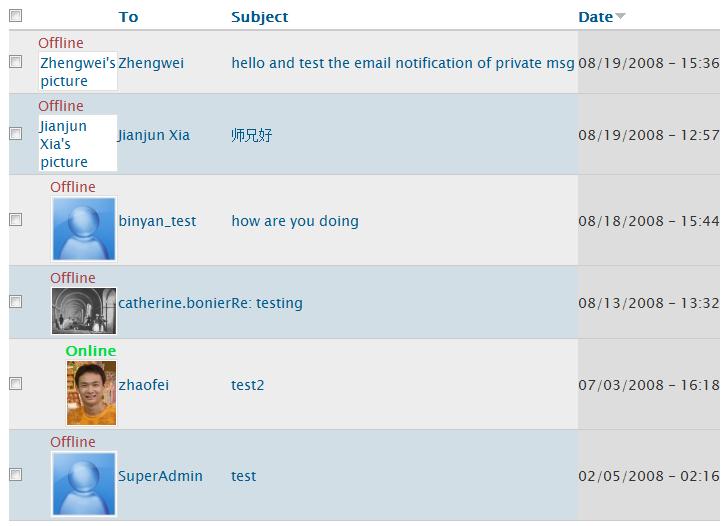
First, the avatar size is not constant in the private messages list, and i can't find the way to set it up.
Second, if a user is using the site default avatar, then the avatar will not be displayed on the private msg page.
I also attached a picture of my site here.
Thank you.
Fei Zhao
Comment #2
George2 commentedthis has annoyed the heck out of me too, and renders it useless for me (users can upload large images as an original profile image) so i'm working on a patch to allow you to choose an imagecache preset from the options, and then privatemsg will use it.
should be ready for testing later today
Comment #3
George2 commentedin need of testing, and probably could be improved by someone with more knowledge :)
[edit] patch removed for one below
Comment #4
George2 commentedok, i later found out that you're using avatar_select then this module returns the full http://.... path to the avatar, which imagecache can't deal with, so i've had to reset the http:// path to the original account->path
Comment #5
B.P.B commentedWhat should be done after patching the module in order to see user images within private messages?
Is this patch suppose to integrate privatemsg+imagecache with Avatar Blocks?
Please help.
Comment #6
George2 commentedas the patch is for privatemsg, i'd guess that it's has nothing to do with avatar blocks.
i'd also guess that as this topic is about integrating imagecache with privatemsg, that the patch integrates imagecache with privatemsg
once patched, go to the privatemsg settings, and you will see an imagecache selection box for you to choose the preset to use for the privatemsg's
as you're asking such basic questions, you need imagecache installed, and you need some presets set up, and then away you go. without the patch, images should show in the private message list. if they don't, then you have a problem.
Comment #7
B.P.B commentedI am running imagecache + imagefield + CCK + views. My preset "thumb" is used to display a thumbnail gallery using views.
Before and after the patch I did not see photos in my message list. After the patch there is an option in privatemsg to select "thumb", but it does not display the user's uploaded picture.
It seems I do have a problem.
Comment #8
George2 commentedas this is a thread about the imagecache patch, and you have a completely different problem, nothing to do with the patch, please start a support request thread
Comment #9
George2 commentedas a post thought, it may just be more efficient to, instead of checking for the strpos of 'http://', just to use the account->path regardless.
any thoughts?
Comment #10
kmillecam commentedHey George2,
Thanks for taking the time to create this patch.
I've applied it to my production site and it sure makes the images look better.
Thanks again,
Kevin
Comment #11
litwol commentedComment #12
George2 commentedupdated
Comment #13
litwol commentedReviewed, fixed, and attached the new patch.
Please review.
Comment #14
George2 commentedComment #15
litwol commented#13 has wrong patch. here's the right one.
Comment #16
George2 commentedComment #17
litwol commentedThanks George2!
http://drupal.org/cvs?commit=137780
Comment #18
Anonymous (not verified) commentedAutomatically closed -- issue fixed for two weeks with no activity.