
Working with Default Values
You are browsing documentation for an older version of Drupal, which is not supported any longer, and the information may not be correct. See current documentation for Contributed modules
Webform allows several special values to be used as defaults when configuring a component. The special placeholders are commonly called tokens. The tokens Webform supports include:
%username
%useremail
%site
%date
%server[key]
%session[key]
%get[key]
%post[key]
%request[key]
%profile[key]
Webform 7.x-4.x and later branches use the Token module.
Webform 7.x-3.x and prior branches do not use the Token module for its replacements, so Webform's tokens may vary from tokens used in other modules. However, you can use the Webform Patched module to use Token module tokens.
Sections
Populating a Field with User Data
Webform includes several tokens that contain user data such as %username and %useremail. In addition, Webform supports any field added through the core profile module. For example, if you had profile fields setup for "First Name" and "Last Name" you could set these values to be the default values for a Webform component.
When setting up the profile fields at Administer->User management->Profiles (admin/user/profile), take care to remember the "Form name" value, as this will be needed when configuring the default value of Webform components that will contain user information.

Setting up a profile field at admin/user/profile/add/textfield. Note the "Form name" value is set to "profile_first_name"
After checking the configuration of a profile field, you can use the profile Form name as the default value in a Webform component.

When configuring a Webform component, use the Profile Form name in the special %profile[form_name] token.
If the current user has filled out the First name profile field, their name will automatically be used as the default value when filling out the webform.
Setting Default Values from the URL (7.x-3 and earlier)
The %get[key] supported by Webform allows form values to be populated from the URL.
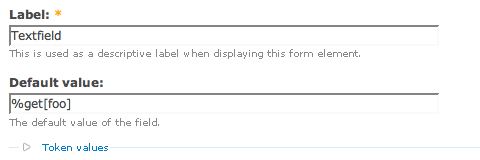
Setting the default values of a component to use a %get[key] value.
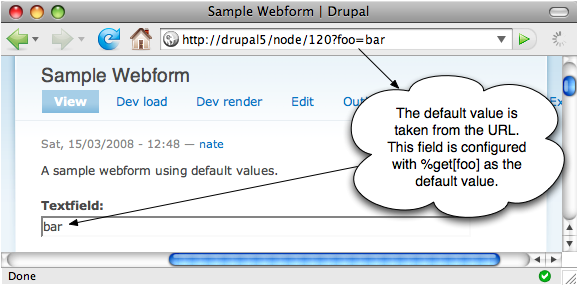
The default value of the field populated from the URL.
Setting Default Values from the URL (7.x-4)
To set the default values of a component to use either:
- Query Format: For urls formatted like http://server/node/120?key=bar use
[current-page:query:key]to return key value., - Args Format: For urls formatted like http://server/node/120/key use
[current-page:url:unaliased:args:value:2]to return key.
Help improve this page
You can:
- Log in, click Edit, and edit this page
- Log in, click Discuss, update the Page status value, and suggest an improvement
- Log in and create a Documentation issue with your suggestion
