

 Come together with the global Drupal community in Rotterdam, 28 Sept – 1 Oct 2026. Sessions, contribution, connection, and Early Bird savings until 8 June.
hi,
I recently installed drupal 6.3 and this great theme nitobe.
but i'm encountering some strange behaviour of this theme in different browsers.
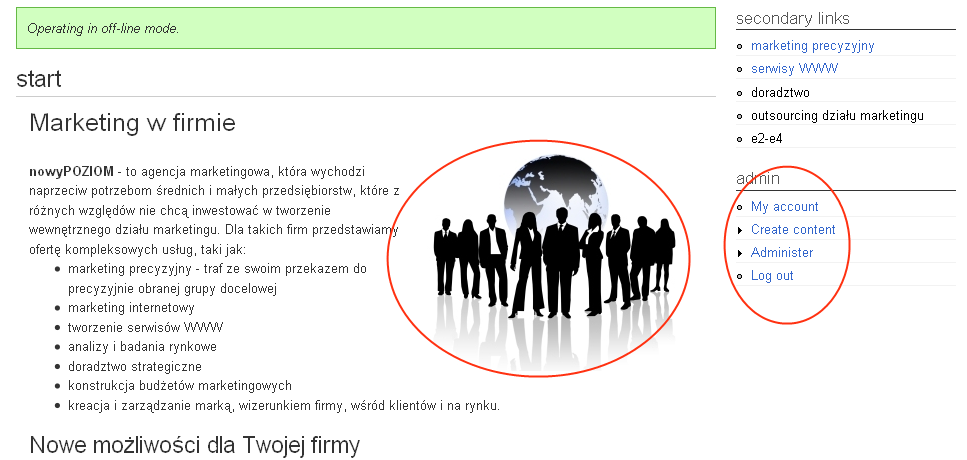
I only use FF, so here everything looks just fine - pls check attached file FF.png
but in IE - it looks different - check file IE.png and IE1.png
1. the image next to the text is in the different position - it should be on the right of the text like in FF
2. bulleting in right menu - as you see menu items are very close to the bullet, in FF it looks OK
3. coding - the text in screenshot is Polish, encoding UTF-8 - as you can see in IE1.png the text looks strange, and Polish diactrics (ę, ą, ś, ć) are in some different font?
why does the same page look different in FF and IE?
unfortunaltely I cannot discard IE issues as I suppose most viewers coming to the site is using IE.
any clues on how to fix this?
change fonts in css file?
thanks
rafal


Comments
Comment #1
Anonymous (not verified) commentedI will probably separate this into multiple issues after some investigation.
The font issue I'm not sure about. My suspicion is that because I have the Linux fonts at the beginning of the font family list, Internet Explorer is performing a font substitution instead of looking at the whole list. The
bodyelement intext.csscurrently looks like this:Try this to see if it fixes the problem:
There will be doing more Internet Explorer testing going forward. It also appears that I need to add a test case for non-English characters.
Thanks!
Comment #2
wankus commentedhi,
thanks for your reply.
3. starting from the last one - yes, you're right - changing font oder in text.css fixed the issue.
it now looks OK in IE. cool :)
1. the version of IE - 7, i didn't check in IE 6
2. the site is offline, so I'm pasting the HTML code of the node:
thanks for your effort!
Comment #3
Anonymous (not verified) commentedI've created a separate issues for the bad font list and the bullet points:
On the image problem:
I think with this issue Firefox is just being more forgiving than Internet Explorer. There are two possibilities I see here:
imgtag outside of theh1element. Theh1element is a block level element, and in this case, Internet Explorer is doing the right thing and expanding the block to include everything inside it.align=attribute is deprecated. Images should be aligned left or right by floating with a CSS class. There's are classes for doing this instyle.css. Try removing thealign="right"and replacing it withclass="floatright".On a web semantics, accessibility, and search engine note, there should only be one
h1element per page. The site title at the top of the page already uses ah1element. If you're just trying to make the size of the text larger, use a CSS class specifying the font size.Comment #4
wankus commentedthanks a lot,
your hints resolved the issues.
images is now displaying in IE as in FF, so how they are supposed to. they have to be CSS aligned. too bad you cannot fully use WYSIWYG (fckeditor) and have to manualy align objects, but this is not a major problem.
so right now everything is solved except of those bulletting in IE.
rafal
Comment #5
Anonymous (not verified) commentedI'm marking this one as closed since the bullet issue is now separate: #297595: bullets render differently in Internet Explorer