

Closed (fixed)
Project:
Gallery
Version:
6.x-1.0
Component:
User Interface / Theming
Priority:
Normal
Category:
Support request
Assigned:
Unassigned
Reporter:
Created:
19 Aug 2008 at 14:56 UTC
Updated:
16 Oct 2009 at 02:45 UTC
Jump to comment: Most recent file

Comments
Comment #1
profix898 commentedStill cant reproduce. Sorry. And nobody else reported this problem.
Comment #2
decibel.places commentedstill having same issue
upgraded to D6.8 core and Gallery 6.x-1.0 module
modules page is blank, if I switch admin theme and disable Gallery modules, then switch admin theme back to the modules page appears fine
if I then enable the Gallery modules, the modules page becomes blank...
Comment #3
tmdude commentedHaving the same issue, any progress on finding the cause? Also seen another report on the gallery support forums of the same issue.
Comment #4
decibel.places commentedI removed all my contributed modules and readded them one by one (alphabetically)
I found that many caused the modules list page to fail to load intermittently using FourSeasons as the system default admin theme, sometimes I had to reload it 5 or 6 times for it to display properly. When unsuccessful, it was a blank white page in Firefox and in IE7 I got a "page failed to display" error.
Finally, I used Themekey http://drupal.org/project/themekey to switch the theme to Garland for the admin/build/modules path
This seems to work.
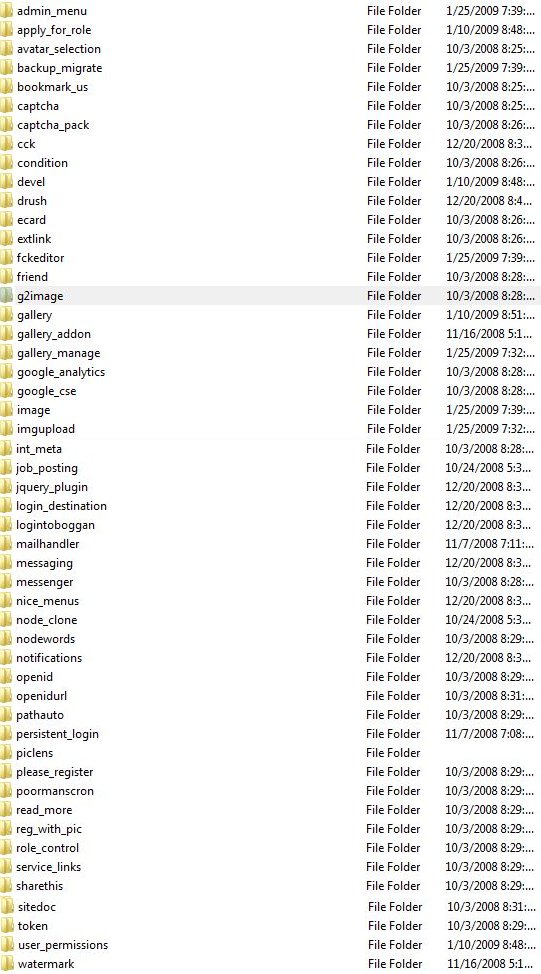
These are some of the modules that caused the problem (actually, Gallery did not - so this would appear to be a FourSeasons Issue)
Google Analytics
logintoboggan
mailhandler
messaging
messenger
nicemenus
nodeclone
nodewords
notifications
openid
pathauto
persistent login
token
It is noteworthy that these modules are at the middle of the alphabet or after, so the problem may be caused by the NUMBER of modules being displayed in FourSeasons, not by specific modules. However, other modules surrounding these modules did not seem to cause any problem...
Comment #5
decibel.places commenteda list of the modules attached
Comment #6
alexandreracine commentedSo this is not a gallery module error. Thanks.
Comment #7
alexandreracine commentedBy the way, this sound like a memory_limit in your php.ini file problem, so I would start there if your FourSeasons support can't found anything.
Comment #8
decibel.places commentedI think this is a Four Seasons theme issue.
I run into blank pages often in admin, but not when I am using another theme eg Garland, Pushbutton
Also, I am using Garland to diaplay my Gallery pages because they were not consistently displaying in Four Seasons; Gallery displays fine standalone.
I would switch themes but I am fond of Four Seasons
I have 96M php memory according to devel phpinfo() which should be sufficient
Comment #9
cdonner commentedWhatever the cause of this issue is (I only have mainstream modules installed, and I don't have Four Seasons), it still seems to happen. My workaround is to add admin/* to the list of excluded pages in the block configuration for any Gallery2 blocks. I am on a shared hosting environment without access to anything but Drupal's error_log, and there was nothing showing up there. The only thing in the Watchdog log is a few Javascript parsing errors, but I am not inclined to research them, since my workaround if good enough.
Since this is a closed issue, there is no need to respond to this.
Comment #10
decibel.places commentedI started using IE Unlimited CSS Loader (for D6 only) that fixes these issues and more, not just in IE.
http://drupal.org/project/unlimited_css
Comment #11
kenny hektik commentedThank you so much, by adding the above mentioned module this fixed my issue as well.