

Closed (fixed)
Project:
Lost & found issues
Component:
Miscellaneous
Priority:
Critical
Category:
Bug report
Assigned:
Unassigned
Reporter:
Created:
29 Aug 2005 at 19:19 UTC
Updated:
16 Nov 2006 at 22:16 UTC
Jump to comment: Most recent, Most recent file


Comments
Comment #1
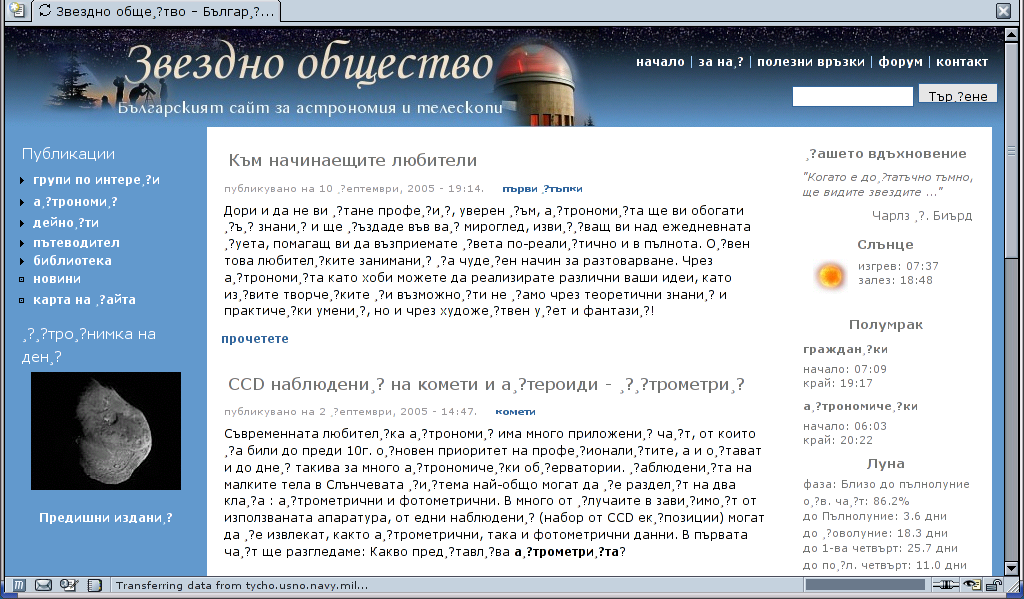
mishaikin commentedI have a simillar problem with Bulgarian - I have done for a site of mine a Bulgarian translation which works fine with Drupal 4.6.0 on my computer. When I export the language file with the localisaton utility, and import it into the new cvs of Drupal a few characters like "с", "я", "А", "Н", "н" are replaced with "�?". However when open the exported file bg.po with Kwrite text editor (utf-8 character set) everything looks ok with these characters.
A little bit pre-history:
I think it has to be connected somehow with the mysql because 3 weeks ago I had simillar problem on the server hosting my site - the site was destroyed unrecoverably because of an import of mysql backup file. Because of the new collation feature of mysql 4.1.x, all mentioned characters were replaced with "�?" during the import of the mysql database. I changed the provider, but when I try to import the database from that server the story goes even worser - I get only question marks .... awful! - http://www.starrydreams.com/. The site looks terrible but let the people from Drupal see it and think about it, and see that the mysql collations and character sets could be really BIG problem for Drupal users. I can't event import the database (which worked on the previous server with latin1 collation) to work with some characters screwed to try to correct them by hand. Total mess.
So, now I want to make another site, but as I see s.th. totally wrong continues to be with Drupal. It is still not possible to rely on it for a Bulgarian site. I installed on my computer the cvs to see if s.th. is done in that direction, however it is not. Really sad!
Comment #2
jozef commentedI have had the same problem with MySQL 4.1 a slovak characters. I have reconfigured MySQL 4.1 from UTF to old 8-bit encoding (win-1250). Now it works. Also the phpMyAdmin 2.6.4 has corupted the dump file. I have turned $cfg['AllowAnywhereRecoding'] = TRUE in his config file and now always export the dump with win-1250 encoding selected.
Comment #3
mishaikin commentedHm, how did you reconfigure mysql?
And if I have to reconfigure it, it won't be possible, because the hosting provider will not reconfigure it just for me. Btw my dump file was produced with mysqldump, not with phpmyadmin.
Comment #4
jozef commentedI am using Windows and there is a MySQLInstanceConfig.exe
I have no problem with my ISP now. He has upgraded to MySQL 4.1 in summer and he did not want to have troubles so he has configured MySQL with 8-bit win-1250 encoding like previous installation of MySQL 4.0. I have noticed problems when i have installed my first MySQL 4.1 on Windows localhost with default UTF-8. I have made many attempts to transfer data between ISP and my localhost using phpMyAdmin. What i have written in my previous post, is the result of many unsuccessful attempts figuring out what is wrong transfering slovak characters between servers.
Here is a configuration of my ISP's MySQL 4.1 outputed in phpMyAdmin using "SHOW VARIABLES":
character_set_client utf8
character_set_connection cp1250
character_set_database cp1250
character_set_results utf8
character_set_server cp1250
character_set_system utf8
collation_connection cp1250_general_ci
collation_database cp1250_general_ci
collation_server cp1250_general_ci
You can see that phpMyAdmin is using utf8, therefore during sqldump i must strictly set it to cp1250 (look at screenshot), and of course my localhost is configured equally.
Comment #5
jozef commentedYou probably should not reconfigure the server, try to ALTER DATABASE to change character set.
http://dev.mysql.com/doc/refman/4.1/en/charset-database.html
Comment #6
mishaikin commentedOn my hosting provider's server all variables are cp1251. I experimented a little bit and found out that depending on these variables the Drupal cms displays the characters differently WHICH makes me think that on different providers the backups will behave differently, something that must not happen!
On my provider's server (cp1251) after I add this line(see http://drupal.org/node/32829) :
mysql_query("SET NAMES 'latin1'", $connection);
mysql_query("SET CHARACTER SET latin1", $connection);
after "$connection = mysql_connect($url['host'], $url['user'], $url['pass'], TRUE) or die(mysql_error());
mysql_select_db(substr($url['path'], 1)) or die('unable to select database');" in the file database.mysql.inc in includes, the site becomes like the attached screenshot (some letters are replaced with ",?" as you can see) instead like http://www.starrydreams.com (only question marks). So, with that line added (the variables are set to latin1 because the ex-provider had this settings on his mysql) I can login to the site, but when I try to change some of the replaced letters nothing happens, because of the latin1 setting probably.
So, it seems to me that Drupal IS NOT READY for mysql 4.1.x (on which many providers work!) and it will cause terrible problems to non-english sites. The site can work with one provider's settings of mysql, and not with others. Even in the recent CVS the mysql database file is in verry old mysql format not knowing anything about collations. And also the developers of Drupal have to pay attention on the way Drupal connects and stores the information in the database having in mind the possibility of different settings of the mysql variables (different than the default ones).
My SITE IS DESTROYED actualy by that bug in Drupal.
Comment #7
mr700 commentedThis is not a locale switcher problem but a problem with drupal's db handling as a whole. There's nothing in the INSTALL.txt file, but when I did my 4.6.0 install I red somthing in the handbook/forums about this problem: "All database tables should use latin-1 encoding". Now there's a new comment in the book under Installing Drupal... AFAIK the problem is that drupal sitll supports mysql 3.x, search google for "site:drupal.org latin-1 utf-8".
In short - If you don't use latin-1 your multi-byte characters and cache will not work.
PP: In order to get 'mysqldump' backups working for me (www.sport1.bg - in Bulgarian) I had to explictly specify "--default-character-set=latin1" or some characters are lost (the tables are in latin-1 encoding).
Comment #8
mishaikin commented10x! It helped. mysqldump with that option produces correct backups of the drupal database. However I need to add this line mysql_query("SET NAMES 'latin1'", $connection); in the database.mysql.inc to override the settings of my provider's mysql and have not only question marks but cyrrilic characters.
Comment #9
killes@www.drop.org commentedThis shoudl have been fixed by moving to utf-8 for table encodings. Can somebody verfiy?
Comment #10
mr700 commentedWe'll have a 4.7.1 (Bulgarian) site running within days and have no such problems so far. If I have not reported any problems next week assume that I have none and have forgotten to report back :-)
Comment #11
mr700 commentedI had no problems with mysql 4.1.x and drupal 4.7.1/4.7.2 at http://yellowcard.sport1.bg/. Some extra modules created their tables with latin-1 encoding, but that is easy to fix, ex:
ALTER TABLE statistics_filter_browsers CONVERT TO CHARACTER SET 'utf8';. Just don't forget to add--default-character-set=utf8to mysqldump if your environment is not using UTF-8 by default when backing up.PS: I noticed that all my installs have one more mysql problem - mysqldump dumps empty blobs as "0x", which can not be restored later. Replacing all
0xs with''fixes the problem, so I filter the dump withsed 's/\([(, ]\)0x\([ ,)]\)/\1'"''"'\2/g'.Comment #12
mr700 commentedI am using 4.7 long enough with no problems translating, backing up and restoring cyrillic contents, so I'm closing this bug. If anyone has problems with cyrillic letters and drupal 4.7 - feel free to ask me for help.
Comment #13
(not verified) commented