

Closed (fixed)
Project:
jQuery Update
Version:
6.x-1.1
Component:
Code
Priority:
Critical
Category:
Bug report
Assigned:
Unassigned
Reporter:
Created:
31 Aug 2008 at 00:46 UTC
Updated:
30 Dec 2008 at 00:20 UTC
Jump to comment: Most recent file

Comments
Comment #1
mfer commentedWhat version of PHP are you using?
Comment #2
jcruz commentedI got the same error. Using PHP 5.2.0
Comment #3
mfer commentedWhat javascripts are loaded into that page? Have you removed jquery.js/drupal.js from the misc directory?
Comment #4
jcruz commentedThat was the problem. This was a new install and I hadn't updated jquery.js in the misc directory. Thanks for pointing it out.
Comment #5
mfer commentedWait, you shouldn't replace any core files with the Drupal 6 version of jQuery Update. It replaces the files for you.
Comment #6
ingacosta commentedI have the same warning message.
I changed from Packed to Minified, as the jQuery compression type, ten minutes before having that error message.
Comment #7
mfer commentedIf you are using Drupal 6.4 and jQuery Update with the setting on packed (default) the section of code throwing the error won't run so you won't get the error.
Comment #8
ingacosta commentedI changed the settings again to Packed compression type and I don't have the error.
Maybe the error is there, at compression type section.
Regards
Hernán
Comment #9
mfer commentedCan you provide a list of modules you have installed? Do you have an example page with the error you can link to?
Comment #10
ingacosta commentedYes, of course. I have the last releases of the following modules:
CCK Modules:
Content, Computed Fields, Content Copy, Content Permisions, Content Templates, Email, FieldGroup, FlexiField, Link, Number, Option Widgets, Text.
Core:
Book, Color, Comment, Database Logging, Help, Locale, Menu, Taxonomy, Trigger, Update Status.
Groups:
Organic Groups, OG Access Control, OG Actions, OG Views Integration, OG Subgroups
Others:
Backup and Migrate, Job Queue, Role Delegation, Token, Token Actions
User Interface:
JQuery Update (Of Course)
Views:
Views, Views UI
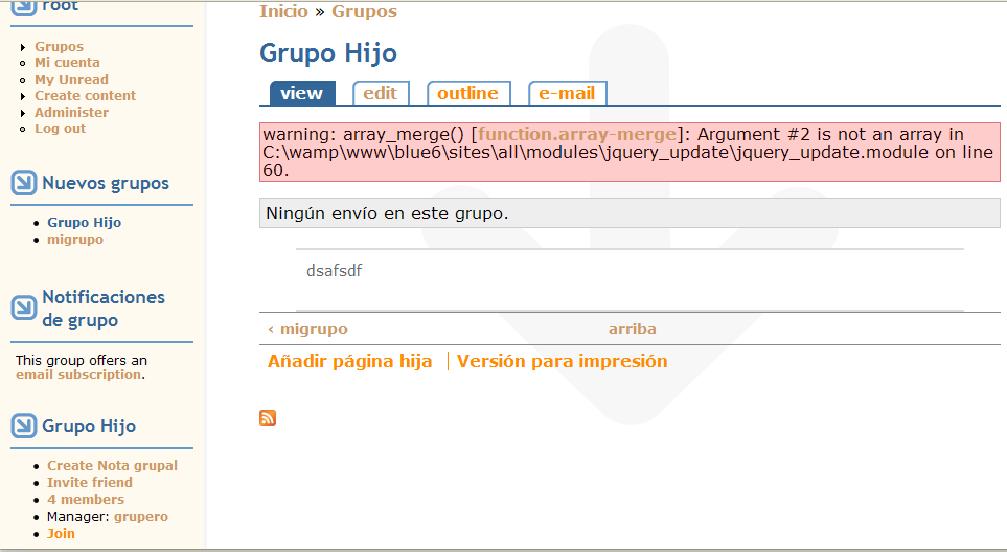
I have this warning message frequently when I navigate at groups pages. Often, I have the error messages, sometimes not, at the same pages.
For example: I select "MiGrupo" (parent group) (http://localhost/drupal6/node/1), after that I select "Grupo Hijo" (a son group of MiGrupo) (http://localhost/drupal6/node/2). In that page appears the warning message.
If I come back to "MiGrupo" the warning message persists, and sometimes the message appears at MyAccount page too.
It happens if I use Minified or None Compresion. I don't have the error if I use Packed Compression.
I attached a screen capture.
Saludos,
Hernán
Comment #11
mfer commentedWhen you select packed compression it isn't going to replace the core files so you won't get the error message. Right now, Drupal 6 and jQuery Update are using the same version of jQuery. jQuery update is smart enough to not replace the core files if they are up to date.
Are you manually adding anything to $scripts/$variables['scripts'] in your theme? Does this happen in garland?
I wonder if a module is manually adding content to the scripts variable outside of using drupal_get_js().
Did you ever solve this?
Comment #12
mfer commentedIn the function og_preprocess_page data is added to the $scripts variable without drupal_add_js being called. This creates a situation where, in jquery_update, there is data in the scripts variable but nothing was ever added via drupal_add_js so jquery.js isn't there to replace. This causes the error we are seeing. It's an incompatibility/bug when working with the OG module.
Comment #13
mfer commentedI submitted a patch against OG to handle their half of this issue at #324484: jQuery.extent called on pages jQuery is not included on. On the jQuery Update side we should test to make sure jquery.js is present before we try to replace it. This could crop up with other modules.
Comment #14
mfer commented@jcruz there was an update committed to OG that should fix your particular problem.
Comment #15
mfer commentedThis was an error in OG that has since been fixed.