Closed (fixed)
Project:
Real Name
Version:
5.x-1.0
Component:
Code
Priority:
Normal
Category:
Bug report
Assigned:
Reporter:
Created:
3 Sep 2008 at 16:08 UTC
Updated:
14 Dec 2008 at 20:42 UTC
Jump to comment: Most recent file


I upgraded my -beta version to 1.0 and two bugs appeared:
1. I no longer get the realname in the 'Who's online' block but the classic username.
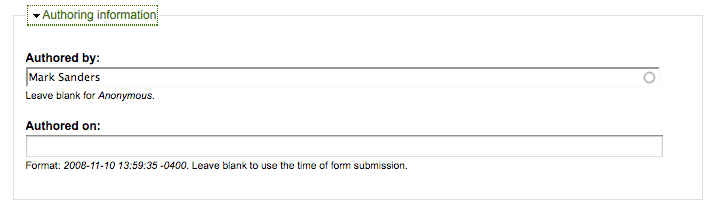
2. Most problematic, when I submit a new node, the author name is prefilled with the realname rather than the username and an error shows up of course if I try to save the node.
| Comment | File | Size | Author |
|---|---|---|---|
| #10 | newnode.gif | 5.28 KB | masande |

Comments
Comment #1
nancydruWith the other changes I have committed, I am not seeing this. Please try the -dev version when it rolls up this evening. If the problem is gone, please mark this issue as "Fixed."
Comment #2
nancydruComment #3
pvasener commentedThe last -dev version is dated June 5th so I can't test to confirm if the bugs are still here or not.
Comment #4
nancydruStrange. I'll see about creating a new official version and finding out why it's not rolling the -dev for 5.x.
Comment #5
nancydruI created a new release for you to test.
Comment #6
nancydruComment #7
Anonymous (not verified) commentedAutomatically closed -- issue fixed for two weeks with no activity.
Comment #8
masande commentedhi nancydru.
sorry to reopen this issue but i have downloaded and tested the latest dev version and the author name when creating a new node is still replaced by the realname. i cleared the cache and the problem remains. with a little testing, it seems to be tied to the 'override username theme' setting. if checked, this is when the problem occurs. i looked through realname_theme.inc to see if i could find what was causing this issue, but i'm afraid it's a little above my ability. i'm happy to test, however.
thanks a bunch for this groovy module. with the issue fixed it will easily accomplish a goal for a website i'm working on.
Comment #9
nancydru@masande: Are you certain you are running the latest code? Or perhaps I misunderstand the issue; could you post a picture showing the problem?
Comment #10
masande commentedi have tried the latest dev version as well as the update you posted over the weekend. i've repeatedly cleared the cache so i feel pretty certain this remains an issue.
attached is an image of the problem. please notice that a realname is used in the 'authored by' text box instead of the username which is 'masande'. by submitting this node i will get a user unknown error.
the only realname setting i have enabled is 'Override username theme' and i have a profile field specified.
does this clarify the issue enough? i'm happy to provide any additional info you request.
Comment #11
nancydruI don't see this happening at all and there are at least 44 other 5.x users who are not reporting this. I almost have to believe that you are somehow still using the old version. The only thing I can suggest is disabling the module, delete all copies that you can find anywhere, and then re-download and install the current version.
Comment #12
masande commentedwell, i just did exactly as you specified and darn it if i still don't have the problem. i'm beginning to think it is a conflict with another module.
and out of curiosity, can you point me to the patch that resolves the original issue or point me to where the 'authored by' username is (or is not) addressed by this module? i want to get a better sense of where and how this info is populated by default.
thanks again for all your kind assistance. i really appreciate it.
Comment #13
nancydruThis is done in "realname_nodeapi" - case 'prepare' (approx. line 109) with the saved value set just a few lines above (case 'view').
If you can track this down, please post the cause here. I am trying to track down why creating a new comment is picking up an old name and email address regardless of the user entering new information.
Comment #14
masande commentedno luck with realname_nodeapi, but an adjustment to realname_user mostly works. by removing the following i have gotten rid of my problem...
doing this certainly has implications beyond my issue, but i don't know the module well enough to know how far. i wonder if there is a way to conditionally apply realname_make_name to instances that do not involve a node? thinking out loud...
Comment #15
nancydruJust out of curiosity, what browser are you using? Have you tried more than one? The problem I mentioned above is not happening in IE7 but is in FF3. (http://drupal.org/node/332726)
Comment #16
masande commentedi'm using ff3 on a mac. i've tried safari and opera, too.
Comment #17
nancydruIn the newest -dev version, there is a version line at the top of the settings page. If you don't get that, you're using an older version somehow. I haven't tried you change because I don't see how the module even functions without it.
Comment #18
miky_italy commentedI have this problem too but it is only for super admin because it has checked the possibility to change the username of itself and of others,
If you check out this permission you don't have that bug.
It is a bit annoying only for me as I'm SU but other normal users cannot do that so the problem doesn't exists.
I think most users are in my condition.
Regards,
Michele
P.S.: the problem anyway persists in all those pages where you have the username of users, like managing points (http://your.site.com/?q=admin/user/userpoints/add/17), because the autocomplete function of the field username is changed automatically to the realname by this module. You have to pay attention because, in some cases, you risk to change the username of your users. IMHO the best way to get out those problems is to have the possibility to have a list of paths to disable the realname functions, like those lists to don't show a menu in some exceptional pages.
Hope this helps.
Comment #19
ianchan commentedI tried the -dev version and I am seeing the realname instead of username within the Authored by field of the node add form.
Also, when I initially enable the -dev version, I receive an empty property message pointing at line 249 of realname.module. If I un-comment 244 and 251, it goes away.
Comment #20
nancydru@ianchan: Your second issue is fixed in #333756: Fatal error.
Comment #21
nancydruCan someone describe the set up that this is happening in, please? I cannot reproduce this at all.
Comment #22
miky_italy commentedAs I told in my post, or as the other user told, the field "authored by" contain the realname instead the correct username: create a new content, do preview, go down to the Authored By tab and look the content, u'll find the realname instead the correct username.
There are other pages that behave like this, another very easy to check is the personal profile, go to my account, edit and u'll see that instead the username the field will be completed by the realname: in this case it is dangerous because a user that didn't notice that will automatically change the own username to the realname if that access action is granted. To check if that is enabled look: Administer, Access Control, the user module and the permission for "change own username". Obviously it is enabled for superuser so, as I told in my previous post, I can pay attention for that, but if you have a team of administrators with that permission enabled that can be dangerous.
Another example is if you have to give a user some points, the username field is filled with realname, so doesn't function until u change it to the correct username.
For this reason I told that probably, IMHO, it is easier to have a list of paths to exclude the realname functionality.
This behaviour is surely in the 5.x-1.1-rc3 version, but I remember it was the same even when I firstly installed the 5.x-1.0 version, since this thread is for that version.
Hope this time I was been more clear.
Michele
Comment #23
miky_italy commentedI forgot to say that for me the "who's online" hasn't any problem.
Regards. Michele
Comment #24
nancydruGrazie mille, Michelle. Yes, I see what you mention in the user account page, so I can fix that.
I am NOT seeing what you report when creating a node. I have tried this with several different types of users and the "Authored by" field is always showing up with the correct user name.
Comment #25
nancydruOkay, the user edit problem is fixed. At the top of the settings page, you should see
Version: $Id: realname.module,v 1.4.2.23 2008/11/14 15:46:39 nancyw Exp $Comment #26
miky_italy commentedNancy,
ok for the authored by, but the other example (manage points: go to a user profile, at the end u'll find the points then go to manage page, the username there is the realname) are still open.
Tnx,
Michele
Comment #27
nancydruI don't use any kind of points modules. If it is a form, it should be easy to fix it.
Comment #28
ianchan commentedThanks for your reply in #20 and the other fixes. Another issue is when I use RealNames with the KnowledgeTree Integration module, the Realname is sent to Knowledgetree in place of the Drupal username (thus creating a duplicate account in KT - one with the Drupal username and one with the Drupal user's Realname). If I deactivate Realname, the Drupal username is sent correctly.
Comment #29
nancydruThere are over 2,000 contributed modules in Drupal. I simply cannot install and test all of them. If some module has a problem, it is usually a simple matter of adding a "case" statement to the _form_alter, but you will have to tell me the form name.
Comment #30
miky_italy commentedHello Nancy,
I understand the problem to test other contributed modules and it is in this situation that I asked if it is possible to have a list field to fulfil and in this way disable the normal operation of the module realname. So everyone just put a path in the list and the normal behaviour is restored.
Thank you for your work!
Michele
Comment #31
nancydruI am working on a generic form override feature.
Comment #32
nancydruCommitted to both branches. There is a new settings tab (this will require clearing the cache). You may specify forms on which to bypass fields.