Hi there,
Hopefully can somebody help me out. I'm trying to get the header image working for my site,
but luck so far.
I'm using drupal 6.4, and as theme I use marinelli.
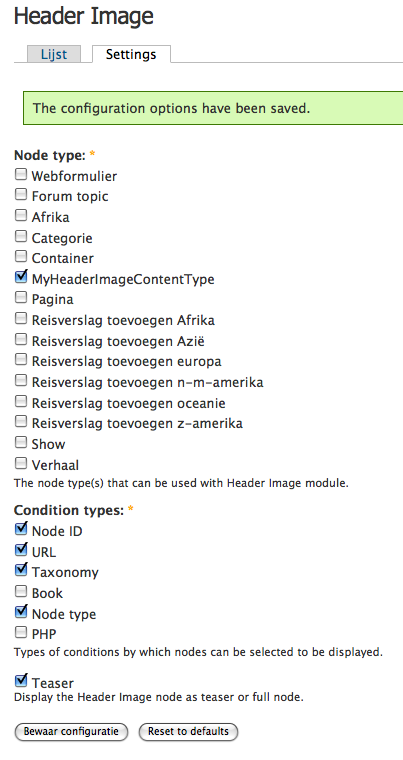
I added some screens how I set up header image, so it's better to see what my settings are. I created the header image,
put them in the header block (i suppose this is used by marinelli?).
I created an extra node type, and added the cck image field. But the image is displayed in the content,
and not in the header.
It's for my site http://wateenreis.nl.
The node I created for one of the header-images is: http://wateenreis.nl/drupal/index.php?q=node/89
thnx for your help.




Comments
Comment #1
noledam commented.. and here are the screens I mentioned.
Comment #2
noledam commentedgreat news, I fixed it!
Apparantely the marinelli theme doesn't have a header section..
I choose another theme, and now it's working :-)
Comment #3
eric.yang commentedComment #4
eric.yang commentedCould you tell me how to use image header to implement the effect that every page show different header page,3ks so much!
Comment #5
noledam commentedHi,
Sorry for the late reply, I didn't saw your message until today.
The purpose of my site is a place where people can add their travel story (actually, the url to their website with the travel story). You can add a travel story by continent. I use taxonomy for that part. For each continent, and all the countries in that continent I want a different header image.
I'm not sure if I'm forgetting something, but if I remember correctly these are the steps I took:
1.
At Administrator » Site configuration » Header Image I created a new header Image
2.
I went to content, and there created the different header images. When you create a new content for
the header image, you can specify when it will be shown (which node-id's, which url's, ehich taxonomy
conditions and which node type conditions.
3.
Then I went to Administrator » Site building » Blocks, and added the header image (created in step 1) to
the header section.
Hopefully this helps!
kind regards, Madelon
Comment #6
thierry.beeckmans commentednote: placing the image header block on top within it's block section could solve some layout problems.
If you position it absolutely with css, it could solve your problems or just create some.
In our latest developed site we needed to work with an absolute positioned navigation menu and the header image underneath it (something like the BMW sites)
To solve layout-problems, I've added an image node containing a blank image.
Comment #7
sutharsan commented@nolendam: from looking at your site, it seems you have it working. Please close the issue if you problem is solved.