

Closed (fixed)
Project:
FCKeditor - WYSIWYG HTML editor
Version:
6.x-1.x-dev
Component:
Code
Priority:
Normal
Category:
Bug report
Assigned:
Unassigned
Reporter:
Created:
17 Sep 2008 at 18:16 UTC
Updated:
21 Sep 2009 at 08:10 UTC
Jump to comment: Most recent, Most recent file



Comments
Comment #1
yched commentedWhat about posting this in the right issue queue ? :-)
Comment #2
wwalc commentedUse PasteWord button to paste content from Word: http://docs.fckeditor.net/FCKeditor_2.x/Users_Guide/Quick_Reference
Comment #3
AlexisWilke commentedHow about mentioning that on the front page here in Drupal?
That way people like alextorpey and I can read that and not bother you any further... 8-)
Thank you for the note about the Paste from MS-Word!
Alexis Wilke
Comment #4
wwalc commentedI have no idea where to put this info, README is already so long... if you know some good place for it, just jet me know.
Comment #5
AlexisWilke commentedwwalc,
Would there be any way to detect that this is a word document being pasted?
If so, then emitting a warning at that time would be super useful!
Now, notice that most people do NOT read the README file. That's a hidden programmer thing. However, the Drupal front page for FCKeditor is visible by all. I meant this one:
http://drupal.org/project/fckeditor
And yes... that page is already pretty long. But I have read it to see whether there was something in that regard.
Anyway, thank you for all your hard work!
Alexis
Comment #6
wwalc commentedCheck this out: http://docs.fckeditor.net/FCKeditor_2.x/Developers_Guide/Configuration/C...
(IE only)
Comment #7
AlexisWilke commentedThat's cool! 8-)
Although, I use IMCE that crashes IE7 under XP. So in other words I have to use a browser that does not crash. Weird, hey?
But that's good to know.
Thank you.
Alexis Wilke
Comment #9
Valeratal commentedI got Div vs. paragraf
How change?
Comment #10
somebodysysop commentedNot sure if I needed to re-open this issue or post a new one. I had the same problem as the original poster of this issue. I followed these instructions:
This gets rid of the extra code, but the paragraph formatting is lost. See the attached images which are the results of using the sample word doc (zipped) file also attached. Note that when the sample agenda is pasted from word (Sample_Agenda_PasteFromWord.jpg) it loses formatting that you see in Sample_Agenda.pdf.
Any suggestions?
p.s. Note that importing this same word file into fckeditor 5.x works as expected.
Comment #11
Jorrit commentedIs there perhaps a conflict with filters?
Comment #12
somebodysysop commentedWhat do you mean?
Comment #13
AlexisWilke commentedSomebodySysop,
Filters can have an effect on your formatting at the time you hit Save.
If you have the problem before hitting Save, then you've got a problem in the Paste itself. So we'd need to know when it happens.
The Pasted data will most certainly include style attributes that are removed by the default filters.
Thank you.
Alexis Wilke
Comment #14
somebodysysop commentedIt appears to display properly in the body section when pasted. Then when Save is hit it displays badly.
Comment #15
AlexisWilke commentedThen Jorrit is probably right. Your filter is certainly what destroys the content. Try using the Full HTML instead of the Default Input filter.
Comment #16
somebodysysop commentedThanks for the response. I'm not exactly sure where I set this "filter". If you mean "Input formats", that is already set to Full HTML.
Comment #17
AlexisWilke commentedYes, Input Formats.
Just in case, you want to verify your FCKeditor setup too. There is a way to select a filter in there that will remove styles and such entries...
Edit the FCKeditor setup that you are using (depends on your role) and see what you have inside the "Security -- Security filters"
Thank you.
Alexis Wilke
Comment #18
somebodysysop commentedFound the security section. Altering these filters (only two: html corrector, html filter) doesn't seem to have any effect.
I find it curious that the pasted code looks correct in the fckeditor body in edit mode, but the code tags show up once the node is saved.
As I noted before, in fckeditor 5.x I am able to import the same word file without this problem. I copied the fckedtitor code from my 5.x site into my 6.x site (that is, the fckeditor subdirectory within the fckeditor module). Same result. So, it appears there is something in my Drupal setup is causing this problem.
Comment #19
Jorrit commentedIs it because the filter settings of the node itself are set to not allow any HTML?
Comment #20
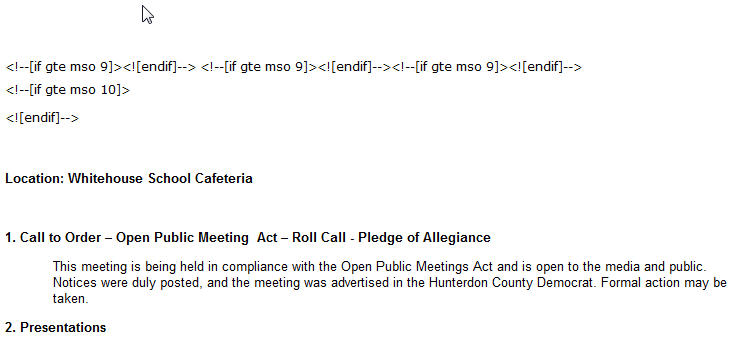
somebodysysop commentedPasteFromWord correctly formats the imported word document. The problem is that there is a bunch of word code that appears above the correctly formatted text: http://drupal.org/files/issues/Sample_Agenda_PasteIntoBody.jpg
The default input type is full html, so I'm not sure where I would have set the filter for the node to be something else.
Comment #21
somebodysysop commentedAlso, there seems to be a difference depending upon the browser used.
In fckeditor 6.x, the problem is with FireFox. It appears that IE works fine.
Yet, in fckeditor 5.x both FF and IE work fine
Is there something about the FF browser that we need to check?
Comment #22
Jorrit commentedDoes the problem also occur on http://www.fckeditor.net/demo?
Comment #23
somebodysysop commentedPaste from word is not available on this site. However, simply pasting the word document into the fckeditor yields this output:

It's unclear what this will look like in the browser.
I know this is what it looks like in my browser:
Comment #24
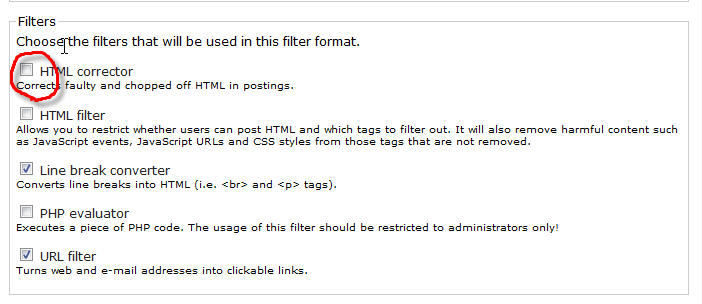
somebodysysop commented@Jorrit and AlexisWilke: Thank you two so much! You were absolutely right! It was the filters. But, the offending filter was the "HTML Corrector" in Input Format settings.

I unchecked this filter, and the problem went away.
Again, thanks to all.
Comment #25
richardtmorgan commentedFCKEditor's PasteWord default behaviour produces <div>s instead of <p>s for each paragraph you paste in from Word. You can read about it at -
http://docs.fckeditor.net/FCKeditor_2.x/Developers_Guide/Configuration/C...
As you see from the documentation, you just need to add this line to your fckeditor.config.js file (anywhere in that file):
FCKConfig.CleanWordKeepsStructure = true ;This fixes the issue - paragraphs stay as paragraphs. Why the default behaviour is to have this set to false, I have no idea...