

Closed (works as designed)
Project:
jcarousel block
Version:
6.x-1.x-dev
Component:
Documentation
Priority:
Normal
Category:
Task
Assigned:
Reporter:
Created:
19 Sep 2008 at 06:12 UTC
Updated:
2 Mar 2011 at 01:12 UTC
Jump to comment: Most recent file


Comments
Comment #1
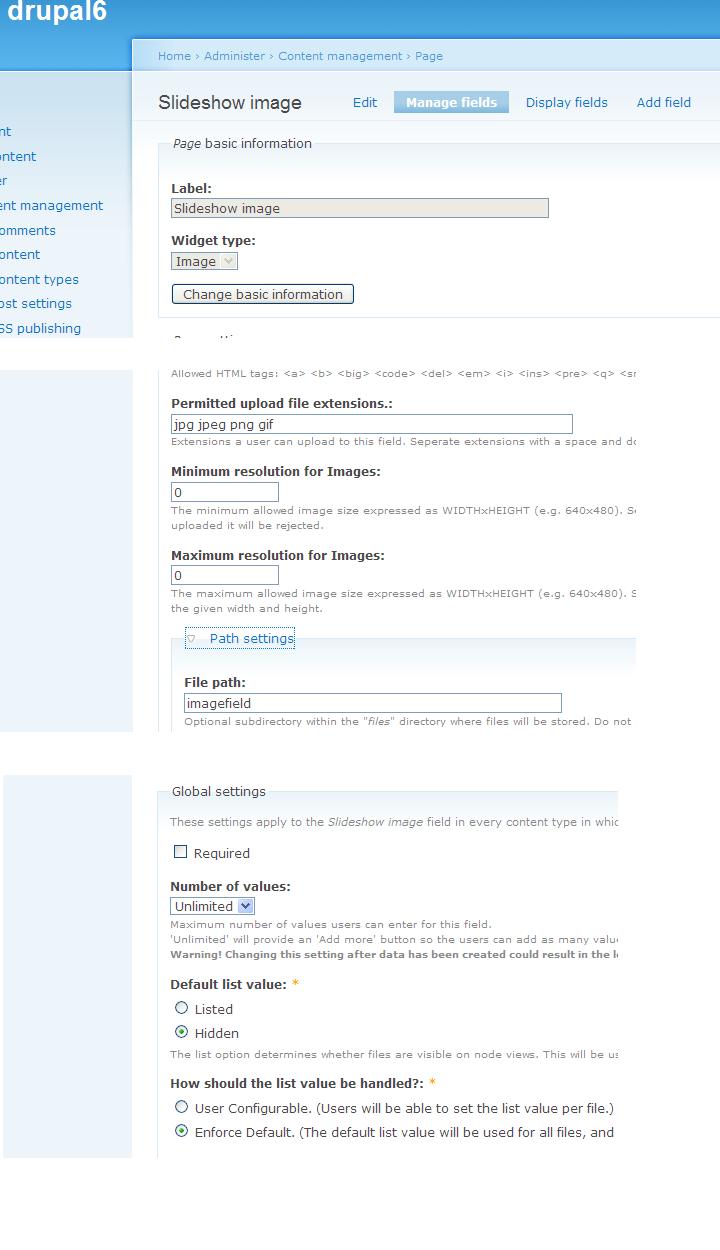
yang_yi_cn commentedStep 1: Create an imagefield to use later
If you already have a CCK imagefield setup for a nodetype, which can handle multiple images, you can skip this, but you still need to know the machine readable name of your field.
Comment #2
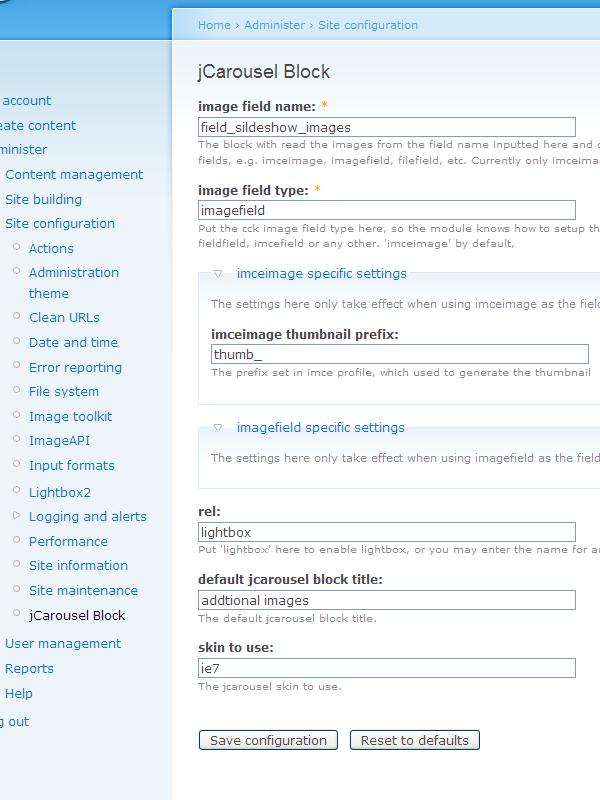
yang_yi_cn commentedStep 2: Setup jCarousel Block in the admin/settings
These are the only required fields:
image field name: yourfieldname
image field type: imagefield
no need to specify thumb prefix.
Comment #3
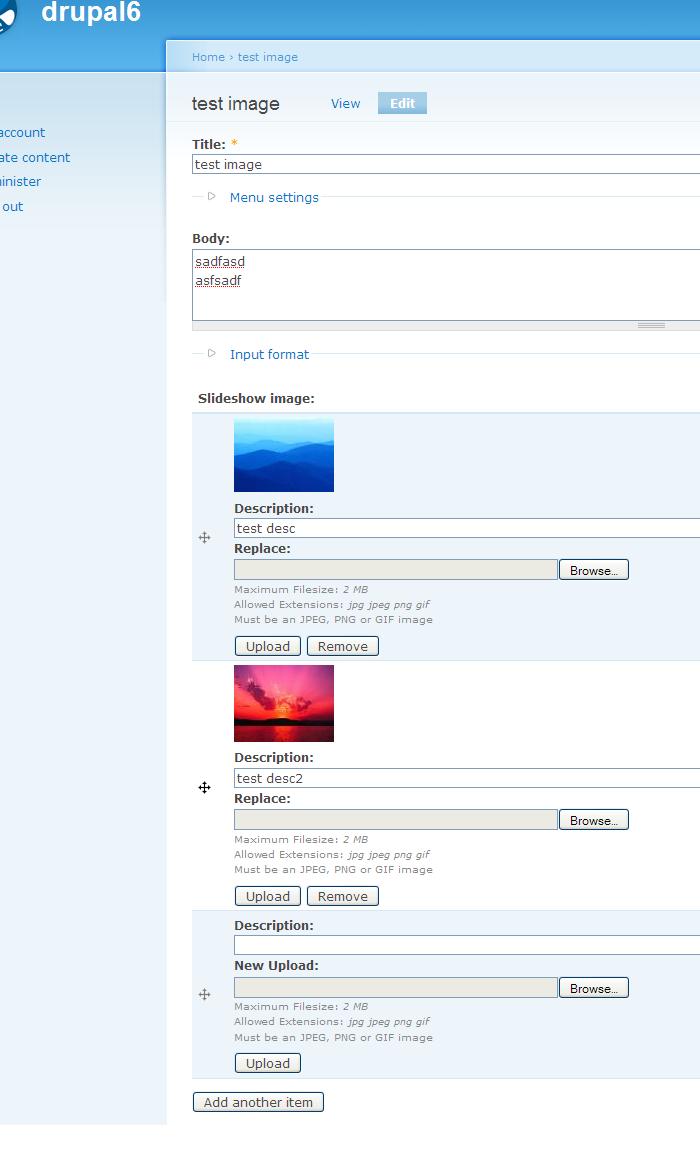
yang_yi_cn commentedStep 3: Upload images
edit node and add the images...
save
Comment #4
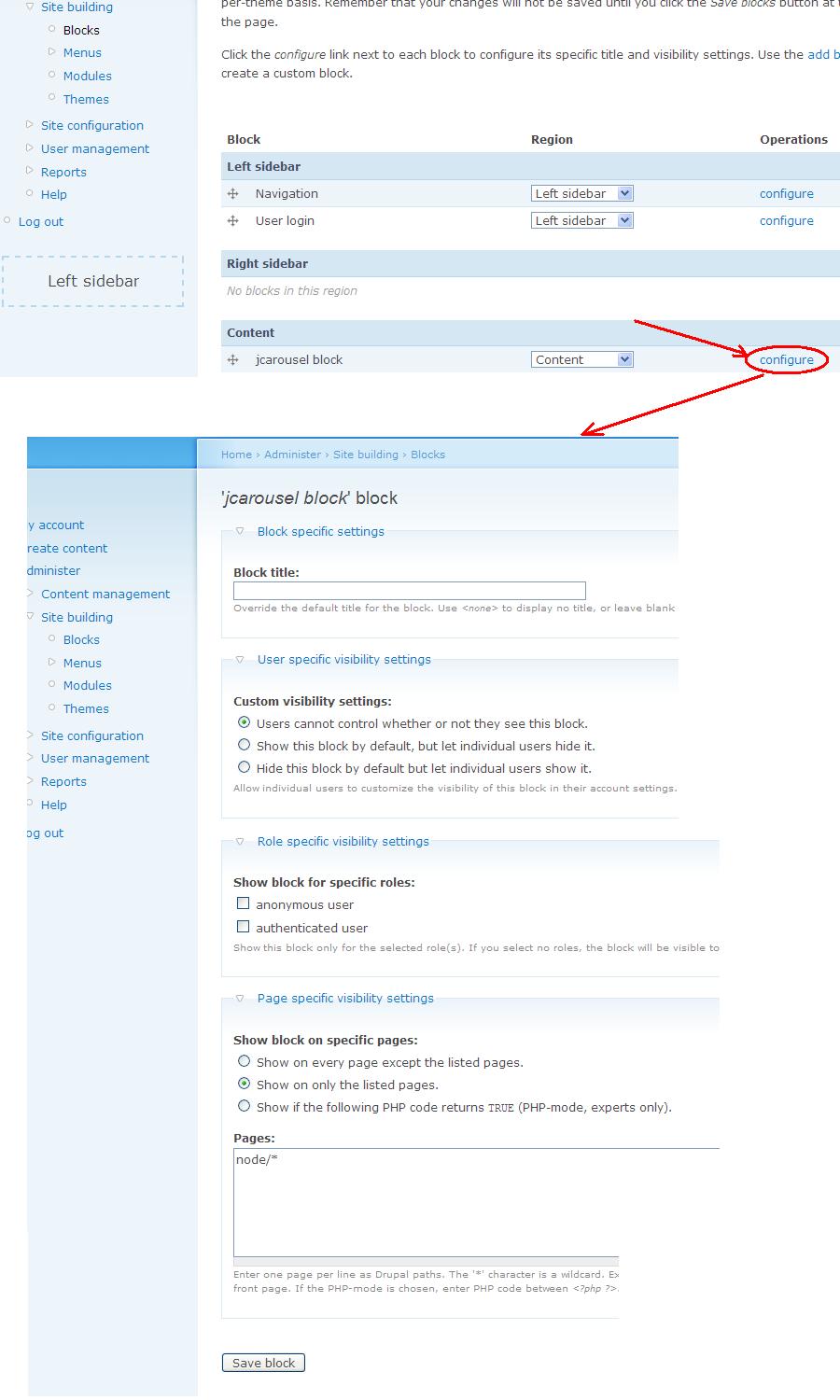
yang_yi_cn commentedStep 4: Check block settings
Of course you need to set the block to the reign you want.
Comment #5
yang_yi_cn commentedThat's it
Comment #6
jdl100 commentedYou've been awesome with support! The carousel still isn't showing up. I'm sorry to ask this but since imagefield isn't officially ported to Drupal 6 nor are some of its prerequisites, I'm using the imceimage instead. Do you mind displaying the same step by step process with the screenshots using imceimage instead? I noticed that in your http://drupal.org/files/issues/cck.jpeg file had Content Management -> Page in the breadcrumb but I'm assuming that I don't need to modify the Page Content Type but that instead I can create a Page and add the images to that page instead?
Thanks again,
Jade
Comment #7
yang_yi_cn commentedre:#6
Please be aware that you DO NEED modify a content type to make the this module work. It can be the 'Page' content type, but doesn't necessarily. You can also create your own content type. In either case, you need to have a CCK field with that content type, this field can be 'imagefield' or 'imceimage' type, and take the name of this CCK field, set it in the jCarousel block module setting. The jCarousel block module will then only pull images from that field.
I notice you mentioned "instead I can create a Page and add the images to that page " which is not the way this module works. I don't know if you are using something like upload module or image module? They are both not supported. This module only accepts images as they are CCK fields in the node, which means you need to manage fields for content types.
Comment #8
jdl100 commentedThanks! That was the missing link. I attached a document with my steps for anyone who is using the imceimage type.
Thanks for contributing this module and for your excellent support Yi Yang!
Comment #9
Sigal commentedHi,
First - thank you for a lovely module and great explanation of use.
Somehow, I can't make it work, please help me.
I'm attaching a file with the steps I made to create the slideshow.
Besides that, I have 2 questions:
1. Can I create different slide shows? If I use a specific imceimage field it will take all the images that are of this content type and I need lots of different slide shows, is it possible? If so how can I do it?
2. What is the image directory pattern for?
Thank you very much,
Sigal
Comment #10
yang_yi_cn commentedIt's weird, your steps seems to be correct. Is it not showing the block at all or showing empty images?
And for your question, first, it does not support multiple slides; second, that is for the directoryimage plugin, only have effect if you choose that option.
Comment #11
Sigal commentedHi,
I saw only a thin blue box on the screen.
Anyway, I started all over again, and decided to use imagefield and upload images to a node.
Now, I noticed that I actually didn't have all the needed directories in the modules folder, I didn't realize I need to download the jcarousel plugin from another site.
I did that, and now I see all the images that I uploaded to the node, and in the bottom, I see the block title, and underneath it, I see an unordered list of all the images I uploaded to the node.
There is now jcarousel effect on the page.
I'm attaching a screenshot again.
Please, can you help?
Thanks,
Sigal
Comment #12
yang_yi_cn commentedcan you show me where you put the downloaded jcarousel plugin?
Comment #13
Sigal commentedThank you very much for replying so fast.
I attach a screenshot of where the I put the plugin.
Comment #14
Sigal commentedHi,
I checked a bit deeper and it looks like the site does not recognize the skin.css file.
If I check the page source, the css file is being called like this:
When I check the page with Firebug, I inspect the items but on the style tab, the skin.css does not appear.
That is probably the problem but I don't understand why it doesn't read the css, any idea?
Thank you very much,
Sigal
[Edited by KiamLaLuno in order to show the HTML tag that was filtered out by the input format]
Comment #15
Sigal commentedHi,
I'm using multisite, it doesn't work with multisite if the module sits in the main site modules directory.
When I moved the module files into the sub site modules directory, it started working... go figure...
Thank you again for all the help.
Sigal
Comment #16
wallbay1 commentedThis module is not ready at all.
poor documentation nothing work, they say download the jcarousel and put on the module folder
nothing nothing, the jcarousel doesn't seems to be a drupal module
really really poor documentation
Comment #17
doomed commentedwallbay1, the documentation has been improved a little.
Check http://drupal.org/node/304628 if you can.
Comment #18
dark_kz commentedHow can I place block on my frontpage? I change "Page specific visibility settings" from "node/*" to , but it doesn't work. H-E-L-P!
Comment #19
doomed commentedDark_kz,
I believe the block should be set to show under Content.
And it will appear on every node, but you must configure the content types to show the Jcarousel field on Teaser mode.
Besides that you shouldnt have to worry about the block showing on Frontpage.
Does this make sense?
Comment #20
avpadernoI am restoring the original report title.
Comment #21
dark_kz commenteddoomed,
I want to show my latest gallery images in that block, and I want to show this block in footer region on my frontpage.
When user click on image, it redirect him to gallery (that is works)
ps: sorry for my english
Comment #22
doomed commenteddark_kz,
I dont think Jcarousel_block is for this.
Comment #23
ianphillpot92@gmail.com commentedHi
I have jcarousel_block working but I'm a little confused as to how exactly it should work. In an earlier post it is stated that it can show on the front page but in my implementation it only shows with the node that it was uploaded in.
Could you confirm that it can be shown on other pages and give more detail on how to "configure the content types to show the Jcarousel field on Teaser mode." as above. I have entered as a page it should show in.
Also, I thought it would show all images uploaded through say, slideshow_images. However, I'm only getting the pictures in the slider for the node on the page. Could you point me to somewhere where this is explained in more detail. I have uploaded four images, two in two nodes. Each pair only show its node. I thought I would have four images in the slider.
Cheers
Ian
Comment #24
avpadernoThe topic of this report is different; for what you reported you should open a different report. To attach an issue to a completely different one is never a good idea.
Comment #25
abubin commentedi am sorry as i don't know where else to post this question.
Can I know which directory to put the images if I am using DirectoryImage?
What is /pictures/$nid means? What is the purpose of this option?
Comment #26
jbova commentedHello,
Is there a way to have the carousel on every page? I added a new block region. I configured the jcarousel_block to display on all pages. However, it only appears when I am viewing the node with the carousel. I don't think there is a way around this. Has anyone else tried?
Thanks.
Comment #27
yang_yi_cn commented