

 The 2026 Drupal Business Survey is open. Your response will help shape the future of the Drupal business ecosystem.
I have filefield_paths installed and have the pattern "image/[term-raw]" for the filepath of the image (also tried [term]). All images nodes have a taxonomy term that is used as album name. When this term contains diacritics etc (e.g. ñ), the following error appears:
warning: array_merge_recursive() [function.array-merge-recursive]: recursion detected in /includes/module.inc on line 473.. With regular characters only in the term, there is no error. The file is saved in correct location either way. There is mention of the exact same error here #219541: warning: array_merge_recursive() for PathAuto.
I use filefield_paths 2008-Aug-29 dev, latest token (1.11), transliteration and also PathAuto (1.1), but I'm assuming it's not due to PathAuto since they fixed the error already.
| Comment | File | Size | Author |
|---|---|---|---|
| #40 | filefield_paths-DRUPAL-6--1-311526-recursion_error-1.patch | 4.96 KB | deciphered |
| #37 | recursion_detcted.png | 412.99 KB | gansbrest |
| #17 | filefield_paths_recursion_d6.patch | 996 bytes | dagmar |

Comments
Comment #1
decipheredI have had not yet been able to reproduce the issue.
Originally I thought it was because I was using Pathauto 6.x-2.x-dev, but when I swapped over to 6.x-1.1 I still couldn't replicate the issue.
My Term used was niño.
It's quite possible that the 6.x-1.1 pathauto fix did fix your error, as when pathauto cleanup is enabled it uses pathautos code.
If the issue still exists for you, please give me a step-by-step guide to reproduce the issue, preferably from a fresh install and hopefully I can get the issue resolved for you.
Cheers,
Deciphered.
Comment #2
ar-jan commentedOK, sorry for the bother: turns out there was some incorrect token entered in the Path settings > filename of my imagefield.
I did not enter it myself and when I changed it I forgot to note the exact tokens that gave the recursion error, it was something similar to "[filefield_paths-name].[filefield_paths-ext]" except that this is the correct one that does not give an error.
Comment #3
decipheredNo Problem,
If the issue pops up again, re-open this issue and I will do what I can to help you out.
Cheers,
Decipher
Comment #4
rhangelxs commentedI have the same issue but not with term token only. There is an error if i using any token in path (global work perfect).
I use the latest modules and have devel module.
I read that PHP 5.2.6 have some bugfix related with buggy function (array_merge_recursive())
I have devel enabled and can post backtrace information.
P.S. sorry for my english
Comment #5
deciphered@rhangelxs
Can you post information about all modules you have enabled (names & versions), how to reproduce the issue and the exact error you are receiving.
The backtrace may be helpful, but the above information is more important at this stage.
Comment #6
ar-jan commentedThe error has come back for me as well, after upgrading from Drupal 6.4 to 6.6, and upgrading a bunch of modules.
It only happens when uploading an imagefield image (which is the only place where I use filefield/filefieldimage + filefield_paths settings).
For node type 'News' > Path settings > File path > value "news/[yyyy]" works without errors (if I leave 'file name' blank).
But any value for 'File name' gives the warning I mentioned in the first post (twice the exact same line, in my case). Both using tokens and using 'filename.jpg' produce the warning.
I am using these modules:
Drupal Administration Menu 6.x-1.1
Automatic Nodetitles 6.x-1.0
Backup and Migrate 6.x-1.0
Bibliography Module 6.x-1.0-beta8
Calendar 6.x-2.0-rc4
Condition(s) 6.x-2.5
Content Construction Kit (CCK) 6.x-2.0-rc10
Date 6.x-2.0-rc4
download_count 6.x-1.3
Email Field 6.x-1.1
Embedded Media Field 6.x-1.0-alpha4
Fast Gallery 6.x-3.1-beta1
FCKeditor - WYSIWYG HTML editor 6.x-1.3-rc3
FileField 6.x-3.0-alpha5
FileField Paths 6.x-1.x-dev (2008-Okt-22)
Global Redirect 6.x-1.x-dev (2008-Sep-16)
Google Analytics 6.x-1.2
Internationalization 6.x-1.0-beta4
ImageAPI 6.x-1.0
ImageCache 6.x-2.0-beta1
ImageField 6.x-3.0-alpha2
IMCE 6.x-1.1
Invisimail 6.x-1.x-dev (2008-Jun-14)
Lightbox2 6.x-1.8
Link 6.x-2.5
Menu block 6.x-2.0
Menu Trails 6.x-1.0
Meta tags 6.x-1.0-rc1
Path Access 6.x-1.x-dev (2008-Aug-11)
Path Redirect 6.x-1.x-dev (2008-Jun-01)
Pathauto 6.x-2.x-dev (2008-Sep-13)
search_config 6.x-1.3
Shared Sign-On 6.x-1.3
Taxonomy Manager 6.x-1.0-beta2
Token 6.x-1.11
Translation Overview 6.x-1.4
Transliteration 6.x-2.0
Upload path 6.x-1.0
View Reference 6.x-2.8
Views 6.x-2.1
Virtual Sites 6.x-1.3
Comment #7
ar-jan commentedchanging issue title, not only happens when the filename contains a diacritic but with any value for 'File name' setting.
Comment #8
ar-jan commentedStill present in 1.0.
To summarize: the error is produced (in my case) like this:
- imagefield 6.x-3.0-alpha2 (and filefield 6.x-3.0-alpha5);
- Transliteration 6.x-2.0;
- Then using any value (fixed or token) for 'file name' in the imagefield's settings;
- And in 'File name cleanup settings', 'transliterate' enabled.
Comment #9
decipheredHi ArjanLikesDrupal,
Yes the bug would still be present in 1.0 if the bug is related to filefield_paths. As I have never been able to reproduce the issue with the huge ammount of testing I have done, and everyone who has seen the bug has also seen it mysteriously fix itself I had to make a call, either keep looking for it, or finally push out a release.
I will run some more tests with your configuration, however I would appreciate it you could be more specific, a step-by-step process of what you do that will always produce the error. It would be even more helpful if you process started from a fresh install so I could have irrefutible evidance of the bug.
I know that may be a bit too much to ask for, but as I've never been able to produce the error, it would be a huge help.
ANy more information you can provide, such as a phpinfo() details, or the name of your webhost so that I can rule out outside interference would also be helpful.
Thanks,
Deciphered.
Comment #10
ar-jan commentedHey there, I understand it's quite a lot to ask to look into a bug that almost no-one experiences, maintaining the module is probably enough work as it is :)
I did a clean D6.6 install on another webhost, and I could not reproduce the error there either. I had some trouble getting it to work however because of php safe mode errors, so I haven't fully tested what I should test. But so far, what happens is that the file does not get renamed according to the pattern (e.g.g [site-date-yyyy]-[filefield_paths-name].[filefield_paths-ext] but keeps the original filename. If that persists on a fully operational server I'll get back to you.
Do you have any suggestions how I could move the entire site I built to a 'clean' Drupal install where the filefield_paths do work for me? Since we might not be able to trace the recursion error in my existing site...
And thanks for the module and for looking into this! Arjan
Comment #11
decipheredArjan,
Thanks for being understanding, especially when this issue does seem to be giving you a fair bit of trouble.
When you say the files aren't being renamed on the new server, do you mean before or after you hit the 'save' button? Either way, that issue might be best as a new Issue if it continues to occur.
As for getting you built site onto a clean install, while the concept is a bit of a contradiction I understand where you're coming from. I suppose the way I would approach this is by doing a database dump of a clean install and your built site and then run a merge using something like WinMerge. It can be a messy process and you have to very careful to make sure the data matches up with the correct fields, but it is the way I do things when trying to keep a development site clean of debug data before the site launches.
I really wish I could get to the bottom of this issue though, it has happened enough times to prove it's existence, but the catalyst completely eludes me.
Comment #12
ar-jan commentedWell, I still hope to find out what's causing it. But I have a lot of additional modules installed and ruling those out may take lot of time.
At least the error is not critical since the result still is what is expected, but it may be confusing to other users uploading stuff.
Comment #13
decipheredI guess there are two options you could take for the moment:
1. Disable the pathauto cleanup functionality if you can do without it. The transliteration cleanup and built-in lowercase functionality may achieve clean enough files.
2. If the first option isn't an option to you, then, dread the thought, you could try to suppress the errors with a theme_preprocess() call... It's a horrible option, but it might have to do for the moment.
Comment #14
ar-jan commentedWhat I mentioned in #10 (the file not being renamed) had to do with a server problem. Php safe_mode is now off, and everything works as it should. Which means I too cannot reproduce the error :S and your module works fine (on a clean install).
Comment #15
decipheredHey Arjan,
Is it all possible that you test your install from your old server on your new server? Transfer the files and the database over and make any minor path changes? Would be interesting to see if a duplicate of your configuration on a new server would have the error or not.
Let me know.
Cheers,
Deciphered.
Comment #16
ar-jan commentedSorry to keep bothering you with this after so long ;)
Re #13:
The problem is not in using Transliteration, but in supplying any value for file name.
Whether it's a fixed value I give for filename or a token, with or without Transliteration cleanup, it gives the error. When I leave it blank there's no error, whether or not I use any cleanup setting.
The function that produces the error, in includes/module.inc, reads:
Is that somehow insightful? (I just know too little of php coding).
Using Pathauto cleanup does produce two other errors, which is already in this issue: #315060: Warnings when using 'Cleanup using Pathauto'.
Comment #17
dagmarHello:
@ArjanLikesDrupal in comment #16: module_invoke_all() is a core function. The error is not here. This function is called by token_replace() but the error is detected by the another function.
I have created a patch for this issue. I have a Drupal 6 instalation without pathauto, and this configuration for a filefield:
File name:
When I create a node I see the same warning:
warning: array_merge_recursive() [function.array-merge-recursive]: recursion detected in /includes/module.inc on line 473.The recursion problem is produced in this line of the fielefield_paths.module file.
The problem is that token_replace found a token of the type 'field' in one of the properties of the object $field;
The patch is pretty simple, maybe $temp_file is not the better name for a variable, but its works :-)
Comment #18
easp commentedI applied the patch and it fixed the recursive error on my initial upload.
If I edit the node and add replace the file with another one I still get the recursive error. I have unlimited set as the number of files I can upload.
Testing showed:
- Create new node with no files - no errors
- Create new node with 1 file - no errors
- Create new node with 2 files - no errors
- Edit node and replace file - recursive error
- Edit node and add another file - recursive error
I hopes this helps to create another patch.
Comment #19
dagmarYes me too. I'm working in a new patch.
If this #361196: Add file name without extension and file extension to Filefields Tokens is commited the solution for this problem will be easy.
Comment #20
ar-jan commentedI'm happy to see you found the problem. I will try the patch when I have more time...
Comment #21
decipheredOut of curiosity, does this bug occur in the 6.x-1.x-dev build?
If so, the issue version should be changes so I can confirm and fix the issue.
Comment #22
Aquilasfx commentedthat error is still persistent also with 6.x-1.x-dev build 2 february
Comment #23
Aquilasfx commentedi think with this dev version there are more bug respect non dev build, now my date token in imagefield aren't processed in filepath.... filename return also incorrect process because return token without processing that....
An example of my imagefield token path:
r/[field_data_reportage-yyyy]/[field_data_reportage-m]/[field_data_reportage-d]/[user-id]/[nid]
that return:
r/[field_data_reportage-yyyy]/[field_data_reportage-m]/[field_data_reportage-d]/1/20
for example...
filename token:
p[field_data_reportage-yy][field_data_reportage-m][field_data_reportage-d].[filefield_paths-ext]
return a filename like this: p[field_data_reportage-yy][field_data_reportage-m][field_data_reportage-d].jpg
Another notice: with precedent non dev version imagefield token path process correctly the path, but filename is still unprocessed with token's date field
Comment #24
dagmarHello again:
Now that filefield has new tokens #361196: Add file name without extension and file extension to Filefields Tokens for his fields I think that is time to modify filefield_paths a bit.
I will try to explain why recursion error occurs.
When filefield_paths try to execute this line
Some tokens in $file object must be "emulated" to work, like filename and file extension. And this is what produces the recursion error.
The problem is that cck builds his own tokens with another function and this tokens are not editable. Then you cannot add more tokens to the existent. For this reason I wrote another patch to add this tokens to filefield.
Now, filefield_paths should use
['field_name_field_onlyname']
['field_name_field_extension']
where field_name must be replaced for the real field name like field_file or field_myfile
instead of
['filefield_paths-name']
['filefield_paths-ext']
And remove the cited line. And token implementations.
With these two changes filefield_paths works fine. But the patch must contemplate three things:
1) Erase the cited lines.
2) Filefield_paths now requires FileFields Tokens.
3) A new update function to modify the settings in the database.
I don't have time to create this patch and test it correctly now. This are my two cents.
Comment #25
aasarava commentedI'm experiencing the same recursion error when using FileField Paths with the fupload module, all on Drupal 6.10.
Dagmar, it would be great to get your new patch. I tried applying your latest two patches to Filefield Paths and FileField Tokens and changing [filefield_paths-name] and ext to ['field_name_field_onlyname'] and ext in the filename field, but I'm still getting the error. And ['field_name_field_onlyname'] and ['field_name_field_extension'] are not being converted in the filename.
Also, what needs to be updated in the database?
If you could help or provide a patch, I'd be happy to test it.
Thanks!
Comment #26
dagmarHello Amit:
These new tokens were added in 6.x-3.0-beta3 version of FileField. Are you using this version?
Thanks for your offer. But as I said after, this is a complex patch. I think that Deciphered should program it. Specially because this patch requires an update of the records in the database and a change of dependencies for this module. Also will be necesary an update of the documentation in the project page.
If I have bit of time this weekend I will try to create an initial patch.
Greetings.
Mariano
Comment #27
decipheredHi Mariano,
Thank for your information. I am looking into it and will definitely be making some changes.
My biggest issues are as such:
- I still can't reproduce this issue, no matter what I do, so if you have any more information about how to make this issue occur I'd be extremely grateful.
- I will not make this reliant on FileField Token as if people simply wish to use this with the Upload module it would be a pain to have to also get the FileField module.
The second issue is not really an issue because I have already implemented a change that will only define the two tokens if FileField Token is not installed, but the first one is a major issue, I can't call an issue fixed if I've never been able to confirm the issue in the first place.
Cheers,
Deciphered.
Comment #28
FinTrader commentedI could simply reproduce this error by installing Drupal 6.10 from scratch with the following modules:
- cck
- filefield
- filefield-paths
- imagefield
- og (organic groups)
- token
I created a new content type to be used by og, added a filefield or imagefield to that type and changed its path to [og-id]. When creating a node of that type and adding a file or image to that type, the error is visible.
Comment #29
deciphered@FinTrader
Can you provide more information.
I created a fresh install, turned on those modules and created a Content Type with a filefield, set the file path and created a node but received no error.
For everyone/anyone experiencing this error, I really want to resolve this issue, but I can't resolve the issue until I can reproduce the issue.
What I need to know is:
- What versions of the modules did you use, if devs, what dates.
- What sub-modules of those modules did you turn on? ie. CCK > Text, CCK > Number, etc.
- What exactly, step-by-step, do you when you create the new site that guarantees the error? Setup each module with what settings, etc.
- What is your server environment? LAMP, WAMP, MAMP, XAMPP, PHP version, Database type, etc.
The most helpful thing that anyone could possibly do is zip up a test site that produces the error, including a database dump, and pass it along to me.
Cheers,
Deciphered.
Comment #30
FinTrader commented@Deciphered
I set up a test site for you. You've got mail.
Good luck.
Comment #31
easp commentedI reported problems back in #18. I did the same testing that failed back then and I did not receive an errors.
My setup:
LAMP
Drupal 6.10
FileField 6.x-3.0-beta3
FileField Paths 6.x-1.0
Pathauto 6.x-2.x-dev
Filefield settings:
File size restrictions - Max upload size: empty
File size restrictions - Max upload per node: empty
File path: news_files/[nid]
File name: empty
File name cleanup settings: using pathauto
I do not receive any recursion error anymore. Files upload correctly.
If I use [filefield_paths-name].[filefield_paths-ext] for the filename field it changes my filename to just the extension. Leaving the field blank seems to work correctly.
Comment #32
dagmarHello Stuart:
I have tested the last dev in a fresh drupal installation and didn't see any recursive error.
However I updated the filefield paths module in another site that use filefield paths and this errors continues happening.
I think that the order in the installation of this modules maybe is causing the problem. This is hard to trace but this the only solution that can explain why in fresh installations works fine, and in others installations not.
One thing is true. The bug is still active.
I use the same environment for the two sites then I think that it doesn't a php or apache problem.
Does Filefield paths provide this functionality? I can find this feature in the code. However I think that a better solution is merge Filefield paths, imagefield paths and a "possible" upload paths in a more solid module called for example "file paths" then you can make diferent dependencies for the three submodules.
Well I'm going to continue searching the raise of this issue. Please to all. If somebody can reproduce the bug from a fresh drupal installation, make a video and upload it to youtube, vimeo or blip.tv. I try to do that but I can't reproduce this issue from a fresh install anymore :(
Greetings.
Mariano
Comment #33
decipheredFirst things first, stop testing on 6.x-1.0. I fixed an issue in 6.x-1.x-dev months ago that should fix this problem, so that is what you should be testing, if it still persists in 6.x-1.x-dev then at least I know that that particular fix didn't completely work.
@dagmar
FileField Tokens is a sub module of FileField, so if I made FileField Tokens a required module I'd also be making FileField a required module.
FileField Paths 6.x-1.x-dev supplies configurable paths for the FileField, ImageField and Upload modules already, there is no need to change that as it will not solve anything.
I will continue to look into this issue as I really would like to resolve it before release version 1.1. I appreciate all the help you guys are providing and look forward to more test results using 6.x-1.x-dev.
Cheers,
Deciphered.
P.S. I downgraded this from critical because it only throws an error, as far as I can tell it doesn't actually break anything.
Comment #34
decipheredClosed due to lack of response, assuming that 6.x-1.x-dev fixed this issue.
Feel free to re-open if you can show otherwise.
Cheers,
Deciphered.
Comment #35
redijedi commentedI just installed the newest 1.1 version which is showing as being more recent than dev and the issue is still there.
Comment #36
deciphered@redijedi
Thanks for your confirmation. :(
If you can provide any information about it, as requested at #29, because I have never been able to reproduce this issue.
Cheers,
Deciphered.
Comment #37
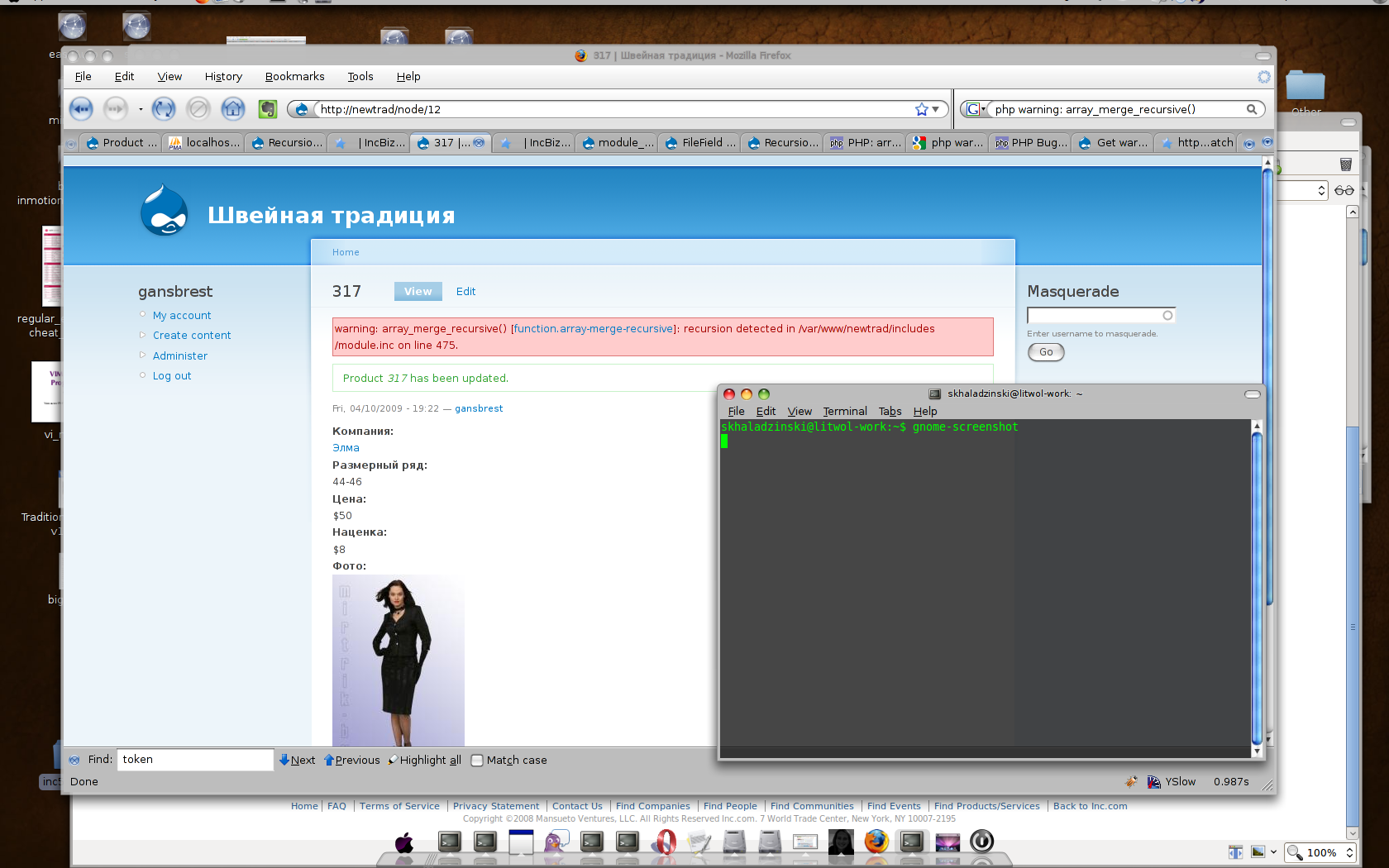
gansbrest commentedHi!
Just recently installed FilePaths module and noticed same error.
My version = "6.x-1.1"
I don't have a lot of modules installed yet. Only CCK (filefield + imageField, Token, Token_Actions, Masquerade, LoginToBoggan )
My php version is PHP Version 5.2.3-1ubuntu6.5 (Apache 2.0 Handler)
But it's not look like PHP error because I've tried raw php samples and they not produce recursive error. The problem lays somewhere inside filefield_paths_filefield_paths_process_file function.
Interesting thing that actual tokens gets replaced correctly and file saved in correct location.
Steps to reproduce:
Create new content type add filefield with imageField widget and try to upload image.
I could even tried to removed all tokens from filename and filepath and still get that recursive error.
Thanks
Comment #38
gansbrest commentedOne more thing to mention:
I'm trying with already created node.
And my Drupal version is 6.10
Comment #39
decipheredThanks for the info gansbrest, but unfortunately I am still unable to reproduce the issue.
If anyone is able to provide me with a zipped up copy of a drupal install filesystem and database dump that has proven the issue at least once and is 100% reproducible, please contact me via my drupal contact form for an email address to send the files to.
Cheers,
Deciphered.
Comment #40
decipheredThanks to gansbrest for supplying a development build to test with I did manage to finally reproduce this issue. :)
It appears to be a very temperamental issue as taking the exact steps on my XAMPP and MAMP installs cannot reproduce the issue, whereas it is visible immediately in my LAMP install.
It appears to be a limitation/issue with the Token module, something that can hopefully be dealt with eventually, but in the meantime I have implemented a workaround.
I still need to look into the Drupal 5 version to see if the same issue is evident and whether I need to port the fix, so I won't be committing the workaround until that time, but until I do you can use the attached patch to fix the issue.
Cheers,
Deciphered.
Comment #41
decipheredFix committed to DRUPAL-6--1 and DRUPAL-5... hopefully that's the last of this issue.
Comment #42
davidredshaw commentedJust as a follow-up, I had this issue on a system running PHP 5.2.5 but not on one running 5.2.6. Not sure if these PHP bugs (fixed between these two releases) could be the cause:
http://bugs.php.net/bug.php?id=43559
http://bugs.php.net/bug.php?id=42177
http://bugs.php.net/bug.php?id=43495
David
Comment #43
ar-jan commentedgreat, thanks Deciphered!
Comment #44
ar-jan commentedOne thing: I applied the patch, because the Releases hadn't updated yet.
This introduced a small bug: when administering a field, the 'File path replacement patterns' list won't open.
(Or maybe you caught that already before committing?).
Comment #45
decipheredArjan, that is not unexpected due to the introduction of a new theme element.
Simple fix, clear your cache :)
Comment #46
ar-jan commentedAh, I see!