

 The 2026 Drupal Business Survey is open. Your response will help shape the future of the Drupal business ecosystem.
After selecting gallery to upload to and clicking browse for upload it just goes back to the screen to select existing or new.
| Comment | File | Size | Author |
|---|---|---|---|
| #7 | java_console.jpg | 229.25 KB | true-pal |
| #3 | imgupload_error.jpg | 144.8 KB | true-pal |


Comments
Comment #1
pre911mindset commentedMy guess is that you don't have a Java JRE 1.6 or later installed on you machine, or you don't have java enabled on your browser.
I am working on a patch that will issue such a warning. Meanwhile try installing java JRE from java.sun.com.
I will update docs also.
Comment #2
pre911mindset commentedIt sounds like you didn't have correct Java enabled. Please try this version, it should give you some specific instructions as to what is wrong.
Comment #3
true-pal commentedsame problem here:
I have installed JRE 1.6.0_07 and enabled.
After installing the module I got 2 install error informations (see jpg).
--> no imce (no such dependency in imgupload)
After installing IMCE the 2 errors vanished but the problem of this issue is the same :-(
any idea ?
Comment #4
pre911mindset commentedThat dependency was cut/paste error in install file. I have removed it, and verified that this works w/o IMCE.
Comment #5
true-pal commentedthanx for the info, but I think this issue is still active since the malfunction hasn't been fixed yet (--> your hint with the wrong/ old JRE was obviously not the solution)
Comment #6
pre911mindset commentedWhat is the symptom of your problem? It can't be the same one because I removed the IMCE dependency. (also you may need to clear your cache). A couple of questions:
Thanks!
Pre
Comment #7
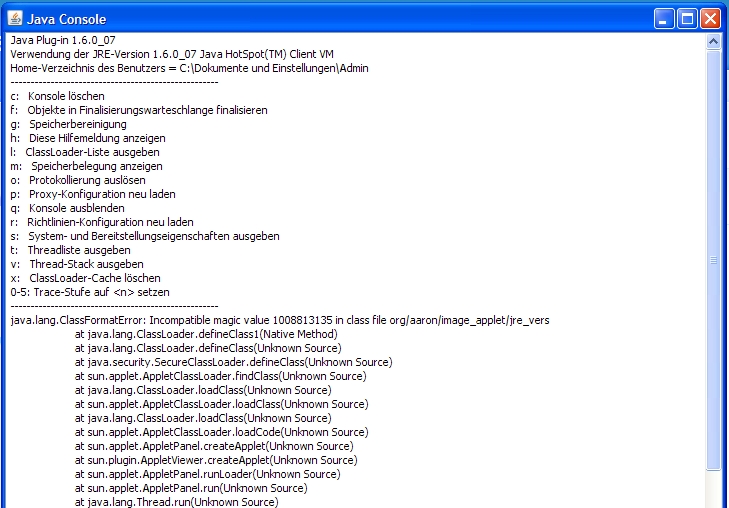
true-pal commentedthe symptom of the problem is exactly the same as mentioned in #1. Click the button: "Browse for Upload" will not display the expected file browser window.
Following error message will be logged in the J-Console: --> see jpg
awaiting new instructions :-)
thanx for your patient support
Comment #8
pre911mindset commentedThis error indicates that the jar file in the applet tag does not look like a real jar file. Most likely this is because your server is not able to find the jar file. It is also possible that your jar file is corrupted. or something else...
Look at the source of the initial page. There will be an applet tag. The tag will have an 'archive' attribute like so:
ARCHIVE="sites/all/modules/imgupload/jre_vers.jar"
This is relative to your base drupal URL, so for instance since i have drupal in the ./foo directory I type:
http://mysite.org/foo/sites/all/modules/imgupload/jre_vers.jar
See if your browser finds that file, or if it gives you a 'not found' error.
Second, put that .jar file in a local directory and type the following command:
java -cp jre_vers.jar org.aaron.image_folder.image_frame
and see if a window pops up.
Note that I released a new version (1.5) which corrects a path problem in the applet tag, which you will need. However, this is a different problem as you don't even see the applet.
Comment #9
true-pal commentedok, I forgot to mention that I use the module on localhost (XAMPP/ Windows).
I have no experience with java ...
... so I don't know if I have to activate/ install an module on my local server to use java
... in the source I found the path: "org.aaron.image_applet.image_applet.class\" do I need this .class?
If so, where can I find the .class-File since it does not come with your module.
Thnx in advance
Comment #10
pre911mindset commentedThe module comes with 2 .jar files. One is called image_applet.jar and one is called jre_vers.jar. If you don't have the .jar files then somehow you got an incomplete distribution, which would explain your problem. Are the .jar files in your module directory?
That's the 'CODE' attribute. I'm interested in the ARCHIVE attribute. It will end in '.jar' and look like so:
ARCHIVE="sites/all/modules/imgupload/jre_vers.jar". This directory is relative to the base of your Drupal distribution and should contain the jar files. Platform/server should make no difference, I am running Apache on both Windows and Linux.
Just FYI, '.jar' is like a '.zip' or '.tar' file. It contains java bytecode files, which have .class extensions. The web server sends the .jar file to the browser and the browser then knows how to find and run the classes indicated in the applet tag.
I appreciate your patience, your fellow Drupal'ers will thank you.
Comment #11
mukhsim commentedI think jar archive's path should be: sites/all/modules/imgupload/imgupload/imgupload/jre_vers.jar
That is where it's located.
Anyways, jar archive is there, but error persists.
Comment #12
pre911mindset commentedOK, can you please go back to #8 and follow the instructions there? Like I mentioned, the error indicates that the applet is not making it back to the browser, and I need to figure out why...
1) type in the name of the jar file directly from your browser, and
2) try to bring up the applet directly from the command line. I just want to see if there is this applet actually runs on your machine.
again I appreciate your patience.
Thanks,
pre
Comment #13
mukhsim commentedApplet indeed runs when started from command line with "java -cp jre_vers.jar org.aaron.image_folder.image_frame".
I can select an image and see it in the applet. I can also download the applet from my webserver by going to : sites/all/modules.../jre_vers.jar
But there is still the same problem when accessing via webserver.
I am using PHP5+Apache2 on my xampp and PHP5+Apache1.3 on my server.
Delf.
Comment #14
pre911mindset commentedOK. I assume this site works for you:
http://java.com/en/download/help/testvm.xml
1) what is the browser make and version
2) could you please show me the entire applet tag?
I have tested on apache 2 and apache 1.3, with IE 6+7, FF 3, Safari and Chrome. So its a little perplexing. I will try downloading Xampp and see if I can reproduce the problem.
btw there is at least one person with the same problem as you:
http://drupal.org/node/315858
Comment #15
hollybeary commentedI also am unable to see the file browser. Just re-installed java, the test works fine.
I'm running xampp with a 6.4 site. All modules up to date. Using latest version of firefox.
Don't know if this helps but i'll post it anyway....
Comment #16
mukhsim commentedJava VM test works fine - I can see the dancing Duke.
I have tested VM and applet with FF v3.03, IE6 and Opera v9.51 - the same "incompatible magic value" problem is everywhere.
BTW, is there any handbook out there about making post requests from an applet to D6? There was an image_jupload module for D5, but when I tried to port it to D6, posts requests simply didn't go through.
Comment #17
mukhsim commentedpre911mindset, this issue could be related to how you upload jar files to the server. Please check the program you use to upload files to drupal.org CVS and make sure it knows to treat JAR files as binary files and NOT as text files.
I hope this will solve the problem.
Comment #18
pre911mindset commentedtrue-pal was able to run the applet by issueing the command locally. I don't think that would be possible if the .jar file is corrupted in CVS.
Maybe seems to have to do with how your web servers are treating the .jar file, or interpreting the applet tag.
Comment #19
pre911mindset commentedCould someone please place the following html code in an html file on your server and try it?
It pulls the jar file from my server as an absolute URL. You should see a green box with a message inside.
If it works, it will indicate that the problem is with the applet tag and not with the jar file itself.
Comment #20
hollybeary commentedThat worked for me, got the green box that said I was good to go.
Comment #21
mukhsim commentedThat worked for me too: Green box with JRE version and "You are good to go".
Comment #22
pre911mindset commentedOK, that's good news. That seems to indicate that the problem is with the construction of the archive path and not anything in the applet itself.
I will add some fields to the admin menu that allow you to specific that explicitly if you have this issue, also maybe I will try to construct an absolute URL to the jar file.
Comment #23
mukhsim commentedAny news, pre911mindset?
Comment #24
pre911mindset commentedTry the 1.6 version of the module, which I just released. The URL for the applet is now calculated as a full, absolute URL, and the user can override it if there are problems.
Also I had a request to compile the jar files to be 1.5 compatible, which seems to be just a compile-time flag.
Let me know if it works, and if not, what happens.
Comment #25
mukhsim commentedIt works now.
The problem was with the path to jar files. The module was somehow incorrectly constructing path with current url+path to .jar files. Once correct path was specified at admin/settings/imgupload, everything worked.
The issue can be closed.
Comment #26
pre911mindset commentedDid you have to modify the path settings? If so, can you give me an example of the original path and the modified one.
Also, are you running clean URLs?
Thanks for the info.
Comment #27
mukhsim commentedThe path at admin/settings/imgupload initially was "admin/settings/imguploadsites/all/modules/imgupload". I corrected it to "sites/all/modules/imgupload". Yes, I am running clean URLs.
Comment #28
pre911mindset commentedComment #29
tic2000 commentedI too have this problem, even if the path is set correctly
this is the java console output
Comment #30
tic2000 commentedComment #31
pre911mindset commentedThis is actually a different problem. You are executing code from the jar file at this point. It looks like it can't find the xml file describing the GUI, which it should be getting from the ClassLoader.
1) please provide browser make/version and JRE version 2) do you see the green box saying you are 'good to go' on the first screen?
Comment #32
tic2000 commentedYes, I do see the green box. The browser is FF 3.0.3
Comment #33
pre911mindset commentedWhen you click on the 'browse for upload' button, do you receive a warning dialog box about a self-signed certificate or some such?
Comment #34
moskito commentedI'm having the same issue that tic2000 have.
And I do receive a warning dialog about self-signed certificate, after I accept it nothing happens.
Using Windows XP/FF 3.0/JRE 1.6 I had the same console output that tic2000, but trying in Ubuntu Linux/FF 3.0/JRE 1.6 the applet froze my browser.
Comment #35
pre911mindset commentedI am also using XP/FF3.0.0 and JRE 1.6.7, and it works for me. I wonder what could be different.
Can you do this (from #8 above):
Look at the source of the initial page. There will be an applet tag. The tag will have an 'archive' attribute like so:
ARCHIVE="sites/all/modules/imgupload/jre_vers.jar". put that .jar file in a local directory and type the following command:
java -cp jre_vers.jar org.aaron.image_folder.image_frame
moskito please check the java console and see what exception is in there.
I am going to try XAMPP with clean URLs and see if I can reproduce some of these problems.
Comment #36
pre911mindset commentedOK, never mind the last request. I can reproduce the issue now. It is definitely some interaction with clean URLs and the java applet. Specifically the java ClassLoader, which lets me access the jar file for icons and applets, seems to be colliding with the mod_rewrite somehow.
Let me research it a bit. I may be able to fix it by loading the classes from the .jar file on the server directly.
Comment #37
pre911mindset commentedI see what the issue is. I should have time to look at this tonight or tomorrow morning.
Without clean URLs java is looking for /web_mirror/META-INF/services/javax.xml.parsers.SAXParserFactor, which does not exist, so java gets it from the local JRE.
With clean URLs enabled, it looks for /web_mirror/admin/content/imgupload/%3c!DOCTYPE%20html%20..., which returns the page from the menu callback located at /web_mirror/admin/content/imgupload. Since this is not a java class the applet fails.
I need to somehow force drupal to return a 404 error if the parameter to the callback is not correct. Or, include all the non-core classes in my .jar file.
Comment #38
pre911mindset commentedSee release notes. Please give it another try and re-open if issues. I tested with both clean and dirty URLs and both seem to work now.
Comment #39
hollybeary commentedyay it works! I like it!
Comment #40
moskito commentedI had the same java console output that tic200.
But, using version 6.x-1.7 it works correctly.
Thanks
Comment #41
Anonymous (not verified) commentedAutomatically closed -- issue fixed for two weeks with no activity.