New feature suggestion:
I would like to suggest a couple of enhancments to administration pages.
First, add a new general settings option to allow the user to specify the admin home page. Currently the watchdog log view is the default home page.
Second, add a new control panel page that can be used as the default admin start page.
I've attached a suggested patch to the CVS head version of the system.module that implements these two enhancements. The patch does the following.
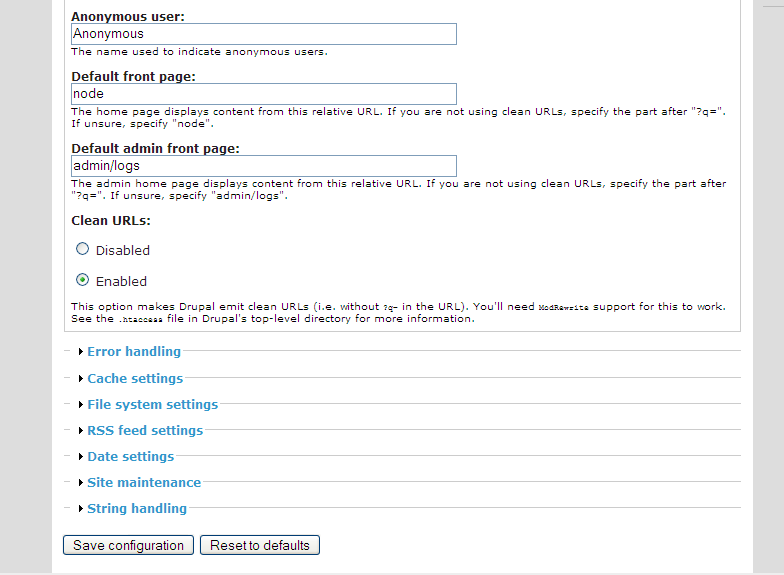
Adds a new "default admin page" text field to the general settings group (just after the "default front page"). It also changes the admin menu entry to call a new function that examines the default "admin page" variable and redirects to the appropriate path. For the control panel, the patch adds a new function (system_admin_controlpanel). This function basically looks for the admin entry in the menu structure and then iterates through the child menu items and builds a control panel page using the path and title information returned from the menu structure. For the control panel icons it looks for an icon file in the misc directory that matches the name of the menu item (e.g. user.png, access.png etc) If it doesn't find an icon it uses a default. I've also included some 48/48 icons that I borrowed from my usr/share/icon/gnome directory of my local Linux box. I believe these are gnome GPL'ed icons but any 48/48 icons could be used.
This patch allows users who prefer the current functionality to keep it as their default. It provides the option for others to make any admin page they want to be their admin "home page" including using a graphical control panel. Module developers that add new admin menu options can add their own custom icons for the control panel but they are not "required" to do so as a default will be used if they don't provide one.



Comments
Comment #1
dreed47 commented48x48 icons attached
Comment #2
dreed47 commentedupdated patch. slightly changed the formatting of the control panel page
Comment #3
moggy commentedI quite like this. It certainly goes some way to making Drupal easier on the eyes for first time users.
I noticed there's a lot of hard coded style. Would this not be better in a stylesheet and the code just containing classes and ids?
Also would a dropdown box of possible admin pages be better than trying to remember how to spell controlpanel (something I'm having trouble with tonight ;-) )
Comment #4
syllance commentedNice job :)
the default admin page is a nice feature, and the controlpanel is a very good idea. This goes in the good direction to make Drupal more user friendly.
i agree with the dropdown menu and stylesheet additions, but i already really appreciate the current version.
hope this will go into core soon, as it really makes the first admin pages contact better :)
i don't mind scrolling through the nav menu and i rarely goes into admin without checking the logs, but that definitely will help me converting my wife's site to drupal :p
thanks !
Comment #5
dreed47 commentedI'll move the styles off to a style sheet but I'm uncertain about whether or not make make the default admin page a dropdown. It's an easy change and it eliminates any typos by the user but it also restricts the user to a current visible admin menu item. If by chance someone wanted to write their own admin start page (ie their own control panel) they would have to hack the core system.module to do it.
Anyone else want to weigh in with their preference?
Also, anyone up for creating drupalized versions of the control panel icons?
Comment #6
chx commentedMaybe just because I created it, I like my control panel module better.
Comment #7
dreed47 commentedIf I would have known there was a module I wouldn't have written this patch although I do think this would be good for core Drupal as the default.
Is your modules a recent creation? I don't see it on drupal.org nor could I find in the contribs section of CVS (either the modules or sandbox sections). I'm I missing something? Is it called something different?
Comment #8
syllance commentedchx control panel is located in his sandbox (cp.module), and thanks to him for letting us know there's one :)
it's working fine (tested on HEAD) and provide interesting concept for navigating through the admin, instead of just add a frontend. the settings part is the better one, listing all elements in the page makes quickly forget the standard menu.
der's one looks nice and provide a more immediate access to admin pages, but the standard menu is still mandatory to access some elements (dba or store settings for example, still needs to be accessed via left menu).
to be honest, i like them both :)
being able to change the default admin page is very nice, and icons make admin looks a lot better, raising the Woman Acceptance Factor by a huge amount (my wife loves it :). but i also really like the more in depth admin navigation offered by chx module.
mixing both on my head setup gives a nice result, so may be it would be a good idea to join forces and mix the 2 panels.
chx, is your module somewhat official and scheduled to hit the core ?
Comment #9
Amazon commentedHi, I asked Karoly to create the control panel module. It important that the control panel be tied into the navigation menu block so that it does not create inconsistent navigation.
The goal is to start a user experience grouping exercise to help the community categorize administration tasks. The first thing that has to happen is that administration must be considered a seperate situation from creating personal content in Drupal. To support this seperation of personal tasks and administration tasks we broke out administration to have a separate theme in the CivicSpace theme.
Through research interviews into Drupal administration we need to discover what the goals and tasks of administrators are. Some early feedback is that site developers need modules to be evaluated on Drupal.org. They have also indicated they need better and consistent administration help ,with incontext list, which we have been adding. We have also heard administrators want a quick overview. Any change to provide a control panel like overview must have a dashboard like overview. You should assume that we will identify a list of 5-7 top goals for administrators.
Once those those 5-7 top goals are identified we need to ensure administrators can acommplish tasks to achieve those goals. Some of those tasks will completed by clicking through to icons or admin interface links. Sub-goals will be accomplished by providing effective navigation. We need to consider 4 types of navigation to be added to the control panel: Global navigation, local navigation, contextual navigation, and situational navigation. Some of this navigation can be accomplished through a theme or blocks. Some will need to be in the page and some need to be added in otherways, such as interaction techniques.
Keep all this in mind when creating a control panel solution. It also must respond to the fact that every site will have different permissions set and different modules. This is a complex problem and it's going to research and experimentation to get it right. But this is a big step in the right direction.
Cheers,
Kieran
Comment #10
dreed47 commentedThis has sparked a lot of good discussion. I've taken a look at cp.module and I think it really is complimentary with my proposed patch. I've taken my patch one step further and provided the settings icons in a collapsable group below the main control panel. This would allow access to all admin functions without referring to the traditional menu.
Syllance, do you think this addresses the gap you saw in my solution?
Comment #11
dreed47 commentedKieran, I'm glad to see some serious thought going into the user experience for site administrators. I think separating the user and admin sections of the site is critical. It will not only allow extensive usability work to be done for site admins it will also make it much easier for theme creators as they will be able to focus on the end user experience. I like the admin theme for civicspace. My only dislike about the approach is that it's template driven which causes a sites template to be larger and more complex due to handling all the logic for user and admin themes. I think a better approach may be to use a module such as the sections module. This allows you to have smaller templates focused on user or admin themes.
I agree with your point about making sure the control panel ties into them menu system. My approach uses the existing menu structure so modules are added dynamically and all permissions are enforced.
Comment #12
chx commentedno way. Use menu !$may_cache and set the path based on the variable.
Adding in-line style elements is also a no-go.
The code style is not kept. Never a space between full stop and apostrophe, always otherwise.
It's not
$menuvisiblebut$menu_visibleI must be blind (it's 0:17am) but // Build the settings section of the control panel does not seem to differ from the previous section. A function may be appropriate.
Comment #13
dreed47 commentedThanks for the code feedback. I'm assuming the extracted style info would get patched to drupal.css?
Your right about the duplicate code. A function would make more sense, I'll make the change.
I'm not sure about the comment to use "$may_cache" I've never used it before. What's it's purpose? How should I use it in this situation. I'll dig around and see if I can figure it out but I thought you might be able to give me a little insight.
Thanks!
Comment #14
syllance commentedder, i've checked the new version of your control panel, and it does simplify access to the settings menu (although with a complex setup, the site config collapsable menu goes a lot more down than the menu, but this a page and not a small menu so its still better)
however, there other case settings like, such as the ecommerce modules, which provides a more complex menu tree (ex : store->settings->payment->adjustments, each with their own admin pages). these are not taken into account by your panel, leaving the menu mandatory.
chx control panel handles this nicely with page navigation. going through the store menu with chx panel is a real pleasure while its a real pain with the menu. So i think the best would be to mix the two panels, chx one handling page navigation, and yours providing a frontend for basic admin pages, and collapsable site config items. instead of linking to the standard admin pages, icons might link to chx nav pages where there are sub entries.
i'm running both today, and this already makes the admin really better, but i'm often switching from der panel to chx one (for store), so mixing both would be, for me, a very nice solution :p
thanks for the good work :)
Comment #15
dreed47 commentedHere's a new patch with the code reworked per chx's comments with the exception of his objection to my use of drupal_goto function. chx, I'm probably missing something really obvious but I'm not understanding your suggestion. Are you suggesting I use some menu function to do the redirect? If so, I could not find one that suits my needs. Or are you suggesting to use the drupal_goto function in a different manner than I am using it. Like I said, I'm probably missing something really obvious here but for the life of me I don't know what it is. Any further advice would be greatly appreciated. The offending code below:
Comment #16
dreed47 commentedComment #17
syllance commentedi think there's a problem with your latest patch. it seems to display all icons as a vertical list. it may be a problem with my setup, but i'm using basic themes that comes with head. the administer page is thus very long, and this is not very useful. previous version was better, imho :)
thanks
Comment #18
dreed47 commentedwhich theme and which browser are you using?
Comment #19
dreed47 commentedI've tested this with IE and FireFox with each of the Drupal shipped HEAD themes and I'm not seeing the issue you described. Are you sure the patch applied correctly to drupal.css?
Here's a slightly revised patch. It make the control panel icon group collapsable but open by default.
Comment #20
dreed47 commentedSorry for the excessive number of patches. I just realized that my previous patch had an issue with icon image file names if there were admin and admin/settings menu items that were the same (eg admin/user and admin/settings/user).
New patch attached to address.
Comment #21
syllance commentedthe vertical thing was probably due to a problem with my drupal.css. i've tested your new patch with a fresh update and the display is fine, but there's a bug.
the site configuration panel displays store settings items (checkout,payment,shipping), and not the global settings one. this might be due to the menus item having the same name 'settings', although not located at the same level (administer/settings, and administer/store/settings). ready for another patch ? :)
your panel adds a nice look and enable default administer page setup. but there's still a lot of menu access needed when other modules are setup (such as ecommerce), and i'm using it in addition to chx one to provide a complete admin solution :)
chx one looks just like the theme you're using with no icons, but it really help accelerating admin navigation. i'm wondering if integrating both to core wouldn't be the ultimate solution. your panel more targeted at standard admin needs, and chx one helping users that deals with lots of modules & settings.
thanks again
Comment #22
Amazon commentedHi, can you guys post some screen shots as you go along for those of us who don't want to keep installing new patches.
Comment #23
dreed47 commentedSure, here's what the current version looks like with the civicspace admin theme.
Comment #24
dreed47 commentedPatch fixing the issue that syllance pointed out and it also fixes the obvious issue with the drupal_goto function arguments. duh!
Comment #25
dreed47 commentedComment #26
dreed47 commentedI've thought about this and I think it makes sense to break this enhancement request up and provide the second request (Admin Control Panel) as an add-on module. Therefore I've scaled this patch back to handling only the first enhancement request:
Add a new general settings option to allow the user to specify the admin home page. Currently the watchdog log view is the default home page.
Comment #27
chx commentedprint theme('page', foo)is not used in HEAD, it'sreturn foo. This approach now looks pretty good. I had another approach in my mind but this begins to look good. I'll test it later.Comment #28
dreed47 commentednew patch per chx's comment
Comment #29
syllance commentedpatch works fine.
this is a small but useful feature, i think it should be added to core while waiting for the reworked control panel module.
may be we could close the thread and switch to a new one for the upcoming module, as the comments start to grow (guilty, your honor :)
keep up your nice work Der :) your patch was nice, but i'm sure we'll soon have a nice admin panel module. (and there is no doubt about it if chx says it begins to look good :)
don't know anything about the approach mentionned by chx, but i really like the result of having der panel + chx one for navigation, this really gives drupal an improved admin usability.
thanks² :)
Comment #30
dreed47 commentedFYI control panel module posted at http://drupal.org/node/31806
Comment #31
dreed47 commentedrerolled patch for current CVS HEAD
Comment #32
dreed47 commentedrerolled again for HEAD due to forms API changes
Comment #33
killes@www.drop.org commentedWe do allow to set a custom front page, so this change makes sense to me.
Comment #34
moshe weitzman commentedPatch looks OK except for one thing:
look at how index.php handles the $return value of menu_execute_active_handler(). We should do same here. Ideally, you should refactor this handling into a new function and use it in both places. Perhaps the function should be called menu_print_active_handler().
Comment #35
dries commentedCare to share a screenshot?
Comment #36
moshe weitzman commentedDries - there is a screenshot in this issue. See http://drupal.org/files/issues/Control%20Panel.png
Comment #37
dreed47 commentedNew patch with changes suggested by Moshe
Comment #38
dreed47 commentedScreenshot of just the admin/settings UI change.
Comment #39
dreed47 commentedrerolled again for latest HEAD
Comment #40
chx commentedHuh! Instead of
menu_print_active_handler();a simplereturn menu_execute_active_handler();isn't enough?Comment #41
dreed47 commentedchx, I changed it at moshe's request (see his comments futher up the post). I'm fine with doing it either way.
Comment #42
Richard Archer commentedThe only thing I can see that needs attention is the phpdoc on menu_print_active_handler(). This is the same as the first line of the phpdoc for menu_execute_active_handler(). These functions do different things so one of them must be wrong.
Perhaps the menu_print_active_handler phpdoc should mention displaying the page or an appropriate error message.
Comment #43
dreed47 commentedNew patch with changed phpdoc comment. It now reads:
Comment #44
Richard Archer commentedI like it!
+1
Comment #45
asimmonds commentedFor me, this makes it too easy to break my admin pages. If I enter something invalid into the default admin page textfield, Apache crashes when I goto /admin next time. The values that I tried were 'admin', 'admin/not-exist' and a empty value, all crashed Apache. As well, if I set it to a page that generates a 404, then the administer menu is not expanded, making it harder to get to /admin/settings.
Could someone please confirm wether I'm not the only one that has problems with this.
Comment #46
Richard Archer commentedYou are right. Apache crashes if the page is not found.
Comment #47
chx commentedAlso to Moshe: we are returning the value of menu_execute_active_handler so why would we need to handle it ourselves? index.php will handle for us if I am not mistaken.
Comment #48
moshe weitzman commentedchx - you might be right about. the previous patch had duplicated code between drupal_ite_offline() and index.php and thats what i want to avoid. i think a better solution would be to remove the break; in the OFFLINE branch?
Comment #49
dreed47 commentedI wasn't able to get Apache to crash on my system but I do see a problem with entering a path like 'admin/not-exist'. This causes a looping condition as the menu system will fall back to the first valid menu item in the path. Which in this case is 'admin' which obviously is the same path that was called in the first place. One way to resolve this would be to validate that the path entered maps to a valid menu item in the menu array first BEFORE 'menu_set_active_item' is called. Another way to address this would be to change the 'textfield' on the admin/settings page to a 'select' that contains only valid menu items to be selected. The only downside I see to this is I think it would require a new function similar to 'menu_parent_options' only it would have to return all valid/selectable menu items.
OR
We could go a much simpler route. The existing admin menu entery look like this with the callback directly to a watchdog function.
How about just allowing the function to be overridden by a variable?
This is a simple one line change. The variable does not have to be changable in core drupal admin/settings. And it give module developers an easy way to override the default.
Comment #50
dreed47 commentedoops...ignore my
<em></em>tags in my last postComment #51
dreed47 commentedHere's a patch for the 'simpler' approach described in my last post.
Comment #52
moshe weitzman commentedthis apache crash problem needs fixing before this can be accepted.
also, the most recent patch lacks a settings form field. not sure if thats deliberate or not.
Comment #53
dreed47 commentedIt was deliberate. See my posting on 11/18. I'm suggesting to scale this patch back to only providing a variable for the now hard coded function name of "watchdog_overview". I don't think it makes sense to provide a settings form field for this.
Comment #54
dreed47 commentedJust checked and this patch still applies cleanly to the latest version of the system.module.
Comment #55
killes@www.drop.org commentedmoving to cvs. I am also wondering if you couldn't replace the default overview suign a module that hijacks the /admin path.
Comment #56
drummI was able to replace the admin screen with a URL alias.
Since HEAD development is reopened, I think we should consider incrementally changing the administration section to be something more useful than logs and more organized than the menu. And establishing standards for contrib modules to properly integrate their items and for us to stay on track in core.
Comment #57
dreed47 commentedAgreed,
This was/is the primary purpose of the 4.6/4.7 administration module done for civicspace. (i.e. rearrange the menus to be more logical and provide a "home" page for admins) About half the work done in the administration module was to remap all the admin menus. The other half was to provide a configurable admin "Home" page. The first part, remapping menu items, should all go into core and the contribs. The second part might be useful as a base for an admin home page.
Comment #58
forngren commentedIsn't this fixed in HEAD/5.0?
Comment #59
Steven commentedAll of this has been changed in the 5.0 admin reorganisation. If there is a request for an icons-and-polish control panel, a new issue should be opened.