Closed (fixed)
Project:
Views (for Drupal 7)
Version:
6.x-2.0-rc3
Component:
Code
Priority:
Normal
Category:
Support request
Assigned:
Unassigned
Reporter:
Created:
1 Oct 2008 at 05:49 UTC
Updated:
15 Oct 2008 at 16:33 UTC


Hi,
I'm new to views 2 in Drupal 6, and there is a specific SQL pattern that I was used to do in V1, I can't figure out how to do it anymore in V2. I'm btw totally amazed by how v2 behaves. So smooth & powerful!
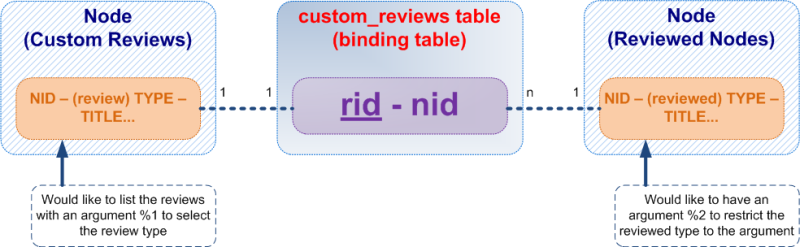
My issue is about the "classical" pattern of relationships. I would like to have the SQL schema as described in the attached picture. So I use a relationship to do that. (This relationship appears in the views configuration).
$data['custom_reviews']['rid'] = array(
    'title' => t('Custom Reviews'),
    'help' => t('The node the uploaded file is attached to'),
    'relationship' => array(
      'label' => t('Custom Reviews'),
      'base' => 'node',
      'base field' => 'nid',
    ),
  );
However, I' can't figure out a way to say from the interface "Hey, now I have this related table, I want to filter only the nodes type X of the related table".
(Before in V1, I simply created a table alias instead with the API, and I had an argument handler to do the request on the related table). Now I don't know if I should do that graphicaly (graphical way to control the related table) or directly into code (by the use of a handler OK, but where should I put it in the 'relationship'). I've read so far some documentation about relationships saying "it's possible" so I might be missing an obvious thing in my relationship, but I don't see...
Thank you, any help would be greatly appreciated.
| Comment | File | Size | Author |
|---|---|---|---|
| schema.png | 101.92 KB | Striky2 |

Comments
Comment #1
merlinofchaos commentedOnce you have the relationship in place, just add the Node: Type filter, and a new dropdown will appear where you can select the relationship. Once you select the relationship, the related node will be what's filtered.
Comment #2
Striky2 commentedThank you, it was so easy that I didn't even think it could be that easy! Incredibly nice feature for advanced usage! It rocks!
Comment #3
Anonymous (not verified) commentedAutomatically closed -- issue fixed for two weeks with no activity.