

Closed (fixed)
Project:
Panels
Version:
6.x-3.x-dev
Component:
User interface
Priority:
Normal
Category:
Bug report
Assigned:
Unassigned
Reporter:
Created:
4 Oct 2008 at 20:52 UTC
Updated:
3 Dec 2013 at 16:35 UTC
Jump to comment: Most recent, Most recent file




Comments
Comment #1
airen2011 commentedTry this out, you can go to admin>panels> and then click the panel pages. You can see the list of panel pages you have made...then in the Operation there are links like Edit/Export and Delete. Here you can edit, export and delete the panel pages you have made.
Comment #2
sdboyer commented@NeoID: Check the 'Layout Settings' tab for the 'hide title' options. That ought to get you the desired result.
I don't see the connection between iren_cruz's answer and the question.
Comment #3
sidharth_k commented@sdboyer I'm looking to remove the Panel title too. I'm using the October 8 dev version. Unfortunately I am not able to see any option in the Layout Settings tab to set the title of the Panel Page. Sorry if I've missed out on something obvious.
Comment #4
sidharth_k commentedThere is a setting for Panel Title in the settings tab. But when I put
<none>, the title of the Panel Page becomes"<none>". I just don't want anything to be displayed.Comment #5
sidharth_k commentedI'm not able to see any hide title setting in the "layout settings". I'm using a flexible layout. See attached Screenshot. I'm using 6.x-2.0-dev
There is a setting for title the "settings" tab. But leaving it blank *still* gives a "No title" title
Comment #6
sidharth_k commentedOkay...here is what is happening.
You need to enter *some* Page title in Panel Page >> Settings tabs. Only THEN will the layout settings for title and the hide title setting be available.
But even if I click on the Hide title checkbox...the title still does not disappear. I'm using the dev version.
Comment #7
hankpalan.com commentedI've actually had this issue for a couple of versions of panels now. I didn't actually need it until now and before I didn't think I was doing it right.
I enter a title on the settings page, go to the layout settings page enter a new title or no title and hit the hide check box. Either way doesn't hide the title, its still being printed.
Comment #8
airen2011 commented@sdboyer: sorry for the last post i made coz i didn't give enough info and maybe i just mis interpreted what NeoId posted, just like the others above do the same thing to check in the Layout tab and click the hide title still the title displayed...and even if you leave blank of the Page title in the Settings tab then the title of the panel pages becomes "No title".
Comment #9
merlinofchaos commentedI've fixed the "No title" portion.
Comment #10
copperdogma commentednewb question, but how do I get an updated version of Panels with the No Title fix in place. I had the same issue, and even after getting the nightly dev build I still see the title at the top no matter how I configure it.
Thanks!
[Edit] Never mind! I think I had two versions of panels in there and the older was overriding the newer. IGNORE ME!
Comment #11
vegardjo commentedHia, I have the same question as copperdogma, but sadly haven't found the solution yet - I'm using 6.x.2.0-alpha2 and if I leave the page title blank I still get "No title" printed as the title, (and also in the
<title>-tag), is there something I'm not seeing here, or is this fix not available till alpha3 / next version?I've solved it so far by typing a space as the title, but it's not very elegant (and
<h2> </h2>is still in the source)best, Vegard
Comment #12
mrthumpz commentedsubscribe
Comment #13
KrisBulman commentedsubscribe
Comment #14
merlinofchaos commentedThe 6.x-2.x-dev version should contain the No Title fix.
Please be aware that this module is in 'alpha' stage and we are aware that there are bugs. Some pretty horrible ones. =)
Comment #15
Flying Drupalist commentedThank you, merlinofchaos should I use the dev version or will the next alpha come out soon?
Comment #16
merlinofchaos commentedI don't have a timeline for the next alpha, so go ahead and use the -dev version.
Comment #17
Flying Drupalist commentedHi, merlinofchaos I checked the hide title, but the title is still there! I cleared cache too.
The title refuses to be anything other than Home. (It's node that I'm replacing). I changed the title in other places to other test names like ASDF or Frontpage, but whatever I do the H1 is always Home. I'm using the dev, but it's not working.
Comment #18
xamountwas the "no title" fix applied to 5.x-2.0-rc1a as well? I don't think so....still seeing the No title there.
Comment #19
dtabach commentedIt looks like there's still a bug somewhere, maybe related to caching?
Here I have 3 Panel pages, made out of 'flexible' type, with similar configurations.
The first one (in order of creation) does not have a Title in the main settings page (/admin/panels/panel-page/my_first_panel/edit). The title does NOT show in the Panel page (as expected), and 'No title' (as expected) is shown in the Admin Panel page (/admin/panels/panel-page).
The second one has a title in the main settings, does not have a title in the Layout Settings (/admin/panels/panel-page/my_second_panel/edit/layout-settings) and 'Hide title' is not checked. The title does NOT show in the Panel page (shouldn't it appear in this case?), but it does show in the Admin Panel page. I'm not sure, but I think I did not set a title when I first created this panel.
In the third one, I first defined a temporary title – let's say "Old Title", then changed it to "New title". There's nothing in the Title field of the Layout Settings and 'Hide Title' is not checked. Strangely enough, the title that shows in the Panel and in the admin page is "Old Title". No matter what I type in both 'Title' fields (by the way, why do we need 2 different and confusing fields to set the same Title?), even if I leave them blank, check or uncheck the 'Hide Title', I can't get rid of the "Old title" anymore.
So, it looks like the module retrieves the Title that was set when the panel is saved for the first time, and can't change it anymore afterwards by any means.
Comment #20
matdwyer commentedThis may or may not be "too simple" of an answer, but here it goes:
Rather than making your panel from "create content", make it from "admin-> panels-> add panel page", and it gives you the option to not have a title.
- Mat
Comment #21
ccdoss commentedDidn't work for me...I'm using the 5.2-rc1a version.
Comment #22
mfbI ended up just hacking my theme to not display the title on certain pages. On d6 it seems like panels_page module is never calling drupal_set_title() on the title it sets up in panels_page_prepare_panels_render(). Not sure where it should do that, maybe in panels_page_render_page_normal(), if it had access to the aforementioned title.
Comment #23
mason@thecodingdesigner.com commentedThis is still broken for me, both in 6.x-2.0-alpha2 and 6.x-2.x-dev
For the time being I've named any panels I want to have no title to 'removeme' and added this line to my template.php file (zen subtheme):
it's a hack but I'll remove it when it's fixed in panels.
Comment #24
sunComment #25
Flying Drupalist commentedComment #26
nosro commentedAfter some experimentation with the 'Panel Title' options in 'Layout Settings', here is what I have found:
1. Title field
The description test suggests this will be the page title for the rendered panel page. Instead it changes the title in the Panel Admin - and only in the secondary admin pages, not the main Panel listing.
2. 'Hide Title' checkbox
No apparent effect anywhere.
3. No Export
The Panel Title options are apparently not exported.
(I tried this with Panels 2.0 - Alpha 3, using a single column panel and a flexible panel)
EDIT: The title field and hide title option do get passed to theme_panels_pane() in the $display object, so they are accessible there.
Comment #27
realityloop commentedThe Hide Title checkbox also has no effect in 6.x-3.x dev release
Comment #28
seanrThis is killing me too - I can't find anywhere to change or disable the page title in Panels 3. It's using the title of the menu item to generate the page title. Can you not make the two titles different? This was easy in prior versions of panels. :-(
Comment #29
seanrWell I finally found the option (this module, great as it is, definitely could benefit from usability testing). Unfortunately it doesn't do a d**n thing. :-(
Comment #30
merlinofchaos commentedSeriously, if you're going to swear at us in the bug reports of an alpha module, get out. I do not need your shit. Yes this project has bugs and yes I put together the UI with absolutely no UI testing and am trying to work backward a little to deal with some of the changes, and if this is a problem for you STUFF IT. Go write some code.
Comment #31
merlinofchaos commentedFixed the hide title issue in -dev
Comment #32
fm commentedIt's not working for me, assuming I've found the correct setting; however, the location of the correct setting hasn't been made clear in this thread. Explicit directions from the developer would help, and in lieu of that (or in addition to that) a screen capture with an arrow would be fantastic.
It would be optimal if the method of hiding a title conformed to the convention used by other Drupal developers.
Comment #33
merlinofchaos commentedI'll get right on that. Would you like fries with that as well?
Comment #34
fm commentedYes, I would. Thanks.
Comment #35
fm commentedWhere is the "Hide title" setting located? I cannot find it or the "Layout Settings" tab/page/whatever-it-is.
I seem to be able to hide pane titles, but not the panel page title.
Comment #36
seanrfm, when on the content tab, there is a link just above the left top corner of the blue box. Click that and you'll find the hide title option.
Comment #37
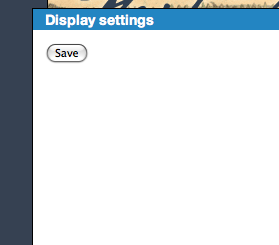
fm commentedThe 'Display Settings' link? Under that, the only options are 'General settings', 'Display style: no style', and 'Cache method: no caching'.
'General settings' is empty except for a save button. Missing something?
'Display style' offers three options: list, no style, and rounded corners
'Cache method' offers two options: no caching and simple caching
I don't see a "Hide title' option here. Sorry if I'm being totally clueless.
Comment #38
merlinofchaos commentedOh that's interesting. General settings under display should not be empty. That should contain the title and hide title options. Though, hm. That option may not exist on all panel applications.
Comment #39
fm commentedI'm not sure what is meant by "that option my not exist on all panel applications." I'm just trying to create a frontpage and hide the panel page title, which oddly enough is "frontpage". So far, I am able to hide all the subordinate pane titles.
Comment #40
NeoID commentedI guess the hide-title-feature should have been here...?
Comment #41
fm commentedThank you, Neo. That's exactly what I'm seeing, albeit in English.
Comment #42
seanrI do get the options there in the latest version. I wonder if it not showing may be a theme specific issue?
Comment #43
merlinofchaos commentedIt looks like they're using garland. I'm confused. When I get done with the big task I'm on I'll take a closer look at this.
Comment #44
fm commentedI'm using Blueprint, so I suppose it wasn't exactly what I was seeing; but it was substantially what I was seeing.
Comment #45
seanrI'm using a sub theme based on blueprint and do see the links. What about other installed modules? Maybe a version conflict between panels and ctools? I'd suggest trying a fresh install on a new site with current versions of everything using Garland.
Comment #46
langworthy commentedNot sure if this is helpful as I'm using 6.x-2.0-alpha3 but this problem is only occurring to me with book content types.
Comment #47
merlinofchaos commentedHide title is now working in Panels 3. Probably not in panels 2, but that's going to be completely removed within the next month.
Comment #48
NeoID commentedOn a fresh Drupal install, latest Ctools and Panels3 the problem still exists for me...
Comment #49
fm commentedI haven't done a fresh install, but the update didn't solve the problem for me either.
Comment #50
RoboPhred commentedWorks for me, 6.x-3.0-beta1
Comment #51
NeoID commentedWorks for me in latest dev (with latest CTools)... :)
Edit:
It works when creating a new panel through the dashboard, but when creating it through "new content type->panels" the settings are gone!
Comment #52
NeoID commentedComment #53
merlinofchaos commented#51: You finally gave a piece of information that nobody else thought was important.
These settings are only missing when using panel nodes. I want to take this moment to let this be a lesson to *everyone* out there entering issues. Details matter, and when two people see different results, providing *exact* steps that you used to get your result might make the difference between an issue languishing for days, weeks or even years, and actually getting it fixed.
In this case, a very important detail got left out: The people failing to find the hide title checkbox were using panel nodes.
One other detail: Reading thorugh the #52 comment history of this issue, the issue we're discussing here has completely changed from what the original problem was, which means someone (I've not bothered to identify who exactly) took over an older issue, for another purpose, which I really prefer people not do.
So here's the best part: Panels doesn't offer the option to hide (or even set) the title on a panel node because it can't. The title is handled by the node system. The title behaves exactly like the title on any other node. I am surprised anyone would think it would be handled differently for a panel node. It is not.
This issue is closed. If you have further problems about this, please file a new issue, because this already derailed an older issue enough.
Comment #54
Anonymous (not verified) commented#20 did the trick for me, Thanks matdwyer
Comment #55
drupalshrek commentedSetting title to not display can be done with the "Title type" dropdown. Set the value to "No title".
If the Title type is set to "Manually set" the title field appears, but note that the following comment beneath the title field is not true. If you set the title to "No Title" it will not be blank. You have to set the "Title type" field to "No title".