

 Come together with the global Drupal community in Rotterdam, 28 Sept – 1 Oct 2026. Sessions, contribution, connection, and Early Bird savings until 8 June.
hello,
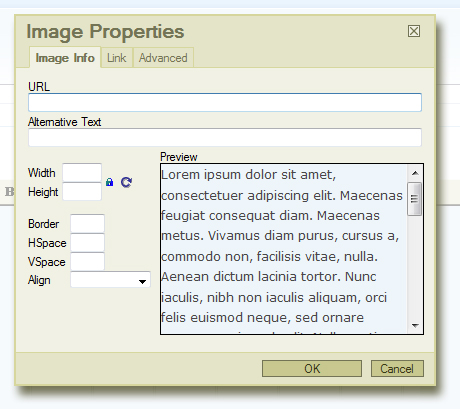
i've installed FCKeditor and made the appropriate code changes per the install instructions for uploading files. Logged in as user1/super-user, clicking the file upload icon opens the pop-up window, but no "browse server" button appears!
currently working with a fresh install of drupal 6.5, and have checked the file directory on my server to make sure all the correct FCKeditor files are in place. dhtml menu and the devel module are the only other non-core modules installed. the core upload module is currently installed, but have tried out all three upload routes (FCKeditor alone, IMCE, or core upload module) - but never get the 'browse server' button.
attached .jpg shows the pop-up file browser i get - sans 'browse server' button...
have i made some mistake, left out some step, or is there a problem with the editor??
| Comment | File | Size | Author |
|---|---|---|---|
| missing-button.jpg | 110.2 KB | fresh-off |

Comments
Comment #1
wwalc commentedDid you adjust file browser settings in your profile (set file browser to "built-in")?
Comment #2
fresh-off commentedwwalc,
thanks for your response. after running into another problem with the editor disappearing, i had to switch to the YUI Editor, and i dont recall whether or not i had the the file browser set to "built in."
that missing button has been a problem for many others though, so hopefully your answer will help the next person reading this!
Comment #3
wwalc commentedComment #4
deadpixel commentedI have YUI inslalled in my drupal 6 but i do not have a browse button for images. i have enabled uploads and set permissions for admin yet no browse button is there just a field where i can type in the path to my image, but its not really good enough to pass on the website like this to a computer illiterate client
Comment #5
Jorrit commentedYUI has nothing to do with FCKeditor. You should change the settings of FCKeditor, look at the file browser settings.