
Submitted_by: Submission line by content type
You are browsing documentation for an older version of Drupal, which is not supported any longer, and the information may not be correct. See current documentation for Contributed modules
The Submitted_by module is a simple little bit of code that allows the admin to change the "Submitted by..." line for nodes and comments by content type. Each content type gets its own pattern for this line. Using the Token module, there is a wide variety of data available to fill in the pattern. The Real Name module places nicely with this one and even provides more tokens.
Installation
Normal module installation applies to this module.
Note: When enabled, the module will by default add "Submitted by" field to every active Display of all your Content types (Default, Teaser, RSS, Search... etc).
That means to say, you will then need to go through every single Content type -> Manage Display -> Display to turn-off the "Submitted by" where it is not needed.
Settings
The settings are found on the content type administration form, in a fieldset titled "Appearance." There is a similar fieldset inside the Comment settings for changing the "Submitted by..." line in the comments. Within each of those fieldsets is another fieldset that, when expanded, shows all the available tokens that you may use.
For example, on one content type that is often user-submitted, we use: Contributed on [month] [d], [yyyy] by [realname-link].
Step by Step Example for Drupal 7
Assuming that you want to change the submitted by information for the Article page from the default Submitted by admin on Thu, 06/21/2012 - 15:26 to Created on June 21, 2012 where June 21, 2012 is the date the node was created on.
- Choose Structure, Content Types and click Edit against Article.
- Click Display Settings.
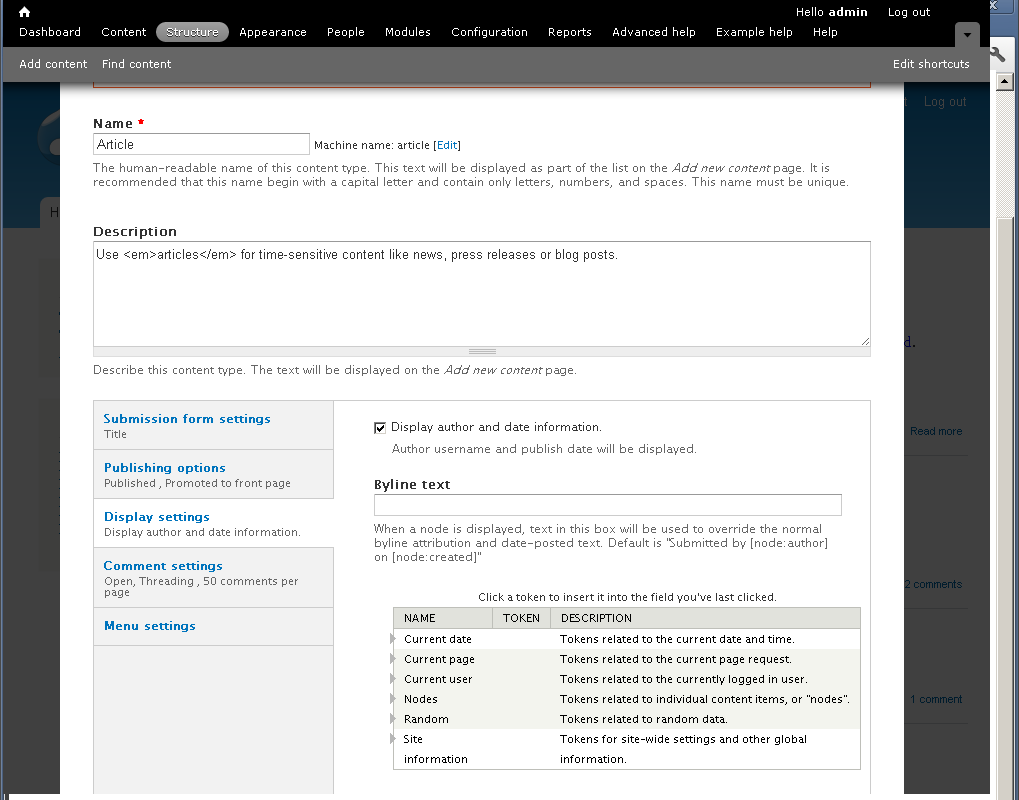
If the Submitted_by module is installed and enabled, you should see a windows similar to the following.
Notice the Byline text box, which is used to define the replacement text for the default "submitted by" information. You may take the help of the Tokens displayed on the screen.
- Enter the following text in the Byline text box.
Created on [node:created:custom:F] [node:created:custom:j], [node:created:custom:Y]
Notice that F, j and Y format characters used here are the PHP date format characters.
- Click the Save Content Type button.
Now if you view an article node, you should see the revised submitted by information on the page.
Menus
There are no exposed menu items for this module.
Permissions
There are no extra permissions for this module.
Blocks
There are no blocks for this module.
Help improve this page
You can:
- Log in, click Edit, and edit this page
- Log in, click Discuss, update the Page status value, and suggest an improvement
- Log in and create a Documentation issue with your suggestion
