

Needs work
Project:
LDAP integration
Version:
6.x-1.x-dev
Component:
Code
Priority:
Normal
Category:
Feature request
Assigned:
Unassigned
Reporter:
Created:
22 Oct 2008 at 15:59 UTC
Updated:
2 Aug 2011 at 20:15 UTC
Jump to comment: Most recent file

Comments
Comment #1
silid commentedDoh! Shame I can't edit that last post - I missed 1 line out of the edit. An important one.
Try the new patch of the module. Use the same admin edit.
BTW my patches also make user 1 authenticated by the the same methods as everyone else.
Comment #2
miglius commentedCan you please use a standard '-u' option to a diff when creating a patch, it would me more readable then. I don't have a IIS server so I cannot test it.
Comment #3
silid commentedsorry - just got carried away.
here is a combined unified diff.
Comment #4
cybertron1 commentedthis looks great! haven't been able to get everything working alright yet, but soon it will!! This is exactly what I want anyway!
when toggling http/ntlm auth on and then trying to change anything I get " Validation error ......"
why? it works fine when using only ldap auth.
Comment #5
cybertron1 commentedok, found the problem. You are reading authmap, and expect to find something in there, but you never create anything so it will work if one manually create all users in the authmap and set it to ldapauth (as requested in your validation) or changing the db_result to look in say users database instead.
It will not work on a new install of drupal and it will not work if you have used webserver_auth before without manually add it/change it.
Update: Authmap isn't updated if the users already exists, if one delete the users it will update accordingly.
Comment #6
zewa commentedIs this still in progress? The only thing for me left to fall in absolute love with LDAP Auth is that
NTLM (SSPI) Stuff for autologin.
This post looks like the most promising for me, so I hope ther'll come in some new patches or explanations :)
Greetings
Zewa
Comment #7
bgeddes commentedDitto
Comment #8
miglius commentedComment #9
miglius commentedSeveral issues I can see here:
1. As mentioned by cybertron1 the new user won't have an entry in the authmap table;
2. The module should perform authentication if the global $user is not an object, which means that authentication should not be performed on each page load, but rather once on the first page request;
3. I don't like the idea that user with uid=1 is forced to the LDAP authentication as well. This means that if ldap authentication is misconfigured, there is no access to the site to fix it.
Comment #10
aren cambre commentedsubscribe
Comment #11
silid commentedI'll admit it needs work. But it is currently working for me so I haven't updated the LDAP module on my installation.
1. On my server the users do have entries in authmap.
2. Okay - i've admitted it needs work.
3. I kind of see your point - but if LDAP auth is working - I'll never be able to login as user 1, because I'll be logged in as the username used in LDAP. At least if it is misconfigured. I can fix it by the back door (ie. removing ldap and and then logging in using the normal methods).
When I get some time I'll quite happily have a look at these issues but I have issues more pressing for me atm.
Comment #12
aren cambre commentedIn that case, user experience should be no different than of an anon user. Maybe show a message similar to if a bad username typed in first time Drupal "sees" that user?
Comment #13
silid commentedHere is a patch to the latest dev release.
It now makes no changes to use with user 1, so user 1 cannot authenticate by NTLM. Make sure you give admin rights to a user that is listed in LDAP else you won't have full admin rights without removing NTLM.
I don't know why people keep saying new users won't have an entry in authmap. This patch does not change the fact that LDAP integration is making authmap entries.
The only difference this is meant to make is that rather than authenticating the user against LDAP it takes the username that has already been authenticated by the webserver. If the webserver doesn't authenticate you will get the forbidden page.
Comment #14
cybertron1 commentedsilid: seems great! however, I am for the moment unable to get ntlm logon working this time around. I've got it working with webserver_auth so it isn't a problem with my iis.
I can login with ldap_auth, so that is not the problem.
It just doesn't log me in.
any ideas to look for?
Comment #15
silid commentedYeah sorry, it was my fault - glaring bug that I fixed after I uploaded it. I've been so busy I forgot to update it.
Comment #16
kardave commentedsubscribing
Comment #17
johnbarclay commentedI thing this is an important patch. The following worked fine:
- created ldap authentified user
- ldap_groups worked fine with it
but ran across some problems on a windows 2008 server with IIS 7:
- Its unclear how to logout without closing the browser. I realize this isn't a bug with the patch, but a feature or IIS integration.
- needs to support mixed mode authentication (webserver or drupal). I'm not sure if IIS will support this on the webserver side.
I think what the patch should strive to do is decouple ldap groups from ldap authentication such that any form of authentication can work with ldap groups. Then existing modules such webserver authentication can be used to complement ldap groups. http://drupal.org/project/webserver_auth
Is there functionality you need in the ldap_integration package besides ldap_groups?
Comment #18
8thom commentedsubscribing
Comment #19
mecvo1984 commentedsubscribing
Comment #20
retsamedoc commentedWhile it might be useful, this is really unnecessary. It makes no sense to add this feature to LDAP Integration when there is already a module that does HTTP Authentication.
HTTP Auth (http://drupal.org/project/httpauth) has this functionality with a patch (http://drupal.org/node/449962). I'm currently using it on my Drupal site to allow HTTP Auth as another access method for feeds.
I could be wrong and you aren't doing this solely for HTTP Auth, but it seems to me that the other modules should hook into LDAP Integration rather than have us duplicate their functionality. The better solution would be to rewrite LDAP Integration to better fit within the Drupal authentication system so special cases won't need to be made in other modules.
Comment #21
aren cambre commentedWhether it gets postponed is up to the module maintainer.
Comment #22
geste commentedRetsamedoc said: "I could be wrong and you aren't doing this solely for HTTP Auth"
I can't speak for Silid but it seemed like his goal was similar to mine: use LDAP for membership/authorization, but *not* for authentication.
We use webserver_auth module to read user ID from our Pubcookie (HTTPD Auth) login. Just today I put together webserver_auth with the latest (beta) ldap_integration (with John Barclay's recent enhancements) and the recent ldap_sync component.... and I managed to get what I want: We use webserver_auth for authentication, but the users and groups are provided by LDAP. ldap_sync is using the LDAP DN we configured in ldap_integration for "anonymous" lookup.
One concern I have is that users created via ldap_sync show "ldapauth" in their authmap records when strictly speaking those users are really "webserver_auth". I wonder if that will come back to bite me, but it is working for now. One problem I foresee is if a new user signs on (and auto-creates new account with webserver_auth auth type) before ldap_sync runs under cron and creates that account with expected authtype=ldapauth.
So, personally, I think it would be cleaner if the ldap_integration module had some configuration allowance for non-LDAP auth options (what Silid seemed to be doing), but I don't know that I am the person who could make that happen, code-wise.
I want to take a moment to thank John, Miglius, Richard (ldap_sync) and everyone else who has worked on this LDAP tool set. It's great.
Jim
Comment #23
verta commentedSubscribing.
I am trying to have users not have to login, but have Windows Auth authenticate, and then have the AD field and roles sync.
I also want to have some Drupal-only roles so I can maintain some permissions for groups of users who have no corresponding AD security group.
Comment #24
jan.pieters commentedHi silid,
it is almost a year ago you posted a solution. I'm just new into drupal and maneged to activate you solution (#17). Great job !
Now I have an other question: what about nested groups ?
I have a AD where my users are defined in 'functional groups' and those 'functional goups' are fitted into 'security groups'. Then the 'security goups are linked in Drupal. Now, I only can authorize users when their account is defined directly in the group linked to Drupal, and not using an intermediate group.
Comment #25
verta commentedIt seems Drupal roles are not nested ... The LDAP integration module now has role sync code. It's called the ldapgroups module, docs here http://drupal.org/node/118112.
It flattens the AD role membership structure out as it create Drupal roles, but unless you need to apply permissions at both parent and child roles it might work for you, maybe?
Comment #26
picca commentedSubscribing. This is really needed feature indeed.
Comment #27
silid commentedHi all,
Long time since I posted and so I thought I better answer some questions:
@johnbarclay (#17)
I think I do want more than just ldap groups, as I want to map LDAP fields to Profile fields.
@retsamedoc (#20)
You might be right, however for me it was just easier to add NTLM auth to LDAP integration. Most of the functionality was already there and a couple of simple tweaks made it work.
@jan.pieters (#24)
Thanks. I can't help with your nested problem I'm afraid.
BTW for all concerned I am still using my modification.
Comment #28
verta commentedI'm trying to use LDAP Integration and Webserver Auth for SSO to my Active Directory, and it's not smooth at all. I can turn on Webserver Auth, but it creates users with domain\user as the user ID and since the slash is an invalid character, I can't add them to roles. I get 'The username contains an illegal character' and that's after I have to go through machinations to not lose my superuser account userid=1.
Plus this module (LDAP Integration) does not get to sync the LDAP attributes or roles.
It's very frustrating, especially since there seem to be patches that I can't apply and test, contributing to determining a possible fix, since I'm using IIS (which is why I'm using these modules in the first place).
I need the webserver auth so my users don't have to log into the site, and I need the LDAP sync so the site knows something about them. Can we merge these modules, perhaps?
Comment #29
silid commentedhave you tried the patch in #15?
This is a patch that adds webserver auth to LDAP Integration. You should not use this with the Webserver auth module.
Comment #30
verta commentedNo, sorry, I haven't been able to try the patch from #15, although I would if I knew how to do that. I have not been able to figure out how to install patches. All the instructions for installing patches seem to assume I am either running Linux or I write operating systems in my spare time - i.e. not tester friendly. If there is some simple way I can do that, I will do it, I do have a test site set up. If there was an attached module file, I could install that, even.
Comment #31
fourteau commentedFabulous ! I don't understand why that patch (#15) is not integrated. It's exactly what I were looking for.
Thanks a lot !
Comment #32
verta commentedI found a blog post that sent me to install cygwin. I can't get it installed here, because all of our servers, even the test boxes, are firewalled from the internet.
Too many barriers. I realize it's not drupal's fault that cygwin won't install, but the patch process remains very windows-unfriendly. I'll test it when it's a dev build.
Please, Linux people, test the patch so the developer can release a dev build ...
Comment #33
silid commentedyou don't need cygwin to install patches. You need the windows build.
http://gnuwin32.sourceforge.net/packages/patch.htm
Comment #34
verta commentedExcellent link - thanks!
Comment #35
verta commentedI was able to install a Windows version of the patch utility, use it to apply the patch in #15, and test it. I'm hoping for some more data, but it worked fine to authenticate.
I wasn't sure where to go at first. You have to go into admin/settings/ldap/authentication and change the authentication type. This patch adds a 3rd option called "HTTP/NTLM Authentication" which allows the web server to handle the authentication.
I am assuming the module will need to query the LDAP server to obtain the role membership still?
The downside is that you MUST put an LDAP user into the administrative roles BEFORE you turn this on, or there's a chance you'll lock yourself out. You can't go to the user/login page - you get "access denied" (one of the stranger behaviors of drupal core). You can't click logout, b/c on the page reload, the authentication will run and you're logged back in as the LDAP user. You'll have to to to the database to disable the module or use SQL to change the userid of the superadmin account to get back in.
These types of modules, on any platform, almost always leave admins enough rope to let them do this to themselves and they rarely warn you severely enough about the consequences of insufficient preparation.
For that reason, I'd suggest having some on screen warning language. I can draft the copy, if it would help ...
Maybe just add some text after "Will just do lookups on the username. Authentication will be left to the server." Something like, "Be SURE that you have configured an administrative user with sufficient permission to access administrative pages on this site. Test the LDAP user account with administrative rights in Mixed mode BEFORE you enable this option."
If there's a help page for this module, something like this would also be a nice addition. (edit: nope, there's no advanced help for this module yet.)
THANK YOU for the patch!
Comment #36
alban66 commentedThank you for this patch (#15) , it's works fine for me.
Comment #37
picca commentedFound a bug in #15 patch. This patch does not think of anonymous users. See my question here for details. My patch is just roughly tested and seems to work.
Comment #38
alban66 commentedThank you (again) for this patch (#15). Works like a charm
My problem was that with this patch users can't logout anymore because the are automatically logged back in by NTLM Authentication.
So i append a few lines so that users can now logout and login with an other account.
Hope this will be usefull for someone.
in ldapauth.module
function ldapauth_init()
function ldapauth_user()
function _ldapauth_auth()
Comment #39
drupal-fan-4u commentedGreat stuff everyone-
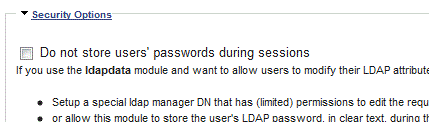
What about when you want to store ldap users' passwords during sessions ? (admin/settings/ldap/ldapauth - security options - uncheck Do not store users' passwords during sessions)
I see no way of using SSPI apache module and true SSO for the above when $_SESSION['ldap_login']['pass'] needs to be set in certain situations.
Ideas?
Comment #40
alban66 commentedHi,
With http auth you can't (hopefully) get the password in plaintext.
Http auth means that your web server authenticate the user with a complex protocol (http://curl.haxx.se/rfc/ntlm.html ) and if authentication is successfull it's populate the $_SERVER variable. With http auth enable, Drupal do not authenticate the user itself, it will just trust the authentication of your web server.
With the script above, ldapauth_init() function set 'password' in value of $login['pass'] instead of the real user password. If you look at the sessions table in your drupal database, you will see all of users authenticated with http auth with a password set to 'password'.
However, when you use the script above, if users logout and login back with the normal drupal user form, (if admin/settings/ldap/ldapauth - security options Do not store users' passwords during sessions is uncheck) passwords are store in plaintext.
Hope this will help you.
Regards
Alban
Comment #41
drupal-fan-4u commentedThanks Alban!
Comment #42
verta commentedJust wanted to post that I have tested the mods in #38 and they do let me log out after being automatically authenticated against LDAP. It's a great feature for administrators, thanks for posting. There's some debate whether it's a great idea to allow users to do that, but they can always log back in, I think.
A quick side note, the pasted code for the third function, _ldapauth_auth has picked up some stuff from the input filter on this site "fixing" the URL to try to make it clickable, even though it's in a code block, so it will need some syntax patchup in order to work.
Comment #43
alban66 commentedi hope that this functionality will be cleanly integrated in a future release because administrators have to login as drupal super user to run updates of modules and drupal core. So a forced authentication with NTLM with no possibility to logout is a serious problem.
However an other solution that i had tested is to create a new apache virtual server with a different serverName that is do not authenticate with NTLM. It's works great too. For my part i use this second virtual server to run the drupal cron, because it do not works with the NTLM activated.
Regards
Alban
Comment #44
verta commentedExcellent point re cron, thanks for reminding me, Alban!
An idea I'm going to try is to use a Windows scheduled job that run iexplore cron.php with the credentials of a user permitted to access the site.
Comment #45
alban66 commentedI have already try this, but it didn't worked because i didn't find any solution to pass the NTLM credentials. For that i have create a new virtual server with no NTLM from i run the cron.php page and it's works like a charm.
Tell me if you have more chance.
Regards Alban
Comment #46
verta commentedI have been encountering an odd error in the log after every page access,
LDAP Bind failure for user CN=lastname\, firstname,OU=Users,OU=lastOU,OU=Next - to-lastOU,OU=This & ThatOU,OU=Us & THEM Area,DC=test,DC=ourdotcom,DC=com. Error 49: Invalid credentials
The LDAP test button works, and the authentication with the patch to use NTLM turned on is working, including role assignment, but something is not quite right.
I do have the data module set to
Synchronize LDAP data with Drupal profiles:
* Every time user object loaded in Drupal. (May cause high LDAP traffic.)
which I know is why I see the error so often, and I know I can change the setting, but this will only reduce the number of errors being logged, and I'd like to find out why the invalid credentials is coming up.
Just a thought, it might not need to be using all the OU= info, just the CN, maybe.
Comment #47
alban66 commentedI do not have such errors.
Have you try to bind your ldap server with a different user in Ldap Server configure > Advanced configuration.
Regards
Alban
Comment #48
verta commentedSorry, no - we only have one directory.
Ideally, I'd like to use the saved account associated with the authorization server for the data pull, not the current user. I can tell it's failing the bind on the current user by the user name, which is not the one saved in the module settings.
Comment #49
pp commentedsubscribe
Comment #50
verta commentedI am using the code in #38 on the ldapauth.module for the automatic login using NTLM. It is working, and the user is authenticated but their field data is not pulled into Drupal, nor are their roles being set from LDAP after authenticating.
Comment #51
alban66 commentedThat's very strange because everythhing works fine for me (Profile Fields <-> Ldap Fields & Drupa profile <-> ldap groups).
Have you try to set your ldap fields in lowercase in the "Drupal user profile field mapping" section ? i had this issue before eveything works.
Comment #52
verta commentedThe mapping works fine if I log in using the form at user/login. If I auto authenticate, it does not populate. I have tried changing the case on the fields, and find that it did not make a difference.
It would be nice if someone would roll a diff that combines #15 and #38 so others could test it.
Comment #53
8thom commentedI'm using patch #15 with both LDAP data & groups and has been working on IIS & apache.
It's a corporate Intranet so there was no requirement to logout.
Comment #54
alban66 commentedHi all,
here is my entire Ldap_integration module that is combine #15 and #38.
Ntlm Authentication, data and groups works fine for me.
Let me know if it's ok.
Comment #55
alban66 commentedHi all,
here is my entire Ldap_integration module that is combine #15 and #38.
Ntlm Authentication, data and groups works fine for me.
Let me know if it's ok.
Comment #56
mstrelan commented@miglius: Do you have plans to get this in to a release? I have a client that needs this functionality and I would like to know whether this will be supported in future releases. I am happy to test out some of the patches in this thread.
Comment #57
geerlingguy commentedSubscribe.
Comment #58
tresstylez commentedAlban, should your module work with user who authenticates over VPN?
Comment #59
aren cambre commentedVPN is on a lower layer, so it shouldn't have any effect.
Comment #60
johnbarclay commentedIn ldap authorization for drupal 7 (http://drupal.org/project/ldap) we are separating ldap authorization from ldap authentication. This will help for integration with Web SSO and web server authentication schemes.
Comment #61
hotspoons commentedI know this thread has been dead for a while, but I just published a module that provides LDAP single sign-on using web server authentication, and is optionally seamless/automatic. This new module fully leverages (and requires) the LDAP Integration module, and bridges the web server's NTLM or other authentication mechanism with a lookup in LDAP using LDAP Integration. The module is located on http://drupal.org/project/ldap_sso. Enjoy.
Comment #62
johnbarclay commentedThis would be good as an option directly in the drupal 7 ldap_authentication module. (/project/ldap) Should we move it in there for drupal 7?
Comment #63
hotspoons commentedYes, I was meaning to contact you regarding a D7 port of this. I have a D7 development site I can use to whip up a port. Would you prefer this to be tacked on directly to one of the modules in ldap as a patch, or would you like it as a separate module?
Besides the D6 -> D7 API scrubbing, my module has a single function specific to the LDAP integration module (ldap_sso_authenticate(), which is ldapauth_authenticate() rewritten to use $_SERVER instead of form variables). I haven't had a chance to look at the ldap D7 module in detail, but so long as authentication is sufficiently decoupled from user-facing forms, porting it should be trivial.
Comment #64
johnbarclay commentedI looked at your module a little. My initial thoughts are:
-- user interface: have the options in ldap_sso_admin() function in a separate fieldset on the ldap authentication configuration page (/admin/config/people/ldap/authentication)
-- keep it in ldap authentication module. In some ways it would be nice for it to be a separate module as ldap_authentication is getting complex. This would also simplify the user inteface for those not using webserver auth. When you write the patch, you should you your best judgement on this.
The function _ldap_authentication_user_login_authenticate_validate() in ldap_authentication.inc is where the bulk of ldap_authentication code is (the credential testing, white and black list, account creation, etc.). This is where the decoupling work from the logon form would need to be done. Having sso take care of authenticating the user and then calling a variation of this function to check for white list/black list, provision drupal accounts, etc. might be the way to go.
Your code is very well documented. Makes for easy reading. Thanks.
Comment #65
hotspoons commentedThanks for the props on the code documentation. I have the UI portion done, as well as the majority of the integration. I'm at the point where it is authenticating, but I'm getting WSOD's and timeouts from the web server, not Drupal, so I'll need to do a little more testing, but I'll probably have it wrapped up Monday. Keep an eye out...
Comment #66
johnbarclay commentedSounds great. Keep in mind there are a fair amount of LDAP simpletests you can run to make sure nothing else breaks. I usually just run one at a time 'cause they take some time to run.
Comment #67
johnbarclay commentedMy sense is this would be resolved if ldapauth and ldapgroups were decoupled. Then webserver authentication module could do its own thing. Does this make sense?
Comment #68
hotspoons commentedI'm not sure I follow; could you give more information? Also, I completed the D7 port to your LDAP module; I'm not sure if you saw it in your queue, but here's the final patch: http://drupal.org/node/1227088#comment-4778490 .