
Creating multistep webforms
With Webforms, it is possible to create forms that span more than one page. These forms are known as multistep, or multipage forms.
To create a multistep form, create the form elements you want to appear on your form. Then, add one or more elements of the pagebreak type. Set the weight for these elements so that they appear in between sections of elements that you want to be separated by page.
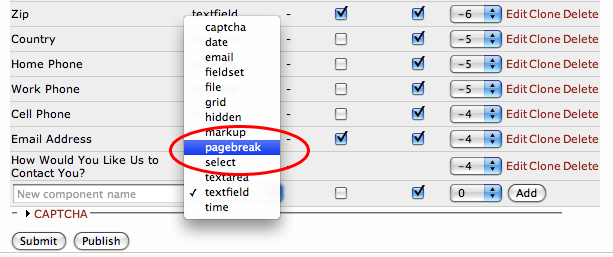
Here is a user selecting the pagebreak element type:
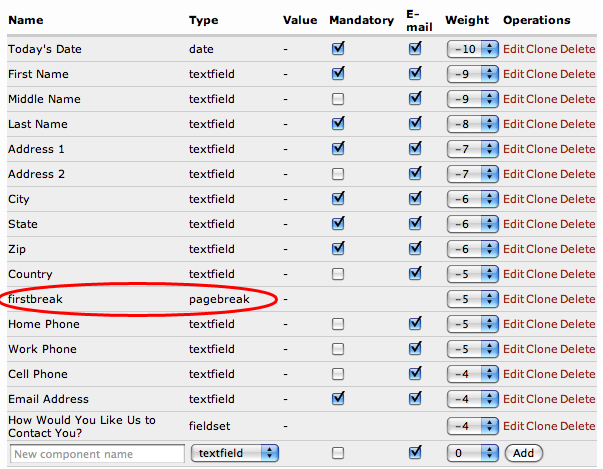
After adding pagebreak element, the page break will appears between two other form elements:
When viewing the form, this element is rendered as a "Next page >>" button:
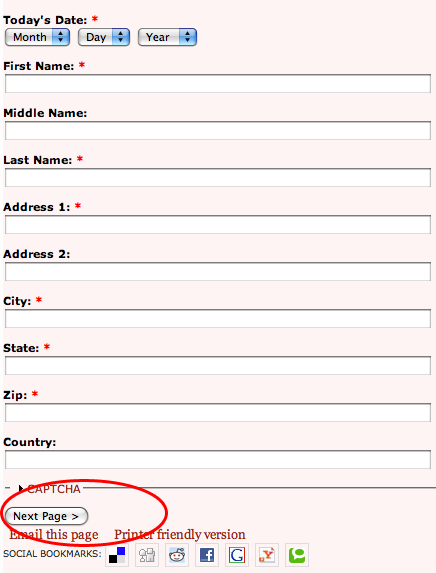
All of the subsequent form elements will appear on the next step of the form, after the user clicks submits this step.
If a pagebreak uses a conditional field that evaluates as false, subsequent components until the next pagebreak will be hidden. A pagebreak is considered the beginning of a new page, not the end of an old page, and as such the entire page is affected by a conditional on the pagebreak.
Note: Use caution when combining the pagebreak and file components. File components will not be submitted unless they are after the last pagebreak in the form.
Help improve this page
You can:
- Log in, click Edit, and edit this page
- Log in, click Discuss, update the Page status value, and suggest an improvement
- Log in and create a Documentation issue with your suggestion
