

Closed (fixed)
Project:
Zoomify
Version:
5.x-2.x-dev
Component:
Code
Priority:
Critical
Category:
Bug report
Assigned:
Unassigned
Reporter:
Created:
23 Oct 2008 at 19:17 UTC
Updated:
10 Nov 2008 at 19:22 UTC
Jump to comment: Most recent file


Comments
Comment #1
infojunkieThanks for your report. This tab thing is tricky and I've had trouble with it, so please bear with me and help me diagnose the problem.
1. Please make sure that files/zoomify/10 does exist and does contain: fid/Image.md5, fid/ImageProperties.xml, fid/TileGroup0/*.jpg
2. Type the link node/xxx/zoomify/0 in your browser. Does it display the Zoomify applet?
3. If it does, then please insert the following line
in line 38 of zoomify.module. When you view the image node, do you see the debug output at the top of the page?
Comment #2
jgarbe commentedFast response! Here's a page where I've just done "create image": http://www.horizonmediagroup.net/public/mapgis/?q=node/12
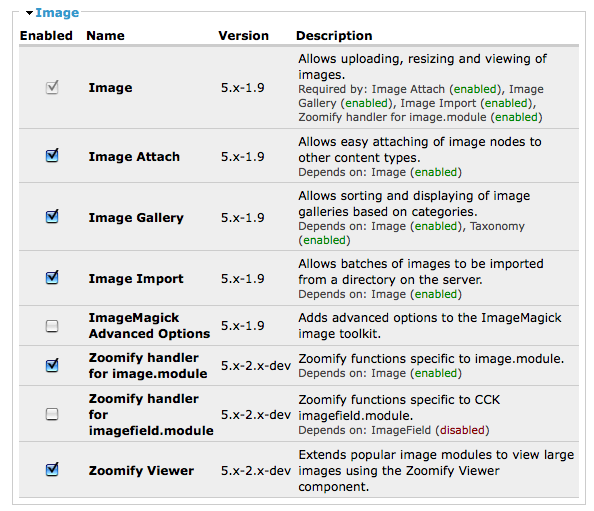
I did a clean reinstall of zoomify 5.x-2.x-dev and enabled Zoomify viewer and the handler for image.module.
I have it set to zoomify for a width or height greater than 500px.
When I added this one picture I got the notification:
"* Created tiles for files/images/paducah_west.jpg.
* The directory files/zoomify/10 has been created.
* Your Image has been created."
There's a directory in zoomify now of 12 -> 22 -> Image.md5, ImageProperties.xml, and folder TileGroup0 which has the pictures in there. A folder named 10 does not appear...not sure if that was just for purposes of example.
Typing in node/12/zoomify/0 doesn't give me anything, so I didn't proceed further. Let me know what to do next, and thanks for the support!
Comment #3
infojunkie* Did you make sure the Image type is checked in the Zoomify settings page? Sorry but just making sure :-)
* Please check the recent log entries in admin/logs/watchdog for anything that Zoomify might have complained about.
* Please apply the attached patch, refresh the node (no need to create a new image), and tell me what you see.
Comment #4
jgarbe commentedApplied the patch (I also went ahead and enabled clean URLs and retried the zoomify/0 thing, and it just loaded the same page) and the only change is now on all the front-end pages of the site it flashes string (6) "1st if" before loading the page.
To clarify, I went to
Administer -> Site building -> Modules and checked "Zoomify handler for image.module" as well as "Zoomify Viewer" but not "Zoomify handler for imagefield.module" as I don't have CCK installed currently. I did this after installing the files to the appropriate directory. I also changed the zoomify settings to zoomify things larger than 500 width or height. Did I miss an enabling step?
List of installed modules:
-image
-imagefield
-nice_menus
-views
-zoomify
Thanks!
Comment #5
jgarbe commentedI have also disabled all modules except zoomify and its dependencies and there was no change. What should I be looking for when it works?
Comment #6
infojunkieYou didn't answer the first question:
* Did you make sure the Image type is checked in the Zoomify settings page? Sorry but just making sure :-)
What the message "1st if" is saying is that Zoomify doesn't consider the node you're viewing as registered to be zoomified. So if the setting above is correctly made, please add the line
right after
at or around line 31. The output we're looking for is something like
where the 'image' type should be non-zero.
Thanks for your patience!
Comment #7
jgarbe commentedThanks for your persistent assistance! I'm getting the sneaking suspicion I might be making a total noob mistake. I'll do what you've suggested and reported back, but for my peace of mind can you tell me the path to the Zoomify settings page you're talking about? The two I know of are:
admin/build/modules (picture 1)
and
admin/settings/zoomify (picture 2)
I'd feel foolish but relieved if it just turned out there was a third page I hadn't set up correctly...hmm....
Comment #8
infojunkieI know what's wrong hehehe. You need to install CCK. Can you plz try that and then I'll fix Zoomify to complain or work without it. When you open the second URL you sent (admin/settings/zoomify) you should see content types we've been talking about. Sorry :o)
Comment #9
infojunkieI checked in a fix in the latest 5.x-2.x-dev branch. You don't need to enable CCK, so please try it and let me know.
Comment #10
jgarbe commentedAnd....solved! I hadn't bothered installing CCK yet because it was on a test server, but now everything's happy. I disabled CCK and enabled the new build of Zoomify just to make sure, and it also works just fine without CCK now. Saw the tab, clicked, was zoomifed, rejoiced.
Thanks a million for your dedicated support, and fantastic module! It's going to provide some real core functionality for my website!
Comment #11
Anonymous (not verified) commentedAutomatically closed -- issue fixed for two weeks with no activity.