

Needs work
Project:
GMap Module
Version:
7.x-2.x-dev
Component:
Code
Priority:
Normal
Category:
Bug report
Assigned:
Unassigned
Reporter:
Anonymous (not verified)
Created:
3 Nov 2008 at 00:50 UTC
Updated:
16 May 2024 at 00:49 UTC
Jump to comment: Most recent, Most recent file


Comments
Comment #1
Anonymous (not verified) commentedAnyone able to help me understand this?
Comment #2
Anonymous (not verified) commentedNobody...?
Comment #3
sjf commentedI've changed the title and marked this as a bug report, though the zoom-on-click is probably also a feature request.
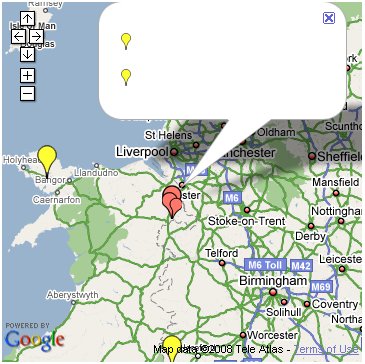
For the bug, here is a snapshot of the same thing on my site. Drupal 6.6, latest devs of location and gmap as of 18 Nov 2008. Using clusterer2.js with the private file system.
Comment #4
daytripscanada commentedI have this very same issue on 6.6 -- but only when displaying from a gmap view. If I look at map/node it works fine.
Comment #5
Anonymous (not verified) commentedI found this post which said that the problem was with the Clusterer.js file, and had some code to fix the issue. I added the code to my Clusterer.js file (after customising it somewhat) and confirmed that it works. I made a patch for anyone else interested in using this code.
Comment #6
kkrgopalan commentedsubscribe
Comment #7
daytripscanada commentedThe code provided in the above post worked well for me. Added bonus is that I prefer zooming to the area vs. a list.
Comment #8
xolotl commentedFor me, applying this patch enables the "click zoom" functionality...ie, when you click on a cluster, you zoom in to it. But when you zoom in, markers are still clustered and only the top marker is clickable for an info window. That info window does now have the right information populated in it however.
Running Drupal 6.9/gmap 6.x.1.0.
Comment #9
j0rd commentedI have the same problem using the latest stable code. Drupal 6.9 and Gmaps 6--1-0.
I'll apply the patch here and now everything is working fine.
For those who are interested, the patch changes this.
Before Patch:
when you click on a cluster, you get that lame popup. You can't actually click on the marker to zoom closer.
After Patch:
when you click on a cluster, you are zoomed into that cluster. Much better.
Comment #10
xolotl commentedTo clarify my use case: I have multiple markers at the exact same lat/long, so zooming in doesn't by itself solve the issue. If the markers are on the same point, I really need a popup that is correctly populated with all the markers stacked on that point.
Comment #11
akahn commentedI'd like to bump this, because I also have the issue nato identifies in #10. Does anyone have a way of using the default clusterer behavior (popup), but filling that popup with more useful information (such as links to each node in the list, or a link that brings up the 'info window' within the map.
Any ideas?
Comment #12
jcamfield commentedI also am experiencing this problem; I have multiple events at one location, so zooming (while a great feature) doesn't solve this particular problem of getting a list of markers (with no node.titles, links, etc)
Comment #13
jcamfield commentedHere's a live example (until I change the settings at least)
http://test.globalyouthserviceday.org/plainmap/2009/us/PA/Newcastle
Note the clusters - keep clicking on them - there are multiple events happening at those locations, so once you get down to the specific location, you're stuck. This is only slightly better than showing you a list of drupal-markers without names/fields/links
Comment #14
erikhopp commentedI'm also having this problem. I had submitted another bug (#400616: clustered item titles do not show up using Jef Poskanzer's Clusterer) but realized this was the same one as this after I found this one. I can test solutions if that is enticing! I am also in the position where I have several nodes pointing to the exact same address lat/long and therefore need clustering to show a stacked list of node titles (or potentially other customizable fields / a template for display). Let me know if I can help! Erik.
Comment #15
sagannotcarl commentedI'm changing the status back to active because while the patch is super useful it doesn't address the issue of "Empty info pop-up when using clusterer".
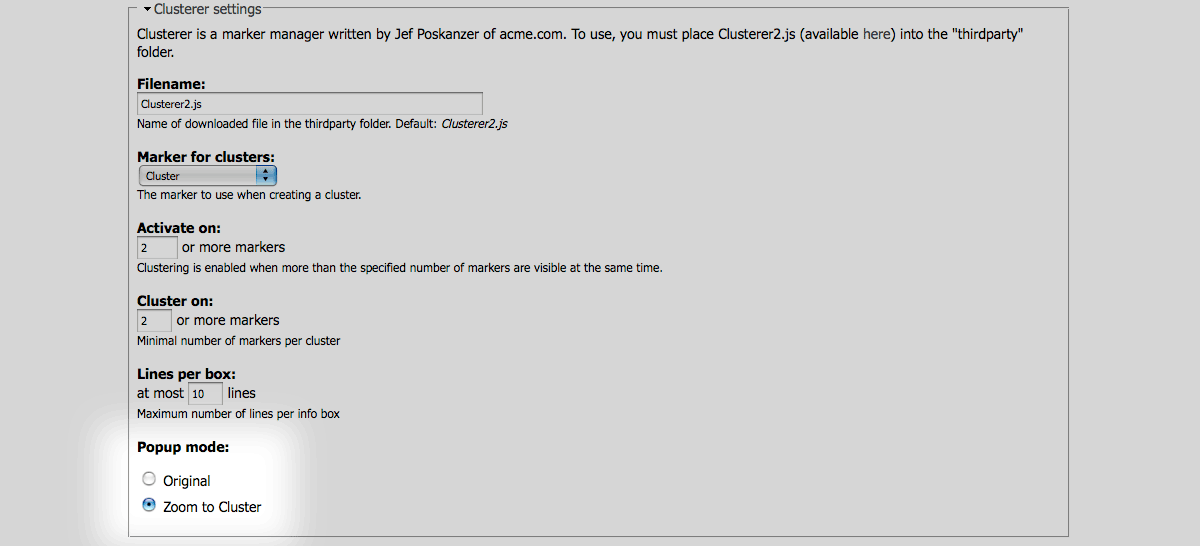
This may have been added since this patch was created but the functionality you get with this patch is already available using the administrative options in Gmap (see screenshot). You can choose whether you want the pop-up mode to be original or zoom.
Does anyone have an idea where to look for fixing the issue of the empty pop-up?
Comment #16
Anonymous (not verified) commentedYes, that functionality was only recently added to GMap. I found quite a few problems I was having were fixed by updating to the latest version.
Comment #17
sagannotcarl commentedIn looking through some of the javascript for where the title is set, I found this on line 36 of clusterer_marker.js:
It looks like there is no marker.opts.title so that if statement is failing. I can't seem to find the title anywhere else in that marker object either but I may just not know where to look.
Maybe something changed with the marker object? Does anyone know where the title lives in that object. If you manually set the t variable there (or add an else to the end of that if) the titles work fine in the clusters.
Comment #18
j0rd commentedThe new clusterer (Martin Pearman's ClusterMarker) that's provided in the new version works wonderfully. Thank you guys for all your hard work. GMaps + Location are my two new favourite modules.
Comment #19
bneel commentedI found a solution for the D5 within the Clusterer2.js. See my website : http://www.lefermenteurabioreaction.com/map/carte-biotech-plus
Now I want to upgrade my site to D6 and my patch doesn't works. (see the attached file)
The patch previously added in this issue or the Martin Pearman's ClusterMarker are not suitable for nodes with the same lat and long.
I change the priority to critical because the Jef Poskanzer clusterer is completely useless. I tried to do something but with no success.
Ben
Comment #20
tonycpsu commentedSubscribing.
Comment #21
tislammac commentedI had an issue with Clusterer2.js: If two+ nodes were located in the same exact place, I needed the popup with node lists to show. However, only the small red icons were showing up in the popup, not the titles.
Here's the change that shows the titles (changed the clusterer_marker.js file in the gmap module, Drupal 6):
obj.bind('addmarker', function (marker) {
var t = 'Product!';
/*
if (marker.opts.title) {
t = marker.opts.title;
if (marker.link) {
t = '' + t + '';
}
}
*/
if (marker.text) {
t = marker.text;
if (marker.link) {
t = '' + t + '';
}
}
obj.clusterer.AddMarker(marker.marker, t);
});
marker.opts.title was null, hence i am now using marker.text
Comment #22
bneel commentedYou are the king
Comment #23
bneel commentedbdragon, are you ok with this ?
Comment #24
amedee-1 commentedIn reply to #21:
The original code in my clusterer_marker.js is:
Changed to:
This works excellent for me. The only remaining problem is that there is no clustering with the closest zoom; you get the default popup with only one node. This is a (minor) issue with multiple nodes on an identical location.
Working example: http://foutparkeerders.be/kaart
Comment #25
Anonymous (not verified) commentedMarking this issue as fixed since the original problem was the empty popup windows which, if I'm not mistaken, have been fixed in recent versions of the module. Other problems such as multiple markers at the same lat/long should be addressed separately, such as here: #530328: Multiple markers with the latitude/longitude on a single GMap
Comment #26
marcp commentedThis is still an issue.
The solution in #24 works, as long as you want the full text that would normally appear in the node's popup window to also appear in the list of clustered items.
gmap_plugin_style_gmap::render(), where the $markers array is built, should have a way of passing in opts -- something like:I guess the question is, what should be passed in as the title? I'd like it to be the node's title, but I haven't dug in enough to figure out if gmap_plugin_style_gmap has that information. The line of code above sends $label out as the title, which, in my case, seems to be a number, and I haven't figured out yet where that number comes from...
Comment #27
marcp commentedFor a node-based view where the node title is included as one of the fields, adding this line to
gmap_plugin_style_gmap::render(), where the $markers array is built does what I'd expect it to do:Now in the cluster popup, the listed items are node titles that link to the node.
This doesn't work, though, in the generic case where you don't want the text in the clustered popup to be the node title linked to its node. There should be some way of configuring what the text is for an item when it's displayed as one item in a clustered popup.
I haven't tested a map with view of users, but in that case, you'd probably just want the user's name linked to its profile (or maybe not -- maybe you just want the user's First and Last Name).
Comment #28
marcp commentedChanged the title to reflect the true issue here. It's only a problem on GMap views.
Comment #4 hits the reason why this issue may not be bothering too many people. The map/node view works fine -- node titles appear in the clustered popup courtesy of:
in gmap_location.module's
gmap_location_user_page()function.There's no corresponding code in
gmap_plugin_style_gmap::render()to set the marker's title. The partial fix in #27 makes it work for node-based GMap views.Are there any maintainers interested in getting this fixed? If so, please ping this issue -- I'd be glad to supply some patches if you'll chime in with some guidance on how you think this should best be addressed.
Comment #29
marcp commentedSetting to "needs review" in order to get some feedback on how to proceed with a fix for this issue.
Comment #30
marcp commentedOne way to go with this would be to add another option in gmap_plugin_style_gmap.inc that lets the view builder pick the field that will be used for the clustered item title. I've got part of this coded up -- the attached screen shot shows what it will look like.
Comment #31
ChrisRut commented:subscribe:
Comment #32
yann_riviere commentedHello Marcp,
Don't now why but it seems to nt work for me.....
here is the code :
$markers[] = array(
'latitude' => $lat,
'longitude' => $lon,
'markername' => $markername,
'offset' => $offsets[$markername],
'text' => $this->row_plugin->render($row),
'opts' => array('title' => l($row->node_title, 'node/' . $row->nid)),
);
Is there an error in my copy/paste ?
Thanks a lot !
Comment #33
marcp commented@yann_riviere - I'm not sure why that wouldn't be working for you if you put that line in gmap_plugin_style_gmap::render(). Your view also needs to be node-based, but I'm sure you've got that under control.
Maybe try putting some debugging info in gmap_plugin_style_gmap::render() to see if it's even getting called in your case.
Comment #34
srobert72 commentedI found also that this issue with Cluster is same as missing Tooltip in GMap Views.
I wrote a patch to set Tooltip as you do, but it offers possibility to choose what field to use as Tooltip info.
See #9 in #364413: GMap style views: missing tooltip
Comment #35
yann_riviere commented@marcp - I'm not dealing with views. I'm am accessing the Map via the URL : map/node.
I have forgotten to check the "Open Link" in the Marker action of the Gmap Location settings !
Now, the Windows info is displaying node titles with an Hypertext link to the node.
Thanks !
Comment #36
marcp commented@yann_riviere - Right -- this isn't a problem with map/node -- only when going thru Views.
Still a valid issue with Views, though.
Comment #37
danieldd commentedmarcp - thanks very much. #27 did produce the missing tooltip in Gmap Views for me.
One quick question - this produces a node title that should link to its node.
Although in my case the tooltip is not rendering the html link - ie it is displaying
<a href="/nodepath/node-title">node-title</a>instead of rendering the link. Any idea how I fix? ThanksComment #38
marcp commented@danieldd - sounds kind of like a filter issue. Not sure what's going on there.
Comment #39
giorgoskThere is also a similar issue here #623234: Views 2.7 - breaks field output - GMap marker info window (bubble) doesn't display fields correctly
Comment #40
beckyjohnson commentedOK...Is this only for the dev version? I am using the release Candidate and I applied the patch..in comment 5 and it stopped giving me a node list with no text and now it just zooms in really close to the cluster but with no pop up.....
I am going to follow the thread and read on but still...just checking.
Becky
Comment #41
beckyjohnson commentedWhere did you get the file clusterer_marker.js? I can't find it. All I have is clusterer2.js and ClusterMarker.js.
I can't find the code in my file that you are changing. Even if I look on line 36 like it says above. I would really appreciate some help on this. The patch above that I applied to clusterer2.js did not work for me...
Becky
Comment #42
beckyjohnson commentedOk. I found the clustere_marker.js file and applied the patch suggested earlier in this thread. It kind of works. What is does for me is zoom in a little and show the pop up for a second and then vanish. It seems like the content is too long for the info window too but it's hard to tell since it only loads for a second. Here is my link: http://beta.wimaxforum.org/courses/map
I am using 6.x-1.x-dev.....hmmmm..
please help,
Becky
Comment #43
beckyjohnson commentedOk. I found the clustere_marker.js file and applied the patch suggested earlier in this thread. It kind of works. What is does for me is zoom in a little and show the pop up for a second and then vanish. It seems like the content is too long for the info window too but it's hard to tell since it only loads for a second. Here is my link: http://beta.wimaxforum.org/courses/map
I am using 6.x-1.x-dev.....hmmmm..
please help,
Becky
Comment #44
beckyjohnson commentedOk! Switching back to the Release Candidate 1 version solved my problem..... The info window shows up. I guess I will have to try to use CSS to make my infoWindow bigger though....
Becky
Comment #45
jessehsI'm running the latest dev version, and this issue seems to have been fixed. I'm generating a gmap using a node-based Block View. I was seeing a blank popup for clusters until I checked the "Display a tooltip when hovering over markers" box in the Gmap's Style settings in the View options. I then chose the "Node: Title" field as the Tooltip field to use.
Seems to me this should be changed so it has its own setting. I'd personally like to see a new setting like "Clusterer display" or the like. Ideally, it would be nice to have clustered pins use a theme-able template file for row-style output. At the very least the title should be able to display HTML, instead of plain text, so the title can link to the node.
Comment #46
wiredescape commented:subscribe:
Comment #47
ngstigator commentedsubscribing
Comment #48
milesw commentedsubscribing
Feels like I'm missing something obvious here. This has got to be a common requirement and it just doesn't work.
Comment #49
rooby commentedCan someone please make a patch that can be easily reviewed.
Thanks.
Comment #50
bb37 commentedsubscribe
Comment #51
bb37 commentedI would also like to see the items in the pop-up list be links to the nodes.
Comment #52
khosman commentedsubscribe
Comment #53
bneel commented#24 works perfectly
Comment #54
elioshI created a new patch to add a new field in the $marker array.
In gmap_plugin_style_gmap.inc, render function, i added this code:
Then, in $marker[] addition, i added just one line ($link => ...)
Obviously, we can add link also for taxonomy && || users :-D
Saluti
Comment #55
chris.slater commented:subscribe
Comment #56
summit commentedSubscribing for views output with clustering.
greetings,
Martijn
Comment #57
Robert_W commentedStill doesn't work with views and displaying users. I'm making a website where users only submit their state/province (privacy issues with more specific information like street, etc.), so alot of users will have the same geolocation. When clicking on a cluster the popup is just empty, only showing little red markers with no text. Tried al the solutions described above, none seems te work.
Drupal 6.22
GMap 6.x-11
Location 6.x-3.x-DEV
Comment #58
webservant316 commentedsubscribe
Comment #59
webservant316 commentedCluster marker addons do not help deal with multiple items at the exact same location which is what I needed. This solution worked for me - http://drupal.org/node/1139088#comment-5956720.
Comment #60
podarokplease, provide patch against latest dev
Comment #61
podaroktest