

 Come together with the global Drupal community in Rotterdam, 28 Sept – 1 Oct 2026. Sessions, contribution, connection, and Early Bird savings until 8 June.
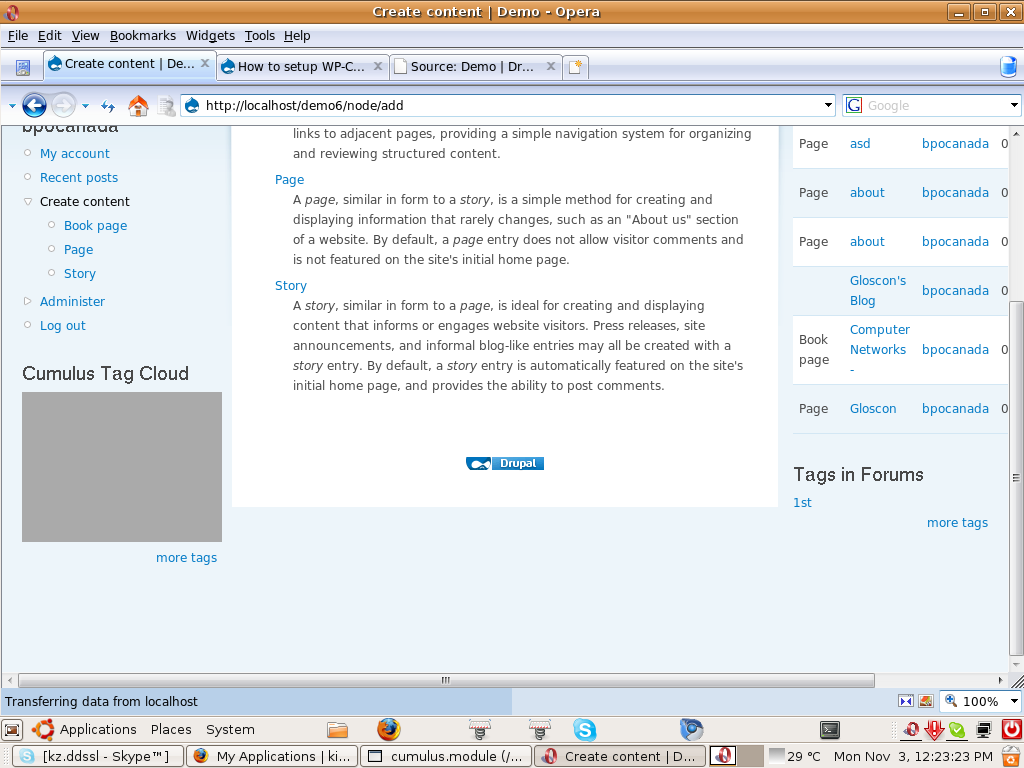
i install as per readme.txt but getting just blank screen.
i used
D-6.3,
Mozilla 3.0.3 ubuntu,
attached screenshot.
Thanks,
| Comment | File | Size | Author |
|---|---|---|---|
| #10 | Screenshot.png | 112.48 KB | kuldip zala |
| Screenshot.png | 134.34 KB | kuldip zala |


Comments
Comment #1
alliax commentedYour screenshot doesn't show a blank screen. It look to me like the screenshot you've uploaded is totally irrelevant to this module.
edit: sorry I'm dumb I totally missed the cumulus bloc on the left side !
So, check that you have the .js file in the cumulus folder and specify the correct vocabulary id and then run /cron.php on your site just to make sure. It should work, it works on my sites both the D5 and D6 versions. Beware that you must have terms in normal english characters, ANSI, not unicode letters such as chinese or arab.
Comment #2
kuldip zala commentednot getting any terms in that cloud. just shown the background color.
Comment #3
bjacob commentedI've recognized the same behaviour while creating the module for D5. It seams that the flash doesn't receive any data. You have to check your settings. Did you provide the appropriate taxonomy id?
Comment #4
lut4rp commentedPlease check before reporting an issue.
- You are not using FF, but Opera in the screenshot.
- Flash in Opera on Linux is a big known issue. I'm pretty sure you will be unable to open most Flash widgets.
Comment #5
kuldip zala commentedI already checked on FF and also opera. Both of them not displayed terms data.
For your kind information Opera 9.62 support flash.
Comment #6
kuldip zala commentedYes i provided the taxonomy id but still....
Comment #7
lut4rp commentedVersions 6.x-1.0 and 5.x-1.0 have been removed, they were created incorrectly. Please try this again on the 6.x-1.x-dev or 5.x-1.x-dev versions till I release the stable versions in a week or so. Create a new issue if you face a problem with them as well.
Comment #8
kuldip zala commentedIt's working fine with D-5. but still i have problem in D-6.
Thanks,
Comment #9
lut4rp commentedDid you try out the 6.x-dev version? or are you still using the wrong 1.0 release?
Comment #10
kuldip zala commentedYa , i already tried.
See attachment.
Comment #11
alliax commentedIn your drupal 6 try to go to the cumulus bloc's settings and click save.
Perhaps your bloc displays nothing because of a bug in tagadelic which makes tagadelic cache permanent instead of temporary, see here : http://drupal.org/node/305380
This empty cumulus bug would happen if you enabled the tagadelic and cumulus modules and the cumulus bloc before there was any term in the vocabulary. So try going to the bloc's settings and save once more in order to recreate the cache.
Going to admin/performance and clicking the delete cache might work as well.
Comment #12
shaneod commentedI had this problem as well, turned out i had the vocabulary name wrong, It's not the name of the vocabulary it's looking for but the number. You'll see this is you click on edit vocabulary, I was caught out becasue I had set it to 1, but it was acutally 2.
Hope that helps, you may have already checked that.
Great Module lads, well done!
Comment #13
kuldip zala commentedi done all the stuff as alliax mention but still getting same problem.
Comment #14
brugalito commentedI have the same issue. using druapl 6.6.
i get the following error when i run cron manually. taxonomy.module on line 1189.
Comment #15
Sens0r commentedSet "Tag size interval: 1" =)
Comment #16
j. ayen green commentedI'll leave the data below in case someone wants to compare, but I realized what the problem is. The block is white only until the mouse is held over it, but since it's blank until then, no one would think of putting their mouse over it. In my case, I left the number of tags set at default (64?) but, since I'm just starting the content, I only have 2 terms. When I changed the number of tags to 3, they appeared from the start. Aside from fixing that, it would be nice if there was a parameter to keep the motion going constantly, it only seems to move when moused over.
I'm having the same issue on 6.6 using 6.x-1.1
- I have the cumulus.swf file in the cumulus directory
- When I set the permissions so that cumulus does not show in admin, I see a regular block with the tags in admin
- The taxonomy id is correct
- I configured ran cron, tagadelic, ran cron, the cumulus block, ran cron again just to make sure
- All I get is a white block
Here is the resulting page code:
Comment #17
Hannu commentedI had this same problem with the dev version. Then I replaced the 384 KB sized "cumulus.swf" file in the dev release with the 40 KB sized "cumulus.swf" file from the 6.x-1.1 release, and the cloud appeared.
Comment #18
weirdovideo commentedThanks for everyone contributing to this issue since I had the same problem but have somehow fixed it.
I pretty much followed all of the instructions in the thread.
I removed the regular cumulus module and then uploaded the dev version, 6.x-1.x-dev.
As suggested however, I took out the larger flash file 348kb exchanging for the flash file from the official 6.x-1.1.
Also, don't forget to move the .js file you have to get separately back into the updated (dev) version.
Ok, at this point I still was getting nothing.
It turned out the Cumulus Tag cloud reference referred to the wrong Tagadelic ID. When the regular Tagadelic block is publish, you may notice the link on the bottom left, More Tags, will lead to tagadelic/chunk/2.
The Cumulus More Tags link linked to tagadelic/chunk/1.
Gotta synch these up in the Cumulus Tag configure link in the blocks section.
Roland Faust
Weirdo Video
www.weirdovideo.com
Comment #19
kars-t commented