

Closed (fixed)
Project:
Fast Gallery
Version:
6.x-3.2-beta1
Component:
Code
Priority:
Critical
Category:
Bug report
Assigned:
Unassigned
Reporter:
Created:
4 Nov 2008 at 22:49 UTC
Updated:
1 Dec 2008 at 09:12 UTC
Jump to comment: Most recent file

Comments
Comment #1
ncy commentedi haven't tested on an international system. are characters like that normally allowed in URL paths?
Comment #2
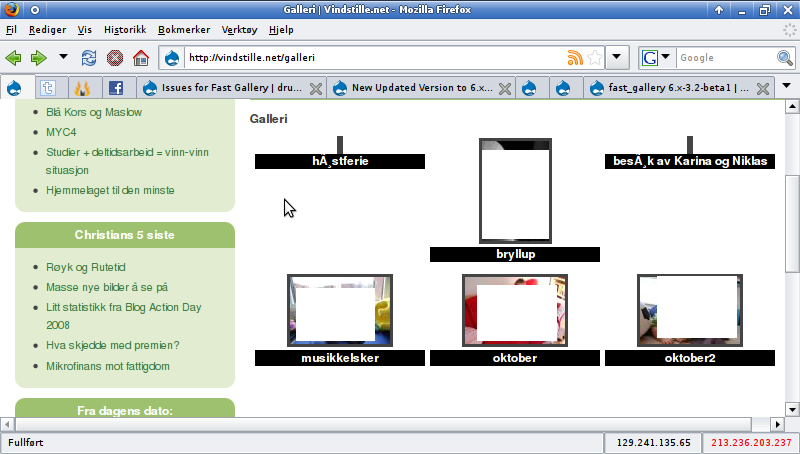
lomz commentedDrupal do not have any trouble with it, neither did Fast Gallery until last version.
Comment #3
ncy commentedi noticed in your screenshot that the thumbnails aren't displaying as well. were the pictures linked correctly and thumbnails displayed in the older version? (which older version, btw?)
there are problems with having international characters in the URL path, and all folders/files are stored by path. but i dont have an international system, so i don't really know how things behave.
UPDATE: ok, i've been messing around with mb_convert_encoding (if you recall, we added this in because some ppl reported special characters weren't being saved to the database). but i guess that's causing other problems. i'll post up a new test version soon. what encoding are you using btw?
Comment #4
ncy commentedhi lomz:
try the attached version. you may want to uninstall the old version first, as i took out the option for renaming files so uninstalling will delete the variable.
this version converts between ISO-8859-1 and UTF-8 encoding. it works for me for special characters in the path, filename, and EXIF data.
not sure how nicely that plays with an international system, so post back and let us know!
:)
cheers,
-nick
Comment #5
lomz commentedThe other thumbnails didnt show because I removed them for the screenshot, the whole point for me to have a gallery is to show off private photos to people with a password so I would be kind of stupid to show them of here ;)
With your test the galleries are working but the text is still shown as høstferie instead of høstferie.
So you are almost there.,
Comment #6
ncy commentedwhat encoding/system are you using?
Comment #7
lomz commentedUTF-8, as standard for Drupal.
Comment #8
ncy commentedi mean, what is the default encoding of your location. the code i posted above converts between UTF-8 and ISO-8859-1 (my encoding) to process the paths, and it works fine for me b/c well, i'm in ISO-8859-1 location ...
can you execute the php code in a page and tell me what you get for output?
for example, i get:
Comment #9
ncy commentedUPDATE:
add this line in fast_gallery.module, line 757 and let me know if that works any better:
add it after:
Comment #10
lomz commentedOutput:
Update:
That didnt do the trick.:(
Comment #11
ar-jan commentedConfirm error. This used to work (3.1beta1). I have some photo's with ñ, which were not a problem before.
Also, I get these errors on the general settings page for fast gallery (not every time, but it seems after changing a setting and saving, or something like that):
# warning: exif_read_data() [function.exif-read-data]: Unable to open file in /sites/all/modules/fast_gallery/fast_gallery.class.php on line 316.
# warning: filemtime() [function.filemtime]: stat failed for album/2008/Piñani.jpg in /sites/all/modules/fast_gallery/fast_gallery.class.php on line 323.
Where "ñ" in the filename would be an "ñ".
Comment #12
ncy commentedok, regressing to some old code. looks like mb_convert_encoding() can't be used in the file paths, only works on some systems but not others. :P
try this, let me know if special characters still show up in the descriptions/captions.
PS: sorry for all this back-and-forth testing. i don't have a setup where i can simulate international servers/systems.
Comment #13
lomz commentedNow it works as it should
Comment #14
ncy commentedok, that's good to hear :). now if i can just find a way to get international characters working on my setup without breaking it for everybody else again .....
Comment #15
ncy commenteddo the national characters still show up in the image captions in the last version i posted?
Comment #16
lomz commentedYes.
Comment #17
ncy commentedi changed mb_convert_encoding() to utf8_encode() and utf8_decode().
can anybody test this version (with national characters) on a non-u.s. server? also can you report on whether links are working correctly to pictures and to folders? also custom folder thumbnails, and breadcrumb links?
if the names aren't right, try adding this line to fast_gallery.module on line 784:
thx .. if this testing gets too long-winded, i might have to just postpone this feature (support for national characters) to not work on all systems.
Comment #18
lomz commentedYou are almost there.
On the galleries page everything works as it should, both the galleries I have with national characters got thumnails and can be opened.
The problem is now that when opening one of the galleries with national characters the line in the adressfield is showing http://vindstille.net/galleri/h%C3%83%C2%B8stferie not http://vindstille.net/galleri/høstferie as it used to to, and the breadcrumbs got the same error.
Comment #19
ncy commentedok, new update. i hope we get to the bottom of this :P thanks for all the testing work, lomz.
i don't expect custom folder thumbnails to work yet, with national chars.
totally unrelated note, added 2 more options for Image Caption selection (Copyright and Artist) by request #293857: Image caption not working in thumbnails
Comment #20
lomz commentedThat doesnt matter, I dont care for setting the folder thumbnail anyway, but give me a notice if you want me to test for it.
Ironicly this fixed the URL-error so this now displays as http://vindstille.net/galleri/besøk_av_Karina_og_Niklas, but the gallerytext is fucked up again, so something inbetween should work.
Comment #21
ncy commentedanother update. i tried tracking down the problem, and what i'm guessing right now is that my webhost server doesn't encode to UTF-8 or decode from UTF-8 when accessing the database, because it probably normally doesn't expect national characters.
sooooo, i've included a new setting on the Advanced settings page to toggle that UTF-8 conversion. if one way doesn't work, toggle it off/on and see if that works.
i also worked on getting it to work when national characters are in the gallery path, which seems like it fixed the custom folder thumbnail problem.
also added the option for including images on pages other than the current one (#332873: Pictures on picturepage 2 doesnt show). it seems to work with Thickbox as well
lemme know how this version goes, and i'll start updating the documentation. thx!
PS: a quick side note, remember to refresh your browser, b/c there are changes to the CSS. and in firefox, i had to clear the cache/private data. and again, it's better to uninstall everything in old version first.
Comment #22
lomz commentedNow it works in adress-field and caption, but it is wrong in breadcrumbs:
You are really doing an amazing job.
Ps: #332873: Pictures on picturepage 2 doesnt show is successfully fixed by theese changes.
Comment #23
ncy commentedthanx! :)
whoops, good catch. i was wondering where else i forgot to fix.
one more version, there was some bug in the random image block too that i fixed.
updated documentation.
i also removed some blocks that looked like they were unused code. so let me know if i removed anything important >_<
the test cases i was running into for the special characters was when Clean URLs were toggled on or off. it does some weird things to the links, so that's what i've been testing. lemme know how this version goes ..... other test cases to test might be, with Hierarchy on/off, Imagecache on/off.
-nick
Comment #24
lomz commentedNow it works as it should
Comment #25
rapsli commentedcan anybody else confirm this, so I get check it in.
I think we should make a stable version soon.
Comment #26
rapsli commentedCreated a Beta2 Version.
Comment #27
Keee commentedSorry, I still get titles like this: '?????? ????'
I'm using win xp with windows-1251 encoding
Comment #28
ncy commenteddid you try toggling the UTF-8 caption conversion on the Advanced settings page?
Comment #29
Keee commentedOK, it seems that exif_read_data doesn't work properly on my system
UPD: Now it works fine, but there is no utf8_decode for image captions, so it put it by myself.
Thanx =)