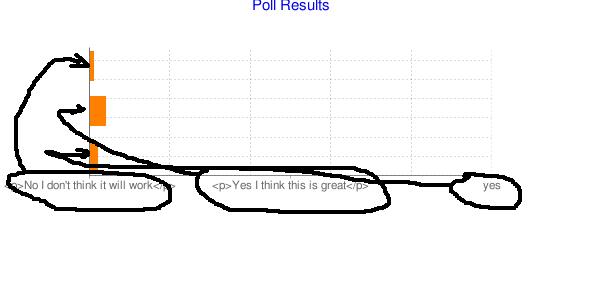
I have the following to create a horizontal bar chart
<?php
$chart = array(
      '#chart_id' => 'test_chart',
      '#title' => chart_title(t('Poll Results'), '0000ee', 15),
      '#type' => CHART_TYPE_BAR_H,
      '#size' => chart_size(300, 400),
      '#grid_lines' => chart_grid_lines(20, 15),
      '#bar_size' => chart_bar_size(30, 15),
    );

$sql = "SELECT count(data) as count, data as label FROM table group by data";

$results = db_query($sql);
while ($result = db_fetch_array($results)){
       $chart['#data'][]        = $result['count'];
       $chart['#labels'][]      = $result['label'];
     }

$chart['#data_colors'][] = chart_unique_color('test_a');

echo chart_render($chart);
?>
which works fine - except that the labels come along the bottom ie x axis, rather than along the y axis. Image attached.
Any ideas how I get the labels moved? thanks


Comments
Comment #1
tjholowaychuk commentedHello please check out this wiki page http://code.google.com/p/drupal-chart-api/wiki/Examples
the section "Line chart, legends, resolution adjustment, and label positioning" should help
Comment #2
Anonymous (not verified) commentedGotchae - its the mixed axis - even though its not mixed ;) - thanks
Comment #3
Anonymous (not verified) commented