

 Come together with the global Drupal community in Rotterdam, 28 Sept – 1 Oct 2026. Sessions, contribution, connection, and Early Bird savings until 8 June.
Hi,
first off, thanks so much for developing the Genesis theme kit, I think it's a great resource for Drupal and well done. I've played with several of your other themes over the past couple months, and have found looking at how you do things to be really helpful. I've spent a fair amount of time over the last couple of years building on other themes, and I've found yours to be very intuitive.
A couple of weeks ago, I started developing a new theme for a site, using a sub-theme of Genesis 1.0, but I saw that you recently released a new version that has some some substantial changes in it. So before moving forward with my theme, I'd like to convert it over to 1.1. Any thing I need to look out for in the upgrade?
I assume based on looking at some of your new sub-themes .info files that I can keep my styles in a single stylesheet, even though the core theme has moved to multiple... is that right?
Thanks,
Patrick
| Comment | File | Size | Author |
|---|---|---|---|
| #3 | spacing-example.jpg | 50.46 KB | pcdonohue |
| #3 | admin-themes.png | 175.88 KB | pcdonohue |


Comments
Comment #1
Jeff Burnz commentedThe main thing I can think of strait off is page.tpl.php - the most radical changes are in that file. If you have modified it you will have to port those changes over. Structurally its mostly the same - I did add a wrapper div that wraps the header elements and nav elements to make theming the entire "top" of a theme easier. I also added more conditional statements so we're not printing stuff when its not being used, such as the entire nav section and the footer stuff.
I think the most radical change you will see is that Genesis now only prints variables in templates, which means that it no longer builds the Logo, Site name, primary and secondary links in page.tpl.php (like all other themes I have looked at do) - I moved this stuff to the preprocess function in template.php, built new variables for some of them and print them in page.tpl.php.
I found upgrading the subthemes very easy, I just ported in the page.tpl.php changes and made very minor tweaks to the CSS, took about 10 - 15 minutes for each subtheme.
If you haven't changed page.tpl.php at all, then its going to be easy - just replace the old page.tpl.php with the new one and you're done - bar minor tweaks and small changes you may need to make to your CSS.
These mostly quite minor - really I just shifted some styles from the core theme to the subtheme, to strip the core naked. This included removing the default padding on inner divs of 0.375em - this is now set in the subtheme.css rather than in core - you will notice this immediately and you need to add it in to your subthemes.css if you haven't already over ridden it.
And yes, you keep your genesis_SUBTHEME.css file as per normal - that is still just one file. This file hasn't change much - I have only added (a small amount of) stuff to it, its worth comparing them - Genesis now prints some extra selectors for the header to allow for more advanced theming - look around line 141. I also added a lot more comments to the CSS and templates to explain things better.
One big change is the new title selectors for nodes, comments and blocks - before it was the standard Drupal h2.title, but now we have it like this:
.node h2.node-title {}
.block h2.block-title {}
div.comment h3.comment-title {}
This allows for much easier targeting of specific h2/h3 title styles, especially when you embed blocks in nodes or nodes in blocks, comments in blocks and so on (all possibly in Drupal).
h1 title for pages is now h1#page-title {}
I am very pleased to hear you think my stuff is intuitive, I work hard to make it that way. I am always "second thinking" everything with regards to how someone else might be seeing it.
If you have any troubles with the port you are welcome contact me directly or ask some specific questions here, it will help others in the same position also.
Comment #2
pcdonohue commentedThanks for all the pointers.
At first glance it's looking like it will be better for me to merge my changes into the new stylesheet rather than the other way around: the additional comments in the new subtheme sheet are useful, and I might as well do the work now for consistency's sake before the theme gets more detailed.
I have made changes to page.tpl.php, so I'll need to bring those over too, but that was largely in the ordering of a few elements: I moved the navigation into the header vs. as a separate block, and I moved the breadcrumbs as well into the main content column so that my sidebar wasn't moving around (depending on whether the breadcrumb was shown or not).
Those should all be easy enough to do, but I'll update this post to say how it went.
Comment #3
pcdonohue commentedHi,
the update to 1.1 went fairly easily, just with a couple of minor issues.
I had moved my nav elements into the header so that they would appear underneath the search box (I essentially have a filled-in rounded corner header, with the primary links appearing in the bottom right corner as white links), and I noticed that switching to 1.1 pushed the nav elements down towards the edge of the header element. After much firebugging, switching back and forth, and head-scratching, I think I finally was able to isolate the difference to changes to the form element in the "input" class... does that sound right?
I also, incidentally, finally noticed differences in spacing between Camino, Safari, and Firefox 3: for some reason the nav elements get pushed down differently in each browser... still researching why. I've attached an image to demonstrate. It's really just a minor annoyance, but I wonder if it's indicative of something I'm doing wrong.
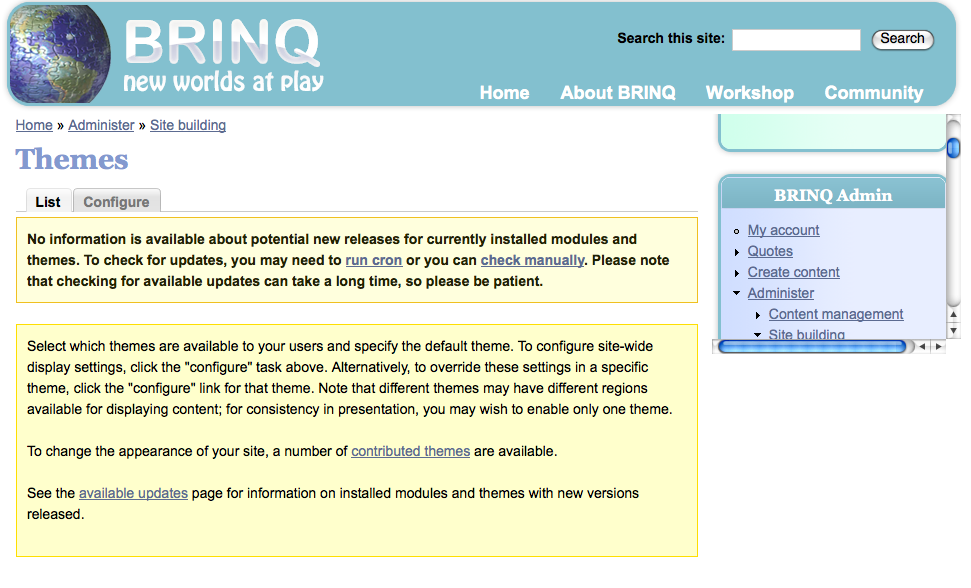
The second issue is that I noticed you were experimenting with the blocks on the themes page to have a fixed height and to be scrollable? I'm going to switch that off (as I just get a small box with scrollbars in the upper right of my admin pages, see attached imaged), but I was wondering what you were trying to solve there? I'm using a modification of the 7th layout scheme, with a sidebar on the right.
thanks again,
Patrick
Comment #4
Jeff Burnz commentedI think I did modify a margin on the search_box.
Its very hard for me to pinpoint why the spacing might be different for those 3 broswers, mainly because I can't run Camino (no mac at the moment, coming soon) and I don't know what you have changed, perhaps when you go live I can muck around with it (I would like to actually, to see what is up). What I can say though is if you adding margin or padding to form elements it will be hard to get right accross browser, because they all handle form elements a wee bit different - hence why Genesis and Drupal add div wrappers to most form elements, so you can set heights and margins on the containing divs. This is more reliable.
The blocks page fixed-height and overflow: scroll - well this is experimental of course - its because the themes table is a fixed width and will hide options behind the right sidebar (or left sidebar in RTL). This can be very annoying for users with a narrow theme and both sidebars enabled (not even that narrow, the table is over 600px wide, so even a 960px theme with both sidebars on will mess up the page). This is a Drupal thing I cant change easily, so the sidebar treatment on the blocks page is a work-around. I know I get pissy when I want to disable a theme and its hiding behind the sidebar block....
The fixed height and scroll bars ensures that all themes/options etc are always visible - so its a usability thing, certainly not beauty:)
Comment #5
Jeff Burnz commentedNew version is out now, which fixes some bugs etc, lets close for now, please reopen if needed or post new issue against the latest version.