

 Come together with the global Drupal community in Rotterdam, 28 Sept – 1 Oct 2026. Sessions, contribution, connection, and Early Bird savings until 8 June.
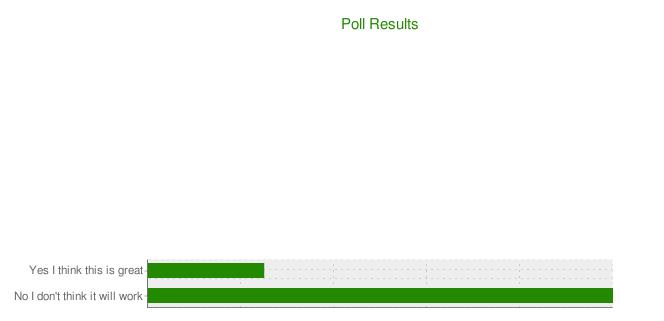
Cool - got it to work. Fairly easy. But I am having trouble with the location of the title of the graph. Here is the code I use to produce the attached image. Note how far away the title is from the bar chart. I have tried all sorts of chart size - and it doesn't seem to help.
Any ideas?
<?php
$chart = array(
      '#chart_id' => 'chart_poll_result',
      '#title' => chart_title(t('Poll Results'), '228900', 15),
      '#type' => CHART_TYPE_BAR_H,
      '#size' => chart_size(600, 300),
      '#bar_size' => chart_bar_size(15, 10),
      '#grid_lines' => chart_grid_lines(20, 20, 1, 5),
      '#adjust_resolution' => TRUE,
      '#chart_fill' => chart_fill('c', 'eeeeee'),
    );

$sql = "SELECT count(table.data) as count, table.data as label FROM table where nid='XX' and nid = table.nid group by table.data";

$results = db_query($sql);
while ($result = db_fetch_array($results)){
       $chart['#data'][]        = $result['count'];
       $chart['#mixed_axis_labels'][CHART_AXIS_Y_LEFT][0][] = chart_mixed_axis_label(t(strip_tags($result['label'])));
     }
$chart['#data_colors'][] = '228900';
echo chart_render($chart);
?>
| Comment | File | Size | Author |
|---|---|---|---|
| title.JPG | 9.89 KB | Anonymous (not verified) |

Comments
Comment #1
tjholowaychuk commentedHmm seems a little weird, can you post the resulting URI to the image, then I can tweak the size and view the resulting image really quickly and see if i can help
Comment #2
Anonymous (not verified) commentedThanks. here is the url
http://chart.apis.google.com/chart?chd=t%3A25%2C100&cht=bhs&chs=600x300&...
Comment #3
tjholowaychuk commentedif you change '#size' => chart_size(600, 300),
to '#size' => chart_size(600, 100), or something lower it does not decrease the height?
Comment #4
Anonymous (not verified) commentedThis is truly embarassing - I swear I tried that! Anyway - thanks - that was exactly the problem. Closed.
Comment #5
Pierre.Vriens commentedAdapting title to link to this issue from the Chart HowTos docu ...