Closed (fixed)
Project:
e-Commerce
Version:
6.x-4.x-dev
Component:
cart
Priority:
Critical
Category:
Bug report
Assigned:
Reporter:
Created:
7 Nov 2008 at 15:07 UTC
Updated:
13 Jan 2009 at 16:30 UTC
Jump to comment: Most recent file


Perhaps this is related to #330848: Updating the drupal ecommerce shopping cart block using Ajax but in case its not ...
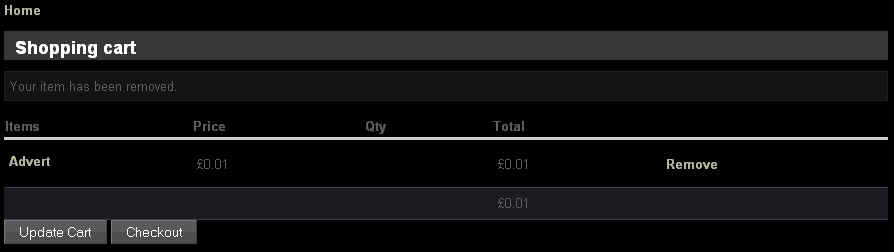
I am unable to remove an item from the shopping car (cart/view). If I click the Remove link next to the item I get back the cart/view page with an additional message saying "Your item has been removed." except the line item is still displayed on the page.
I have tried going away from the page and returning - clearing the browser cache in between etc but the item is still reported as being in the cart.
| Comment | File | Size | Author |
|---|---|---|---|
| #6 | RemoveProblem.jpg | 16.12 KB | jasontanner |

Comments
Comment #1
dublin drupaller commentedhi jason.
I'm unable to recreate the problem you're having with todays 6.x-4.x-dev. items are removed from cart as expected.
do you or did you have any other modules installed on your site that maybe conflicting with ecommerce?
dub
Comment #2
jasontanner commentedI have a ton of modules installed (location ones, cck ones, views ones, panels ones and a bunch of miscellaneous ones) but prior to installing e-commerce I'd not experienced any errors for quite a while - the last was with the gmap module causing conflicts but that was resolved about a month ago.
It is only a test site I'm playing with but I'd prefer not to turn everything off individually to try and see if its a module conflict - it would take quite some time.
No javascript error is reported by Firebug or in the javascript error console. I've even tried different flavors of browsers with the same results.
I've even uninstalled e-commerce abd followed the instructions you posted in another issue about the right order to install stuff.
Comment #3
dublin drupaller commentedcan u post or email me a link to your test site so I can have a quick look? it would be good to find out what's causing it and if it's a conflict with another module.
Comment #4
gordon commentedI think this is fixed
Comment #5
jasontanner commentedSorry for the slow response, I'll check now.
@Drupal Dubliner: Thanks for the offer, I'll be in touch if this is still a problem
Comment #6
jasontanner commentedHi,
Ok previously I had the beta3 version installed, but after gordons last post I downloaded the -dev version of 19th Nov and found the problem to still be present. (See attached screenshot, where you can see the "Item has been removed message" but the item is still displayed in the cart below the message)
@DrupalDubliner: I'll need to move some stuff around, but I'll email you soon.
Jason
Comment #7
gordon commentedIs this an anonymous user?
Comment #8
jasontanner commentedNo, its a registered user as the product in setup as being for Registered users.
I've contacted DrupalDubliner with the url of my test site, if it would help you I can also send that info to you.
Comment #9
jasontanner commentedAlso, another oddity - but perhaps its already been reported:
If, as an anonymous user, I try to add a product to the cart using the Add to Cart link, a product thats been setup only for Registered users, then I get the following messages displayed on the resulting page:
The 2nd message would seem to be misleading as the item has not in fact been added to the cart.
Comment #10
jasontanner commented@DrupalDubliner: Any news ?
Comment #11
jasontanner commentedI've updated to the latest -dev version as of the date of this post and the problem with Removing an item from the Cart still exists.
I've investigated further myself and discovered that the remove operation does modify the ec_cart table but only seems to perform an update rather than a delete. The update changes the 'changed' field value and NULLifies the 'data' field.
If I logout, reboot the PC, and restart, and then login again the cart still shows the supposedly removed item.
@Gordon: Should the ec_cart table still contain rows that relate to 'Removed' items ?
Comment #12
jasontanner commentedMore information, this problem only seems to affect products I create using the 'Generic Product' template, the one with the non-shipable / and no qty options.
The remove operation works just fine on a product created using the 'Shippable Product' template. Looking at the ec_cart table, after removing a shippable product resulted in the row being removed completely.
Comment #13
jasontanner commentedComment #14
jasontanner commentedHi,
I've tested this problem with the latest 6.x-4.x-dev release (as of this date) and I'm afraid the problem still persists.
Generic products, are left in the ec_cart table when removed and so still appear in the cart view
BUT
Tangible / Shippable products are removed just fine.
Comment #15
jasontanner commentedHi,
I've tested this again with the latest 6.x-4.x-dev release (as of this date) and I'm afraid the problem still persists.
However, this time I was able to narrow it down a bit further. It seems to be related to the NO QUANTITY feature.
I had add/remove working from the cart working fine for a non-shippable product ... until I added the NO QUANTITY feature.
Comment #16
gordon commentedThanks, That was the bit of information that solved the issue.
Comment #17
jasontanner commentedTested with the latest -dev release as of 20th December and I am delighted to confirm that the problem is resolved.