

Closed (duplicate)
Project:
Ubercart
Version:
6.x-2.x-dev
Component:
Code
Priority:
Normal
Category:
Bug report
Assigned:
Issue tags:
Reporter:
Created:
8 Nov 2008 at 01:01 UTC
Updated:
23 Jul 2010 at 18:53 UTC
Jump to comment: Most recent file


Comments
Comment #1
rszrama commentedAs in, you have the module setup and it's not working or you don't know how to set it up?
Comment #2
iharley commentedTo my knowledge the module is setup, though I can't say I'm 100% certain of that. I have permissions set correctly for my test group, and FTP'd files to a folder in my drupal installation root. When making a product, and editing it's Features, I'm able to find the file(s) and associate it with the given product, and have none of the files also available for shipping. Check out is fine, with no shipping offered. Paypal WebPayments Standard returns and IPN and the transaction is listed as Completed. I go back to My Account, look under Files, and it tells me No downloads found. Have I missed something?
Comment #3
rszrama commentedHmm... you know, I haven't really tested it on D6. It may be something isn't firing right, like if the order status setting for granting file downloads is set to the wrong one. You might also look at this replacement module by cha0s. If that works and we can get some thorough testing, I'd like to include it in our first beta.
Comment #4
iharley commentedI see that a new DEV release came out today. Would you recommend loading this model before trying the replacement module? Also, is there any rough documentation I can look at, or is looking at the release for Drupal 5.x good for a rough idea on how things work?
Comment #5
jackread commentedI have downloads working in D6 so I dont think its a problem wit the module.
Comment #6
iharley commentedCan I ask just how you set it up? Are there other steps needed to trigger the download to be available?
Comment #7
iharley commentedThe first difference I see between the replacement module and the one supplied is that in View File Downloads I actually see all the files in my store, the original module only allowed for deleting and uploading. This list is also supposed to show what product and SKU a file is assigned to. None of my files are showing as assigned to a product or SKU, though all my products have files in their feature settings. I even made a new product and assigned it a file but it also didn't show. It seems to me that if the store doesn't recognize a file linked to a product it would have no way of serving up a download.
Comment #8
butler360 commentedI also have downloads working on the regular Bazaar version of Ubercart, but I think I took the same steps as you when enabling them.
Comment #9
cha0s commented@iharley:
Thank you for the comments about the new file module.
First off, I'm not sure what you mean about the 'View File Downloads' page. As far as I know, the file module always listed all the files in the directory you specified at the file product feature dialog. Anyways, even if that wasn't so, I think it's the correct behavior. If the files weren't showing, how could you select any to delete them?
About the second issue you raised, the download not showing association with products it has been added on, you're correct. That was a bug and it's fixed in the latest version attached on that page. However keep in mind this was only a *cosmetic* error on the admin screen. Any files attached to a product will still have access granted to any user who purchases the files.
Comment #10
iharley commentedLet me make sure I've got this straight. The process for adding a file to a product is done through the Feature's tab that is accessible when editing a product, right? Then to add a file I've just needed to input the path relative to my files directory that I made for my store. In the previous dev version of Ubercart when I went to /admin/store/products/files I would only get the option of adding or deleting files. With ucfiles update module I now see a list of all my files, but none are showing as being assigned to a particular product when I have 21 products having anywhere from 2-9 files assigned to them.
Also, I see as of Nov. 7 there is a new Ubercart dev version. When I went to install this I would get errors relating to my database and in particular the ucfiles table. I should have copied down the error message, but I've had so many problems this weekend between my host having problems to an error within Drupal I just wanted to get things back to normal by downgrading ubercart then re-upgrading the files module. This worries me that I can't seem to go back to ubercart itself.
Comment #11
cha0s commentedGot this in my queue and will report back as soon as I've been able to do some testing. Has the issue been resolved, iharley?
Comment #12
iharley commentedHi Cha0s,
I've made some headway. It took a a couple re-installs to fix most of the issue. I think I had a somehow corrupted installation. Previously I wasn't able to see a file related to a product, but that's working great now. My only issue at the moment is that using PayPal to process a transaction does not allow for the customer to download their file(s). The order is marked complete, and the payment has gone through correctly, yet in their account there is no file downloads option. I have to go in, change the status of the order, then change it again to Complete.
Comment #13
cha0s commentedHm, that's odd. It seems to me this may be a CA issue instead of a file download issue. Files now depend on CA to grant access (after say, an order gets to completed with a file on it) so if that isn't being triggered then, I think maybe it isn't working right with PayPal?
Comment #14
cha0s commented*bump*
Any word on this? Were you able to get it working, iharley?
Comment #15
iharley commentedI'll get back to you by Friday. The client who I was working with on this has stalled so much on it that I haven't been actively working on the project.
Comment #16
yesct commentedI'm having a similar issue. I think it is a CA thing...
The file download feature for a product is working great... except, after they complete paypal, and come back to their account, under the files tab, it does not list the file. I have to go in as admin and give them access to the file, and then it shows up in their files tab, and they can download it no problem....
And I think I need some kind of action in the CA stuff... but I dont know what...
or does ubercart come with one of the CAs that should add the file they paid for to their files allowed?
Comment #17
expotv commentedI am having the same problem exactly.
Every once in a blue moon it will work though.
Should I try to use the Cha0s module listed above?
Comment #18
yesct commentedThe stuff from the replacement module might already be in the ubercert deb or beta3.
Comment #19
expotv commentedThanks. Since this function is key to what we need, is there any other module that can provide a similar solution?
QuickFile isn't for 6.x yet either.
It's weird that this has worked twice for me. It worked for me once today after I had manually ran the cron. But after that never again, again..
Comment #20
cha0s commentedFWIW, the code Ryan linked is already in core.
I have seen some stuff about PayPal race conditions, perhaps it is related to that issue... All I can say is that if PayPal isn't setting the status to 'complete' (or whaever you set as the status for granting downloads) then you aren't gonna get the file granting function firing. Same with roles.
Comment #21
expotv commentedThe status is being set to complete and I am getting the money..
If I switch the status back to something else then to complete, the email gets sent out and the file added.
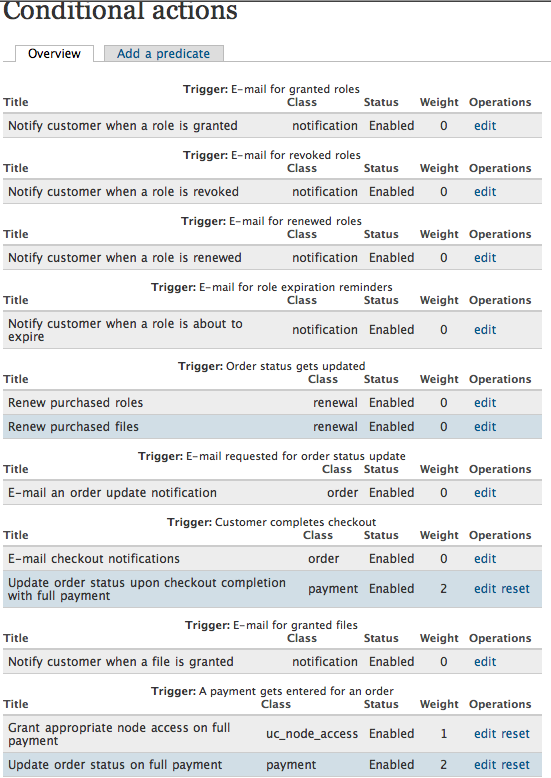
Do I have the CA set properly ? Hmm. Attached is my CA setup.
Comment #22
iharley commentedI've been able to look into the site that was giving me problems. I am unable to trigger the release of a file to be a downloadable file. The PayPal payment goes through and changes the status of my order to Complete. At the time an order's status changes to complete is when the customer is able to download. My CA are the same as expotv's. Currently our workaround is to manually change the order status from Complete to some other status, then change it back to complete again.
Comment #23
yesct commentedI have used the latest bazaar version as of 8am central time usa feb 7.
When I leave the conditional actions alone (the way they come with ubercart), then when someone makes an order, paypal replies... order status gets set to payment received, and never moves to completed.
If I go in and (under view order) change the order status to completed, then the files get added to the user profile files tab, and the email goes out to the user.
It seems like the CA:
Trigger: a payment gets entered for an order
Title: update order status on full payment
Conditions:
check the order balance: Balance is less than or equal to $0.00
Check the order status: order status: payment received
Actions: Update the order status: payment received
might be wrong... the action should be to update to completed...
it would be nice if CAs being triggered could get logged in the "report" log...
I'm going to try changing the action ...
-CT (optimistic)
Comment #24
yesct commentedsigh, I misread it...
it is actually on the condition: order status: payment received NEGATE
so.. this only gets triggered if it is not already in payment received...
so the action would be correct, to set it to payment received.
back to trying to find the problem.. -CT
Comment #25
yesct commentedMaybe the CA:
Trigger: customer completes checkout:
Title: update order status upon checkout completion with full payment
conditions:
condition: check the order balance: balance is less than or equal to $0.00
condition: check if an order can be shipped: NEGATE
action: update the order status: completed
... maybe this one is under the wrong trigger.
maybe this should be under the trigger: order status updated...
or there should be another CA duplicating the concitions and actions under the additional trigger: order status updated...
hmmm
Maybe I'll try one. I wonder if I should only trigger it on order status: with a condition ... payment received...
Comment #26
yesct commentedI tried adding this CA:
Trigger: order status gets updated
conditions: AND
condition: check the order status: order status: payment received
condition: check if an order can be shipped: NEGATE
condition: check the order balance: balance is less than or equal to $0.00
actions:
action: update the order status: order status: completed
action: display a message to the user (hmmm I'm not sure why I have this..)
But... when I create an order, use paypal, the other CA sets it correctly to payment received and the balance is zero, and I checked that the product is set to not be shippable... but this CA does not fire.. the order status does not move to completed.
....
unless I manually move it myself in the view order page.
it sounds like others are seeing the same behavior I am...
I dont know how to figure out why it doesnt work though...
Thanks a lot for your time on this, I know you are really busy! -CT
Comment #27
yesct commentedhttp://cathytheys.blip.tv/#1758196 is a really short video ... which I think shows a bug in the ubercart conditional actions that are based on order update status triggers and order status conditions
and this is a longer video putting it more into context:
http://cathytheys.blip.tv/#1758027
Comment #28
yesct commentedtagging this one CA
(sorry if i do something strange in the issue queue, I thought maybe I could help out with the issue queue to free up the time of others.)
Comment #29
cha0s commentedNo problem tagging this one CA, watching the video it's clear that there is some problem present. Thanks for taking the time to make that video... Something's definitely messed up but I haven't figured it out yet. It's not just a PayPal + CA thing though.
Comment #30
yesct commentedI'm so glad some one watched the video! Thanks!
If you have any thoughts about what might be wrong or want me to try anything let me know. I'm obviously motivated, I have some time to work on it, I'm just at a mental block for figuring out how to fix it :)
Thanks a ton for looking at this. :)
Comment #31
cha0s commentedYesCT, I've been watching your videos and in them your custom conditions to update order statuses are operating on the 'original order', instead of the 'updated order'! That would explain the crazy behavior in the shorter video, and also the reason why the 'chain' from payment_received to completed didn't fire in the longer one, until you changed the order status.
Comment #32
yesct commentedAh! I'll try it out with the updated order!
-CT (who was really hoping I just had some box checked wrong)
Comment #33
yesct commentedI made an action that triggers on order status change (of updated order) and changes the status to completed (of updated order). So my task is working!
But the odd thing is I really dont understand when to use original and when to use updated status...
take for example, some of the other conditional actions, like "Update order status upon checkout completion with full payment" which is triggered on "customer completes checkout". It has an action: Update the Order Status of "Update the order status to Completed." ... but that action has as arguments NOT a choice of updating the original or the updated order, but just "Order"...
Should I open a new issue... to tackle the topic of when to have what for the arguments of the actions (and conditions)... ?
Oh, and here is a video of file downloads working: http://cathytheys.blip.tv/#1766501
I'll post a text todo/check list of setting it up later.
It would be cool to be able to "export" the CAs ... so we could easily share the settings... kind of like how you can use the gui for views, or import and export them. -CT (dreaming)
Comment #34
Island Usurper commentedThe action to update an order is different from the condition to check an order's status, which is also different from the trigger that happens when an order's status actually is updated.
The order status trigger provides two arguments: the order before the status was changed, and the order after the status was changed. If the order status condition is added to this trigger, it takes one order argument. There are two available, so you must decide which order status you want to check. The condition answers the questions "Was the order in the 'payment received' status?" or "Is the order now in the 'payment received' status?" depending on whether the "original order" or the "updated order" is chosen.
There used to be a bug in the order status condition which made it ignore the argument setting. This went unnoticed because it was still doing what people expected rather than what they actually told it to do. I believe a lot of confusion stems from this issue.
The update order status action only takes one argument, because it actually causes the order status trigger to happen. This means that you should not put this action on this trigger unless you really, really know what you are doing. Infinite loops are not fun.
Comment #35
cha0s commentedMarking as a duplicate of #369742: CA predicates maybe don't need to be prevented from being evaluated more than once. for now.
Comment #36
iharley commentedI'm a little lost... Is there a way to make downloads work?
Comment #37
Backcountry Kitchen commentedI am also at a loss.
Currently I have to go into store administration/orders to manually change the order status from completed to payment received & back to completed.
Has this bug been fixed?
Comment #38
torgospizzaIf you look at the issue a couple posts above that cha0s marked this a "duplicate" of, there is a patch there which will hopefully solve the issue, but it needs to be tested more, I think. Please give #369742: CA predicates maybe don't need to be prevented from being evaluated more than once. a look.
Comment #39
torgospizzaThere is a more recent patch by cha0s here: http://www.ubercart.org/forum/support/9589/file_download_notification_no... which solved the issue for us on a D6 site.
Comment #40
hixster commentedHi CT,
I'm trying to get these CA working properly, the link to the video you posted here is for a Views tutorial,
Oh, and here is a video of file downloads working: http://cathytheys.blip.tv/#1766501
I'll post a text todo/check list of setting it up later.
can you post a link to the working file downloads?
Kind regards
Hix
Comment #41
yesct commented@Hix
huh... try this link:
http://blip.tv/file/1757864
Comment #42
chriscalip commentedThe Order Status of the order with the file download feature should be tagged as completed before the file downloads related those orders becomes available.
Comment #43
bkosborneWas this ever solved? I'm having the same issue. I offer downloadable products and downloadable products. So when a purchase goes thru, the order status goes to Payment Received. This does not trigger the availability of the file downloads. I have to change the status to Order Complete. I would like the downloads to be available immediately.
I tried changing the CA actions and conditions around to reflect what I want but no go. I can't seem to get it to allow file downloads when the order goes to "Payment Received" which is what I want. Anyone figure this out?