Closed (won't fix)
Project:
Ajax
Version:
6.x-1.x-dev
Component:
Code
Priority:
Normal
Category:
Support request
Assigned:
Reporter:
Created:
9 Nov 2008 at 01:21 UTC
Updated:
12 Dec 2008 at 08:09 UTC


Hi, thanks for this wonderful module.
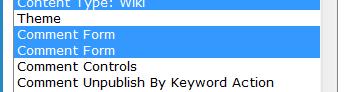
I am getting, for some reason, 2 comment forms on in the settings. I attached the image.
Using one of them, when trying to post a comment gets me:
Fatal error: Unsupported operand types in /home2/public_html/includes/common.inc on line 1275
Using the other, the save button becomes 'loading', but the comment never actually loads. I also have Live, if that's relevant.
Thanks.
| Comment | File | Size | Author |
|---|---|---|---|
| 2comments.jpg | 8.58 KB | Flying Drupalist |

Comments
Comment #1
Flying Drupalist commentedOh, I also want to add that the comment itself has actually been posted. It's just that there are no updates to that effect. (In firefox I see: Error requesting data!)
Also, something similar happens with the userlogin form. The loading continues forever and the page doesn't redirect or refresh, even if the login is completed.
Thanks.
Comment #2
brendoncrawford commentedWhat version of PHP?
What version of Drupal?
What server platform (Unix, Windows)?
What is "Live"?
Thanks,
Brendon
Comment #3
Flying Drupalist commentedHi, Live is Live Preview, which they call Live.
I'm using:
Apache 1.3.41 Linux
PHP 5.2.6
MySQLi 4.1.22
Drupal 6.6
Comment #4
brendoncrawford commentedI am not quite able to reproduce this bug. Can you do 2 things for me...
1. Enable BOTH "Comment Form" items in the Ajax Form Settings.
2. Paste the ajax response data from Firebug here. If you don't know how to do this, let me know.
Thanks
Comment #5
Flying Drupalist commentedHi, I'm not sure how to do this. Is it in the console or the dom? Anyway I don't know what it is that's need. :)
Thanks for helping me.
Comment #6
brendoncrawford commentedAfter you submit the comment form, in firebug, under the "Console" tab, you should see a line that says something like:
"POST http://foo.com/bar"
Click to expand that item. Then go to the "Response" tab within the item. The response should appear. If it does not immediately appear, click "Load Response", at which point it should appear.
Copy and paste the response into the issue tracker here.
Comment #7
Flying Drupalist commentedIt says this:
Firebug needs to POST to the server to get this information for url:
http://site.com/forums/main-forums/news-and-announcements/second-voting-...
This second POST can interfere with some sites. If you want to send the POST again, open a new tab in Firefox, use URL 'about:config', set boolean value 'extensions.firebug.allowDoublePost' to true
This value is reset every time you restart Firefox This problem will disappear when https://bugzilla.mozilla.org/show_bug.cgi?id=430155 is shipped.
Then I click Load Response:
ANd since it's so huge I decided to stuff it on drupalbin.
http://drupalbin.com/3951
Thanks.
Comment #8
Flying Drupalist commentedHi, is this insufficient? I don't want to sound impatient, but I really love your module and want to use it.
Comment #9
brendoncrawford commentedMiraploy,
Drupalbin is down. Can you post the response to pastebin?
Comment #10
Flying Drupalist commentedHi, this is what it says:
http://pastie.org/318054
*pastebin tripped the spam filter.
Comment #11
brendoncrawford commentedWell,
I Still am not able to reproduce. Try disabling all non-core modules, and try again. Let me know if that works.
Comment #12
Flying Drupalist commentedHi I just stripped down my site.
I'm trying the same thing again, did not work, but the response is different:
{ "status": true, "updaters": [ ], "messages_error": [ ], "messages_status": [ ], "messages_warning"
: [ ], "redirect": "http://z.com/node/155#comment-90", "preview": null }
This is on POST. I don't see GET at all.
But I know it works, I can see the comments if I refresh.
BTW, where is the database? I think it's possible that's what's messed up. I can't find a checkbox for the module in the uninstall list while trying to reinstall it.
Comment #13
Flying Drupalist commentedThinking that it was something in the database that was strange. I did a totally new install.
I'm still seeing 2 comment fields, and getting the same error as above.
{ "status": true, "updaters": [ ], "messages_error": [ ], "messages_status": [ ], "messages_warning"
: [ ], "redirect": "http://z.us/node/2#comment-6", "preview": null }
Comment #14
brendoncrawford commentedMiraploy,
For now, just enable both comment forms in the admin settings. That is an unrelated bug that I can fix later. The new message you posted appears to be a valid response, so you should be seeing the expected behaviour. What behaviour are you seeing when you get that response?
Comment #15
Flying Drupalist commentedHi, I see the comment save button become loading, then back to save again. But nothing else has happened. No comment appears or anything of the sort. The page isn't reloaded either.
Comment #16
brendoncrawford commentedAre you getting any javascript errors?
Comment #17
Flying Drupalist commentedHi, there are no javascript errors.
Comment #18
brendoncrawford commentedMiraploy,
I think I might know what the problem is. Try downloading the latest dev version of this module. I have made a lot of fixes since you first downloaded it. I am pretty sure that the latest dev version has addressed your problem.
Latest dev version can be found here: http://ftp.drupal.org/files/projects/ajax-6.x-1.x-dev.tar.gz
Comment #19
Flying Drupalist commentedHi, I've actually been pretty good with keeping up with your new devs, and I'm still getting this in the latest.
I don't know why this is only happening to me. I did this on 2 servers and including a clean install. It's somewhat strange and disheartening that I'm the only one getting this. :(
Comment #20
brendoncrawford commentedMiraploy,
Unless someone else can shed some light on this, the only thing I can do is see if you would be willing to send a tarball of your Drupal install as-is (changing your passwords of course) and a tarball SQL dump of your database. Then I can mimic your install. If you are willing to go to all that trouble, you can contact me through the contact form and let me know.
Comment #21
Flying Drupalist commentedOh I'm willing, though I'm not sure how helpful it will be. I'm testing this on a completely clean install both for the files and the database, so it confuses the heck out of me why this is happening. But I'll use the contact form to send you my install.
Comment #22
brendoncrawford commentedMiraploy,
Perhaps you could send me your php.ini file as well.
Comment #23
brendoncrawford commentedMiraploy,
Also, what browser are you using?
Comment #24
Flying Drupalist commentedUsing FF/Opera/Chrome, happens on all 3.
Comment #25
gorlov commentedAre you using the "Comment Notify" notify? I am getting the same error when trying to post a comment, but I am NOT using "AJAX Forms".
Comment #26
Flying Drupalist commentedNo I'm not. This only happens with ajax forms.
Comment #27
brendoncrawford commentedMiraploy,
I have not received those files from you. I am going to close this bug. Feel free to reopen if still interested.
Sorry I couldnt be of more help.
Thanks