

Closed (fixed)
Project:
iPaper
Version:
6.x-1.0-rc8
Component:
Miscellaneous
Priority:
Normal
Category:
Support request
Assigned:
Unassigned
Reporter:
Created:
10 Nov 2008 at 16:47 UTC
Updated:
24 Oct 2009 at 06:10 UTC
Jump to comment: Most recent file



Comments
Comment #1
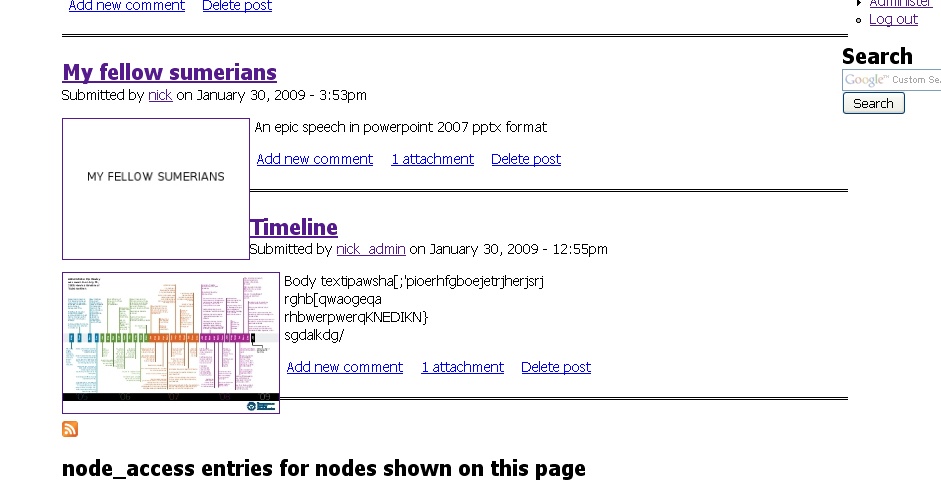
rares commentedIt definitely depends on the theme. I have themes that build a box around the teasers for each node and keep them separate, and others let them get mixed up.
I tried fixing this through the module, and didn't succeed. but I don't know CSS that well, so maybe someone knows how to style it better.
Maybe you can compare the modules and how they differ in CSS over how they style teasers.
Rares
Comment #2
nick5768 commentedI was able to fix my issue by adding the "clear-block" class into the div that displayed the content in my node.tpl.php
FYI this was the base Zen framework (I may have changed some slight things, but not many).
node.tpl.php before:
...
print $content;...
node.tpl.php after:
...
print $content;...
Hope this helps someone.
Comment #3
TravieMo9 commentedThis may apply to me. Thumbnails are displayed diagonal pattern in IE as if no break between. Don't really understand nick5768 solution above. Can't see a difference in the code before and after. I tried to take this out with CSS but not successful. I put a large right margin in div for each thumbnail. It made the thumbs break but the title was misplaced to the far right.
Comment #4
rares commentedThe one solution that I've found is using the following code in ipaper.css. The downside is that if there isn't enough text to fill the height of the height of the thumbnail, the teaser text will be displayed below.
If enough people think that this works, I can replace the css file with this in the next version.