Closed (fixed)
Project:
Pixture Reloaded
Version:
6.x-3.0
Component:
Code
Priority:
Normal
Category:
Bug report
Assigned:
Unassigned
Reporter:
Created:
13 Nov 2008 at 01:25 UTC
Updated:
30 Nov 2011 at 23:17 UTC


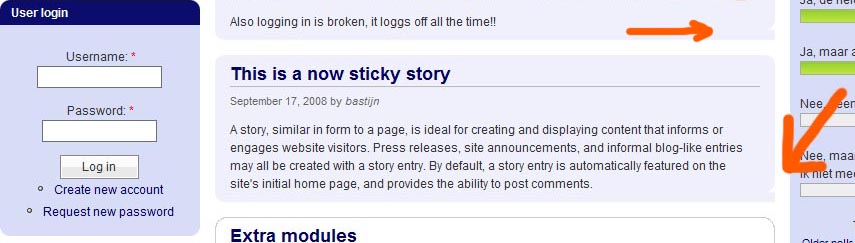
This problem only happens when i'm not logged in, this theme has a minor layout error with sticky postings. (see the image attached)
Strange is that when i am logged in this rounded corner shows correct? What and where should I edit the code to fix this problem? Thank you.
| Comment | File | Size | Author |
|---|---|---|---|
| bug_theme.jpg | 55.52 KB | marcbloem |

Comments
Comment #1
Jeff Burnz commentedI need to know what browser are you using (version and operating system if applicable).
Comment #2
marcbloem commentedHi,
this problem occurs in both browsers I use, IE7 and Firefox 3. You can see a live example here: www.bastijn.nl/drupal.
BTW your theme looks very nice! Regards, Marc
Comment #3
Jeff Burnz commentedI see, if you make this change it will solve your problem, the issue seems to be related to the Read More link not appearing (because there is nothing to read more of, as these are short articles):
What's changing here are the margins - we need to strip off the margin bottom:
style.css (line 486)
After you have made the change to style.css, upload it as per normal, then go to the theme settings page for Pixture Reloaded and click "Save configuration", this re-saves the theme settings (which you must do for this to take effect).
Comment #4
marcbloem commentedHi!
Thanks for looking I really appreciate your work! The problem is now fixed in Firefox but not in IE7 yet (www.bastijn.nl/drupal).
Should another "#content-area .node-teaser.sticky" be changed?
Thanks, Marc
Comment #5
Jeff Burnz commentedTry fiddling with the CSS in the ie stylesheet to adjust the paddings and margins as I have shown above - you should be able to get it work ok, sorry I don't have time right now to replicate and work out a fix for you.
Comment #6
marcbloem commentedHi Jeff!
Thanks for putting me on the right direction. After some fiddling, I've finally solved the bug. The only thing to do is to add and change the following code in IE.CSS & STYLE.CSS:
#content-area .node-teaser.sticky .content { margin: 10px 15px 0 15px; padding: 0 0 3px 0; }Keep up the good work!
Regards, Marc
Comment #7
Jeff Burnz commentedWell done mate, I thought it would be pretty strait forward, I'll mark as fixed for now.
Comment #8
Jeff Burnz commentedClosing, all issues appear resolved.
Comment #9
philmck commentedYou've marked this closed (fixed), but the bug is still there 3 years later - something didn't get propagated.