

 The 2026 Drupal Business Survey is open. Your response will help shape the future of the Drupal business ecosystem.
I hadn't notriced till today, as i have not really neeeded to make additions, and i obviously didnt check after the last upgrade, my bad.
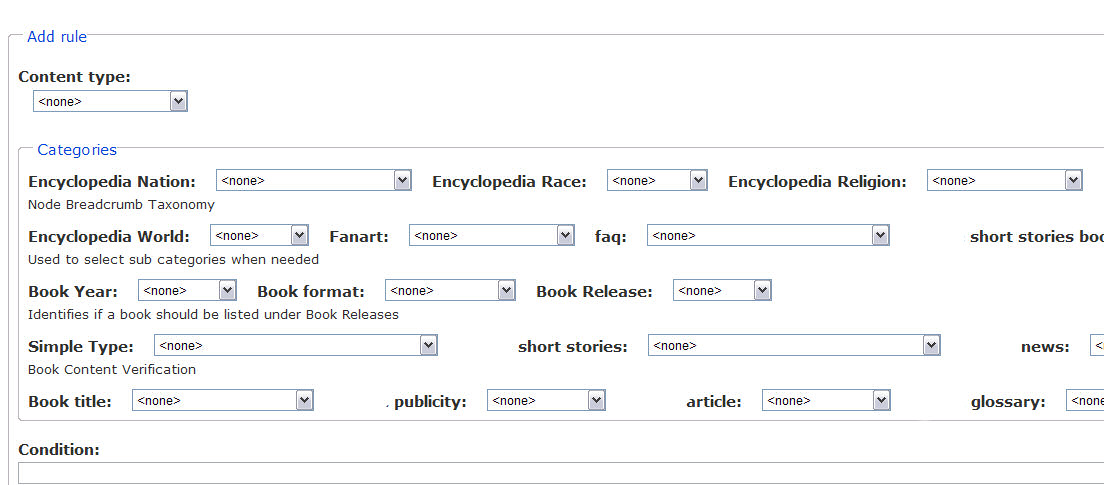
In the categories section I was no longer getting the categories as one column, but as 5 rows of several entries, breaking the theme
In case it makes any difference
Row 1 had 16 categories,
Row 2 had 5 categories,
Row 3 had 3 categories
Row 4 had 6 and
Row 5 had 8
Renaming the CSS to OLD ( effectively dissabling it) returned the display to as expected
Is this a bug of the CSS file or my installation
many thanks
| Comment | File | Size | Author |
|---|---|---|---|
| #4 | Image1.jpg | 105.21 KB | Anonymous (not verified) |
| #4 | Image2.jpg | 64.64 KB | Anonymous (not verified) |


Comments
Comment #1
Anonymous (not verified) commentedCorrection . ignore the bit about the CSS file it didnt work
Comment #2
Anonymous (not verified) commentedComment #3
edhel commentedcan you post screenshot?
Comment #4
Anonymous (not verified) commentedOK i have figured the cause
It is due to the addition of the CSS file at some point between 5.x-2.0-beta1 and 5.x-2.0-rc2
Image2 is what I had always been getting
Image1 is what you currently get
I just made the following change to the css which puts everything back where in my opinion it belongs (image2)
Comment #5
edhel commentedSuch layout was made for more compact representation. You can change module's css-file or add css to your theme.
Change first or second line of node_breadcrumb.css: display:inline => display:block. Or insert changed lines to your theme.
Comment #6
Anonymous (not verified) commentedI just realised though that soemthing doesnt make sense, as my test site has the unmodified css file, and is showing the original layout. So something other than the theme must have been modifying it after the module to give me the a different layout
This sort of indicates that something has probably been fixed elsewhere which now puts things back to as expected
Thanks again for your help. This is one very useful module