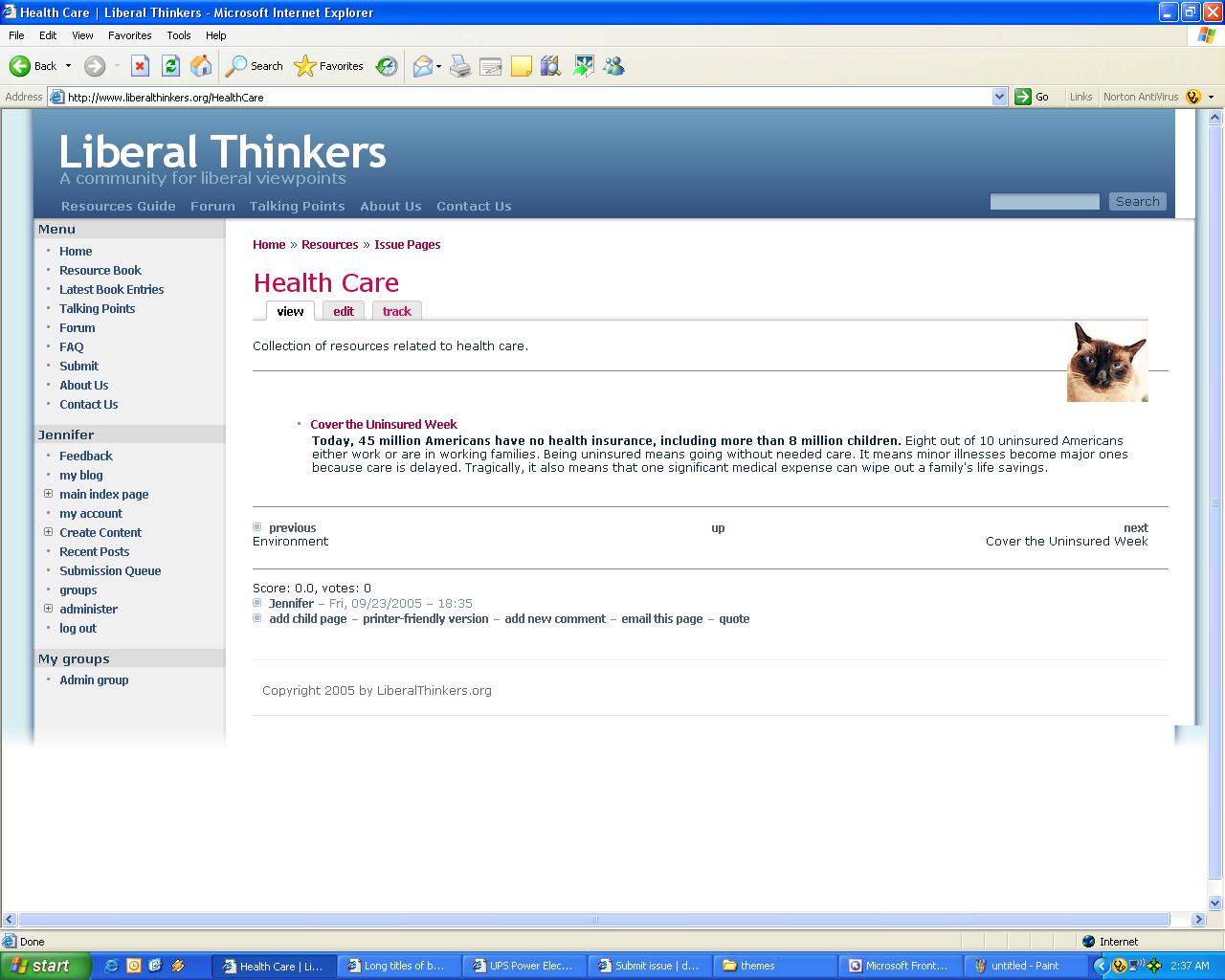
, for some reason, expands wider than the rest of the page in IE6 and makes portions of the page not line up correctly. I've (tried to) attached a screenshot, and here's the link to the
actual page in the screen shot. At first, I thought it was just me, but that turned out not be the case.
Another's website.
Then, I discovered it also happens in any of the submit content pages, but just not as dramatically. I tested out other phptemplate driven themes (greybox, spreadfirefox) and non-phptemplates (goofy), and I can't find the same problem. There's nothing in the style.css template relating to the class "book."


Comments
Comment #1
ryooki commentedafter some more testing, I've figured out that this happens in IE6, but not Netscape7. I've narrowed the code down to this:
.item-list ul li a, li.expanded a, li.collapsed a, li.leaf a {
margin: 0px;
padding: 3px 0px 3px 20px;
display: block; <<<<<< key line
}
I don't know why it does this, and I don't know if there is a work around. Someone with more CSS knowledge than me may be able to help better.
Thanks!
Comment #2
ryooki commentedhmm... that didn't display correctly..
Take 2:
.item-list ul li a, li.expanded a, li.collapsed a, li.leaf a {
margin: 0px;
padding: 3px 0px 3px 20px;
display: block;
}
"display: block" appears to be the kicker in CSS for the book pages, anyway. I don't know if there is another way to decrease the rt sided indentation so it goes away.
Thanks!
Comment #3
JohnG-1 commentedsorry if i got here too late!
from the screenshot it looks like the picture of the cat is out of kilter. It could be this throwing off everything else.
according to the html it should appear between 'Health Care' [picture] 'Collection of resources ...' something like this:
'Health Care'
[picture]
'Collection of resources ...'
yes a css positioning issue (which explains why different browsers display differently). I couldn't see any references to it's class tags: .thumbnail and .picture in the style.css (which is your uber-stylesheet) so you could try adding this (to style.css) and see if it makes a difference:
the border will let you know if the class reference is finding the picture you want.
the added 'display:block' should make the next html element clear the picture, ie start on a new line from the left (rather than it pushing the picture to the right)
if it doesn't work, try it with one class tag, ie
and then the other!
I have seen this thing before - profile module springs to mind. It might be a bug in friendselectric theme.
I hope this does help.
good luck!
Comment #4
ryooki commentedActually, I had changed the css code to display the picture on the right on purpose.
/* Thumbnail (user pics) */
.thumbnail {
float: right;
}
What I was complaining about was the fact that there's an extra white bar on the top, and the fadeout on the bottom doesn't line up. If you check the other person's website with IE6, you'll see that it displays the same odd thing. When I took out the display:block on the code I had isolated the problem to, the spaces went away, but then a.hover didn't display as well.
Thanks for looking!
Comment #5
JohnG-1 commentedoh I didn't notice that! (I'm so used to seeing it on my test-site!)
That's your wrapper width that is. Have a read of this one: http://drupal.org/node/31869
Basically, I think it's a clash between Firefox, overwide main-content and the way friendselectric uses background pngs for styling the header and sidebars.
The easiest one to deal with is content width.
I still think that your (deliberately right-aligned!) cat is pushing the main-content width out. Please try it.
(I had a cat that loved to curl up on an open book, but only if someone was reading it at the time. Cats are like that ... take my word for it!)
Comment #6
ryooki commentedI'm not sure how that thread will help me... I don't have tables, and noticed that the problem disappeared if I simply put the book content in a table (weird). For reference, I attached a screenshot of the page without the thumbnail (disabled thumbnails in post option). I've found, that if I remove
if you look at the article page: www.liberalthinkers.org/article, it seems to display the style on the links perfectly & exactly how I'd like it to look. Now if I could just figure out how it managed to do that...
Thanks! I really appreciate your help.
(lol. Yes, my cats seem to love whatever I'm working on or looking at, including the space right between the monitor & my eyes... then there are the ones that refuse to sit on a surface directly but must sit on the piece of paper, uneven stack of books, or mess of wires that happen be laying the floor / couch)
Comment #7
ryooki commentedApparently, my last post's screenshot didn't upload. I'm now using Foxfire & the web developer's extension. Wow, I could have benefited from this earlier! Thanks for the tip.
Looking at the page http://www.liberalthinkers.org/ResourcesStartPage, with the Outline block level elements checked, I see the blocks displaying themselves quite nicely & all inside the proper area. When, I hover my cursor over one of the links, the outline of the box that appears goes farther to the right than it should by ~20px.
When I check Outline link without title attributes on Web developer's toolbar, I see that red box appears ~20px larger on the right than the block element outline - which happens to be the exact same outline as the hover box.
Any suggestions?
Comment #8
ryooki commentedI meant to say, that if I remove or the "div class=menu" or the anchor tag or the css code li.a{display:block}, the whole issue goes away. Of course, removing the anchor tag would defeat the purpose, removing {display:block} makes it look less pretty, and removing the style.css code refering to menu{margin:0} doesn't help. Plus, the div class=menu seems to be working just fine in other blocks.
Comment #9
ryooki commentedJust changing the title back to the appropriate title.
Comment #10
ryooki commentedOK. I'm trying to upload the screenshot again, showing the issue in IE6.
Comment #11
ryooki commentedhere's a link to the screenshot, since the file won't attach: http://www.liberalthinkers.org/themes/friendselectric/wideWithoutPic.bmp
Comment #12
nethome commentedI am having same problem. It seems that it only happens with pages that involve book module and nothing else. There must be a simple fix related to book module, don't you think?
Comment #13
ryooki commentedIt happens with IE and not with Firefox. I think I also noticed it on the submit Story page - but much less so.
Comment #14
Kaniva commentedStill no one has any idea? i dont think it has anything to do with the book module, because it still happens with the module de-activated. and it happens on almost every page, just some real small, some on-godly large.
Comment #15
nethome commentedIt happens in other modules also if the content is too large in size 9such as pictures). i think it is the drupal problem. The only theme that doesn't do is box_grey for some reason. So maybe it is theme related. I wish someone can have some answers. I really like this theme, but it does make the book module display real annoying.
Comment #16
ryooki commentedI managed to isolate problem pretty much exactly on the book pages: it's class=menu li.a {display: block}, but I couldn't figure out how to get rid of it.
Comment #17
insomoz commentedI have the same problem with book pages, if I change the pages to html the error goes away
Comment #18
Continental commentedI am using FriendsElectric theme either. I still can't figure out if my promles it the same or not. The problem is that under IR (on FireFox is ok) I have the problem, that my right sidebar is always (one time from abuot 10s) moving somewhere RIGHT depending of sometimes large content, sometimes on nothing. Can anyony help me and clafiry how to RESOLVE this thing? I tries play with max-width, but doesn't help. I could not understand (what shoudl I do?) about display:blocks, html pages in the ussie above?
Comment #19
mcduarte2000 commentedI have exactly the some problem. Still no solutions?
Comment #20
silurius commentedI see this same basic issue under several report threads.
Is there any kind of resolution on the horizon?
Comment #21
Codefisher commentedchange
to
It is a well known bug in IE.