

 Come together with the global Drupal community in Rotterdam, 28 Sept – 1 Oct 2026. Sessions, contribution, connection, and Early Bird savings until 8 June.
Hi
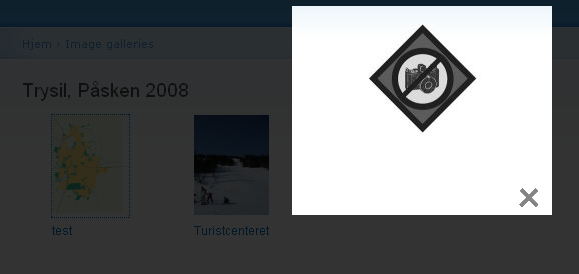
I have just made en image node gallery (image.image_gallery). The gallery works great, but when I click on the image to show the "original" image with lightbox, the only thing i get is s "brokenimage.png.
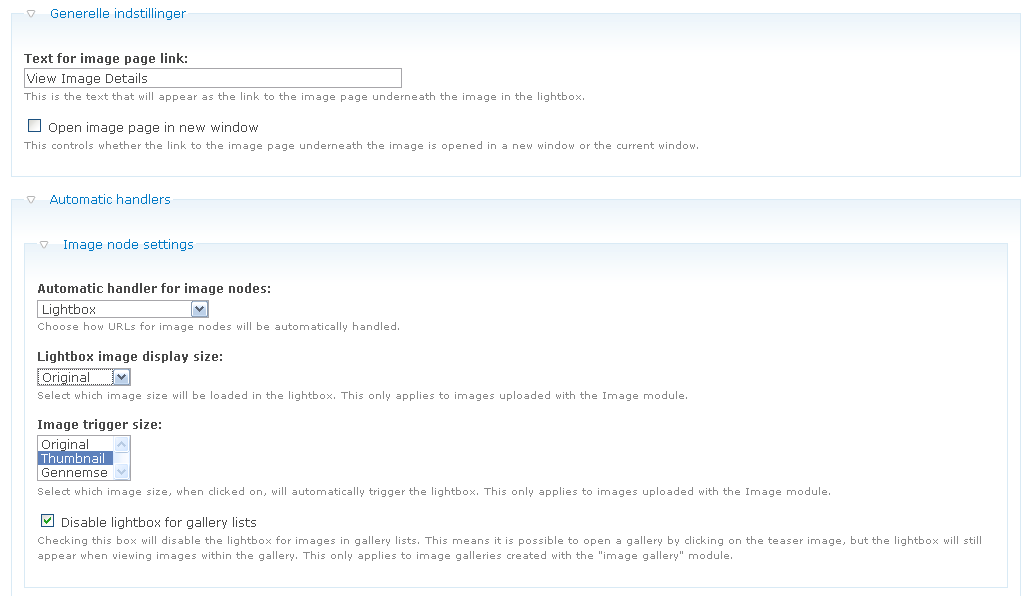
As you can se in the attached images, i use the default "thumbnail" as trigger and the "orignal" as the target.
Any ideas on how to fix the issue ? I have tried with both the 5.x-2.x-dev and the 5.x-2.8 version, with the same result.
| Comment | File | Size | Author |
|---|---|---|---|
| lightboxsetting.PNG | 25.37 KB | zerospin | |
| gallery_error_preview.PNG | 32.44 KB | zerospin |

Comments
Comment #1
stella commentedHmmm I'm not sure what the problem is. Other than do the files exist? Can you send me a link to your site? My contact form is enabled if you wish to do so privately.
Cheers,
Stella
Comment #2
gavacho commentedI have the same problem. The lightbox opens, but displays only the broken image symbol. Both the large image and the thumbnail are in the same folder, and the path to the thumbnail is correct. It was working OK a couple of days ago, but in the meantime, I did a lot of messing around attempting to get various slideshow modules to work. I have undone all the changes that I have made since installing Lightbox to the best of my recollection, but I still cannot get it to work. Can you offer any advice on troubleshooting this problem or narrow it down to possible causes? I am using Lightbox2 on a field created by the node_image module. I am running 5.11 and I tried reinstalling Lightbox2. Thanks.
Comment #3
stella commentedWhat version of lightbox2 are you using? Are you using the image module or something else?
Comment #4
gavacho commentedI am using Lightbox2 v. 5.x-2.8 and image 5.x-1.9. The Web developer error console for a page with the lightbox shows this message:
"Warning: Expected color but found 'http'. Error in parsing value for property 'background'. Declaration dropped.
Source File: http://localhost/saffron/admin/settings/lightbox2
Line: 0"
if that is any help.
Comment #5
stella commentedHmmm, that's strange. Can you send me the link to your site? My contact form is enabled if you wish to do so privately. If it's a local site, then you'll need to use the Web developer toolbar to look at the generated html source and see where the above error may be coming from.
Cheers,
Stella
Comment #6
gavacho commentedSomething I just noticed (sorry I didn't notice it earlier) is that the path to the large image that the thumbnail links to is incorrect:
http://localhost/saffron/node/files/images/node/img_1710.jpg
For some reason it is adding "node" into the path. The correct path should be:
http://localhost/saffron/files/images/node/img_1710.jpg
Any ideas?
Comment #7
gavacho commentedThank you Stella. Here is the source code. I eliminated some irrelevant parts in the interest of condensing the code for the post. I have more modules enabled than need be, because I enabled everything having anything to do with images in the hope of fixing the problem. The script is a slideshow type script that I hard coded into page.tpl.php (I hadn't gotten around to changing it to an include).
Comment #8
gavacho commentedI think I must be treating the symptom rather than the root problem with this fix, because it worked before without it, but what got it working for me now is:
Change in node_images.module, $image->filepath to base_path().$image->filepath. I hope this doesn't break something else.
Thanks so much for your help Stella. Lightbox2 is one of the few image related modules in Drupal that works like it is supposed to and is easy to install, and your attention to support requests is unmatched.
Comment #9
stella commentedWait, are you using the Image module or Node Images module? You said earlier image 5.x-1.9, but you've just referred to node_images.module in your last post. The Image module is supported, but node_images isn't yet.
If you've detected a bug in the node_images module, then you should probably create a patch for it so others may avail of the same fix.
Cheers,
Stella
Comment #10
palmyto commentedi'm using image module 5.x-1.6 & Lightbox2 5.x-2.8 and have the same problem, if you can take a look to my site, www.palmyto.com.ar -> fotos
the site is in spanish
thanks
Comment #11
palmyto commentedno? thanks anyway...
Comment #12
gavacho commentedSorry for the slow response. I didn't expect additional comments. I am using node_images. A problem I did have though, is that jquery update broke openresort and broke it badly. Uninstalling jquery update didn't undo the damage. I did a fresh install of the entire site due to this, and the second time, node_images worked fine without needing the fix. Maybe there was an incorrect path input somewhere? (there seems to be little standardization among Drupal modules regarding image folders and paths. This contributes to making working with most image modules in Drupal a real nightmare). This is certainly not a knock on lightbox2 because your module works well and is well maintained. I am using thickbox instead because it does not need jquery update. It works well also.
Comment #13
stella commented@gavacho: thanks for letting me know.
@palmyto: the current image module version is 5.x-1.9. The older 5.x-1.6 version which you have installed is no longer supported. I'd upgrade the module, run update.php and see if the problem still occurs. If it does, please open a separate support request. This issue is in relation to the "node images" module only.
Cheers,
Stella
Comment #14
Loic-1 commentedHey all !
I do have the same problem (broken image displayed), but only whith the basic lighthbox image nodes handling.
Indeed, when I use the ligthbox grouped or the slideshow handling, I do have the appropriate image displayed.
I decided to use the ligthbox grouped display, but would appreciate an hint on the basic lightbox handling issue...
Cheers
Loïc
Comment #15
hanskuiters commentedSame problem here as Loic. Used the same solution to make it work.
Comment #16
stella commented@Loic, @capono: are you using the "image" module or "node_images" module? And which version? Does it happen on the image node or in the gallery? Can you provide a link to the site where it happens?My contact form is enabled if you wish to do so privately.
Comment #17
hanskuiters commentedI'm using:
Image module 5.x-1.9
Lightbox 5.x-2.8
Url: http://boerakker.bakelbos.nl/over-smederij-boerakker
Comment #18
stella commentedHmmm I can't reproduce this issue on your site or mine, though I am using the latest dev version of Lightbox2, so that might be part of it.
Comment #19
hanskuiters commentedI've send you an email through the contact form, Stella.
Comment #20
stella commentedUpgrade to the dev version of the module. That's an old issue that has been fixed already, can't find the issue number right now though.