The Audio module provides several Flash players, some them which can be themed, some of them which cannot. As of Audio 5.x-1.3, four Flash players are provided:
- 1pixelout (can be themed)
- XSPF Button (can be themed)
- XSPF Extended (cannot be themed)
- XSPF Slim (cannot be themed)
Normally themable Flash players are themed by passing FlashVars, but Audio provides theming functions that can do so for you, so that you would only need to override respective theming functions should you want to theme your Flash player. It is assumed that you are familiar with override functions.
Theming 1pixelout
The name of the 1pixelout theming function is <prefix>_audio_1pixelout_node_player. Below is an example of an override function for the PHPTemplate theme engine.
function phptemplate_audio_1pixelout_node_player($node, $options = array()) {
  $options = array_merge(array(
    'leftbg' => '0xFF0000',
    'rightbg' => '0x000000',
    'lefticon' => '0xFFFFFF',
    'righticon' => '0xFFFFFF',
  ));
  return theme_audio_1pixelout_node_player($node, $options);
}
As you can see, there are quite a few FlashVars that dictate colors. There are also a few that dictate behavior. The FlashVars supported by 1pixelout are listed on the Runtime options section on 1pixelout.net, paraphrased below for convenience:
| Name |
Description |
| autostart |
Possible values are yes or no. The default is no. |
| loop |
Possible values are yes or no. The default is no. |
| bg |
Background color.
The format is 0xHHHHHH where HHHHHH is a valid hexadecimal color value such as FFFFFF or 009933. |
| leftbg |
Left background color |
| rightbg |
Right background color |
| rightbghover |
Right background color (hover) |
| lefticon |
Left icon color |
| righticon |
Right icon color |
| righticonhover |
Right icon color (hover) |
| text |
Text color |
| slider |
Slider color |
| loader |
Loader bar color |
| track |
Progress track color |
| border |
Progress track border color |
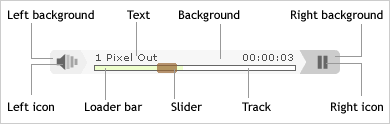
Illustration of various visual components of 1pixelout and their corresponding names, from 1pixelout.net.
Theming XSPF Button
The name of the XSPF Button theming function is <prefix>_audio_button_node_player. Below is an example of an override function for the PHPTemplate theme engine.
function phptemplate_audio_button_node_player($node, $options = array()) {
  $options = array_merge(array(
    'b_bgcolor' => 'cccccc',
    'b_fgcolor' => '009000',
    'b_colors' => 'ff0000,,0000ff,ffff00',
  ), $options);
  return theme('audio_button_node_player', $node, $options);
}
As does the 1pixelout Flash player, XSPF Button provides several color and behavior changing FlashVars, listed below:
| Name |
Description |
| autoplay |
Possible string values are true or false. The default is false. |
| repeat |
Possible string values are true or false. The default is false. |
| b_bgcolor |
Background color. The format is HHHHHH where HHHHHH
is a valid hexadecimal color value such as FFFFFF or 009933.
Not specifying a value would make the background transparent. |
| b_fgcolor |
Foreground color, which is the color for the icon and the border. |
| b_colors |
Foreground colors by state. A comma-separated string of colors,
in the order of load (spinner), play (icon displayed when stopped),
stop (icon displayed when playing), and error. A state may be omitted,
but the comma may not. There has to be three commas in total.
For example, ff0000,,0000ff,ffff00 specifies all states except for play. |
| buttons |
Custom icons by state. If you don't like the icons provided by XSPF Button,
you can replace them with your own altogether.
A comma-separated string of URLs that point to SWF files.
The same comma and order rules apply.
For example,
http://musicplayer.sourceforge.net/button/load_btn_test.swf,<br />
      http://musicplayer.sourceforge.net/button/play_btn_test.swf,<br />
      http://musicplayer.sourceforge.net/button/stop_btn_test.swf,<br />
      http://musicplayer.sourceforge.net/button/error_btn_test.swf
specifies all four states. |
Note: For more informations you may see also:
How To: Theme the 1pixelout Flash Player - Part 1
How To: Theme the 1pixelout Flash Player - Part 2
Thanks to Innovating Tomorrow


