

 The 2026 Drupal Business Survey is open. Your response will help shape the future of the Drupal business ecosystem.
Is it possible to specify the width of the wysiwyg editor in text columns? I have been able to figure out how to set the number of columns for text within the rich-text area (specifically when using TinyMCE with the wysiwyg module).
It doesn't appear to be the case that the rich text editor fits to the same dimensions on the regular text area that it replaced. In my particular case, the original regular text area had 60 columns, but the TinyMCE editor that replaces it has 100 columns. This results in a wysiwyg editor area that has more columns than can be displayed, causing it scroll horizontally before the editor's built-in word-wrap goes into effect.
| Comment | File | Size | Author |
|---|---|---|---|
| #2 | screenshot1.png | 14.02 KB | igwk |
| #2 | screenshot2.png | 15.45 KB | igwk |


Comments
Comment #1
sunAs of now, TinyMCE uses a width of 100% (and not the size of the original textarea, which may be too small for an editor, and also does not allow the editor to be resized when the browser window is resized).
Unfortunately, I did not fully grasp what you are talking about here. Could you add some screenshots?
Comment #2
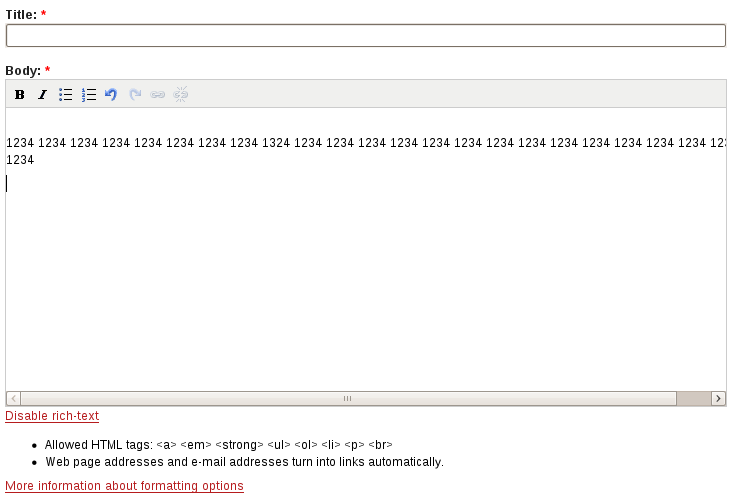
igwk commentedHi sun, here's some screenshots that will hopefully help to explain this better. Screenshot1 shows the plain textarea and screenshot2 shows the rich-text enabled editor using TinyMCE. The exact same text is shown in both shots (all I did was click on the enable/disable link). I have the rich-text editor setup to use the same stylesheet as the plain textarea so the font size is identical.
In screenshot1, you can see that the text wraps at the right edge of the textarea.
In screenshot2, you can see that the text continues past the right edge of the editor area and a horizontal scrollbar is displayed within the editor.
What I'd like to be able to do is to have the rich-text editor automatically wrap text at its right edge rather than scrolling horizontally. Is this something that is currently possible to configure?
Comment #3
sunUgh. This is most probably caused by your theme, resp. stylesheets. The content of the editor normally wraps long lines as it should. I only ever saw a horizontal scrollbar in an editor, when there was a malformed table or an image exceeding the total width of the editor's content area. However, since both does not seem to be the case here, either your theme's stylesheet or a custom editor content stylesheet (if you specified one) is guilty.
Nothing we can fix in the module, sorry.
Comment #4
igwk commentedYup, you were right -- I was using my theme stylesheet rather than using the TinyMCE default stylesheet. Once I switched to using the TinyMCE stylesheet the problems went away.
Thanks for pointing me in the right direction!