

Closed (fixed)
Project:
Content Construction Kit (CCK)
Version:
6.x-2.x-dev
Component:
Views Integration
Priority:
Normal
Category:
Support request
Assigned:
Unassigned
Reporter:
Anonymous (not verified)
Created:
7 Dec 2008 at 00:00 UTC
Updated:
11 Jul 2015 at 02:47 UTC
Jump to comment: Most recent
 instead human readable text
Comments
Comment #1
Anonymous (not verified) commentedsorry for my english... I would say:
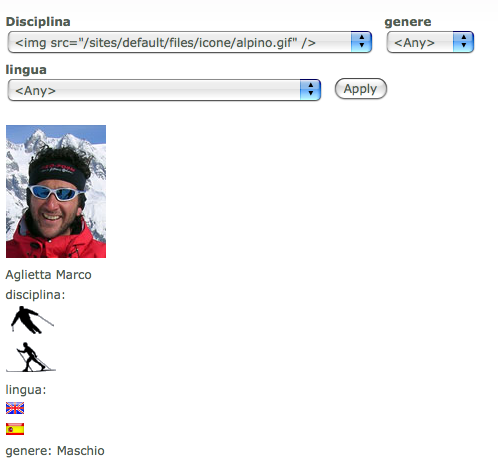
when I expose filter in views i get code... any chance to get human readable text?
Comment #2
merlinofchaos commentedIt's not a bug; select boxes can't have HTML inside them. Blame HTML for that.
Maybe there's another way to do it that CCK could do, so I'm marking it a feature request but I feel 95% certain that CCK developers will shrug and say "Sorry, can't fix," unless they have better ideas than I do.
Comment #3
Anonymous (not verified) commentedwhat a pity, there is anyboby (will be payed) to help me in a possible workaround? maybe throught a parallel cck computed field?
Comment #4
meeotch commentedTry out the Views Checkboxes module:
http://drupal.org/project/views_checkboxes
Worked for me.
Comment #5
Anonymous (not verified) commentedunfortunaly, I'm useing D6, anyone else?
Comment #6
prbass commentedI would suggest using a Taxonomy based approach, and Taxonomy Image: http://drupal.org/project/taxonomy_image rather than CCK for this.
This works with views out of the box, (although of course for the reason mentioned above, you cannot have images in an HTML select element, so it will use the term name instead.
You should be able to get everything else how you need it through theming, no custom coding required.
I'm going to mark this as closed. Giorez - I'll help you with this in your other thread in the forum http://drupal.org/node/347004, rather than cluttering up the CCK issue queue.