

 Come together with the global Drupal community in Rotterdam, 28 Sept – 1 Oct 2026. Sessions, contribution, connection, and Early Bird savings until 8 June.
Hello,
Thank you for developing this wonderful theme.
I am running Drupal 6.X and have installed your 6.x dev theme onto the site.
I noticed that in the primary link area, the blue tabs do not correctly link to any aliased URLs. I have confirmed it is not a menu issue as I can switch the theme to another theme without modifying the menu items and the links will work correctly. Any link that is Aliased will link back to the root domain (www.mydomain.com not the aliased www.mydomain.com/blog (which was the alias for www.mydomain.com/blog/4) for example).
What do you recommend as a solution to render the aliased links correctly?
Thank you.
| Comment | File | Size | Author |
|---|---|---|---|
| #4 | amor.PNG | 154.25 KB | cyberchris |

Comments
Comment #1
likewhoa commentedsame issue here.
Comment #2
info@zrix.com commentedWe checked at our end and found that the links are working fine. Suggest that you download the updated version of this theme by visiting the link below:
http://drupal.org/project/Themes
You should be able to access links properly.
Comment #3
TheProf commentedHello,
Thank you for your response. I checked your link and I am using the same theme version as you indicated. The problem is still there. How were you able to verify that it works on your end? What method are you using to create the aliases? Hopefully together we can resolve this issue.
Thank you!
Comment #4
cyberchris commentedLove this theme!
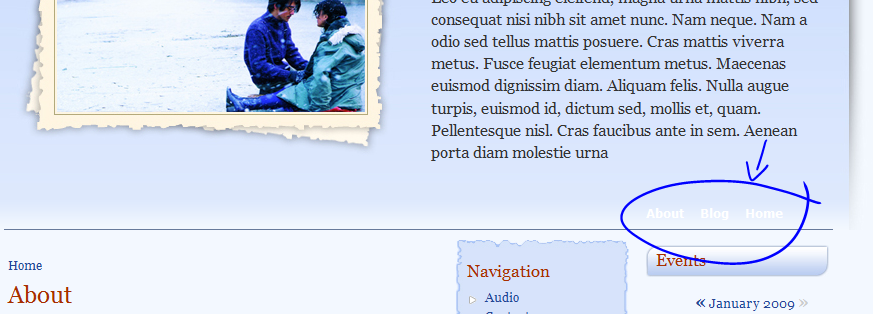
In my case the links are working fine, however the blue tabs does not show up. You can see the primary links are in the right place with white font. Is there a way to enable the tabs?
Thanks
Chris
Comment #5
TheProf commentedHello,
As our church site gets closer to launch, I'm still struggling with this issue of aliases for the primary links. I confirmed that it does NOT work with aliases but removing the aliases and having the links work correctly. Thus if I alias the links, the blue tab points to the main root domain mydomain.com not mydomain.com/blog which is an alias for mydomain.com/blog/3.
I also noticed another error -- the theme is ignoring the permissions when displaying the primary links. Example. There is a link for 'register' -- normally this shows up when you are not logged in. However, it is still in when I log in using Amor Azul. I know this is a theme specific issue because when I switch the theme to another theme, that problem disappears (along with the aliased problem mentioned above).
What should I do?
thank you.
Comment #6
TheProf commentedHello,
Just an update with respect to the previous postings -- just recently (within past 2 weeks) I was looking through the updates page on my drupal installation and it indicated that there was a new version of Amor Azul available for download. I downloaded and installed it and my issues with respect to the permissions for the tabs and the aliasing are gone.
Thank you very much!
Comment #7
kevster111 commentedIm having the no blue tabs problem too. Love this theme. Also the bottom links don't link correctly.
Comment #8
useuy commentedI am looking for the solution for this behavior all day
and guess what ...
the problem is there are different file name between style.css and the file in the image folder
in style.css the name is pro_drop4_0b.jpg
but in image folder the name is pro_drop4_0b.gif
* sorry for my bad english
Comment #9
cyberchris commentedThank you useuy, I changed the style.css and the blue tabs are showing now.
Now, I enabled the language switch block and instead of see the flag icons I see the img scr links:
img src='/a/sites/all/modules/languageicons/flags/en.png' class="language-icon" alt="English" width="16" height="12" English"
"img src='/a/sites/all/modules/languageicons/flags/pt-br.png' class="language-icon" alt="Português" width="16" height="12" Português"
Does anybody know what should I change to fix that?
Chris
Comment #10
info@zrix.com commentedPlease send us the URL of your website and a screenshot of the page on which you are facing this problem so that we can assist you further.
Comment #11
Maria Deschauer commentedHi,
I am still having problems with the tabs not showing up in Amor Azul.
I have renamed the file in style.css from pro_drop4_0b.jpg to a .gif file as suggested in an earlier post, but no luck.
I assume I am missing another step. Do I need to enable tabs somewhere in the administrative area of my site?
site is: www.loseweight-1.com
Thanks, any direction would be greatly appreciated
Maria
Comment #12
pursuehappiness83 commentedFor the problems with the tabs not showing up in Amor Azul,
please refer to
http://drupal.org/node/420030
i also have this problem, it solved my problem.