

 Come together with the global Drupal community in Rotterdam, 28 Sept – 1 Oct 2026. Sessions, contribution, connection, and Early Bird savings until 8 June.
I find it difficult to make use of this module, is there any documentation available so it will guide me through?
| Comment | File | Size | Author |
|---|---|---|---|
| #2 | example1.JPG | 116.42 KB | thermador |
| #2 | example2.JPG | 118.18 KB | thermador |


Comments
Comment #1
Microbe commentedThere isn't any documentation on how to use it at the moment. I think that that is something that should come quite soon.
For now though here is a quick guide:
There are two main ways of building your family tree.
You can import via GEDCOM and then add other things via Drupal if you already have you family tree on another program.
1 GEDCOM
To import a GEDCOM file goto Administer > Content Management > Family Import browse for GEDCOM file and click start import.
2 Adding Manually
NB: It is best to start at the top of your family tree when entering data (oldest first)
You don't have to create individuals layer by layer coming down your family tree but it can be easier as you can't select the parent group of an individual until you have created that group
I don't have a lot of time right now to make it more detailed and add helpful pictures.
If there is anything else you would like to know feel free to ask.
I hope this short guide helps
Peter
Comment #2
thermador commentedCustomizing the Look of the Family Tree Module
I found it really useful to use Views to customize this module for my site.
For example, I wanted to customize the look of the following pages:
/family/
/family/individual/
/family/group/
/family/location/
What I wanted to do is add information to explain to the user what to do, and edit some of the default info on the /family/ page to reflect how I set up my site. Here's what I did:
Log in as Admin
Go to Admin -> Site Building -> Modules
Enable the "PHP Filter" module
Go to Admin -> Site Building -> Views
Click "Edit" on "Node view: family"
On the left side you'll see a menu that says:
* Defaults
* Family Page
* Individuals Page
* Groups Page
* Locations Page
Click on "Family Page"
Under "Basic Settings" select "Header"
This opens up a box to edit the text on the page /family/
I edited replaced the code there with this code:
Note that changes were made to the instructions so that they fit my site's menus, links were added to the instructions, and PHP links were added at the bottom.
After you've made your changes, click on "Input Format" and select "PHP Code"
Then click on "Update" and then "Save"
Now check out your new /family/ page...
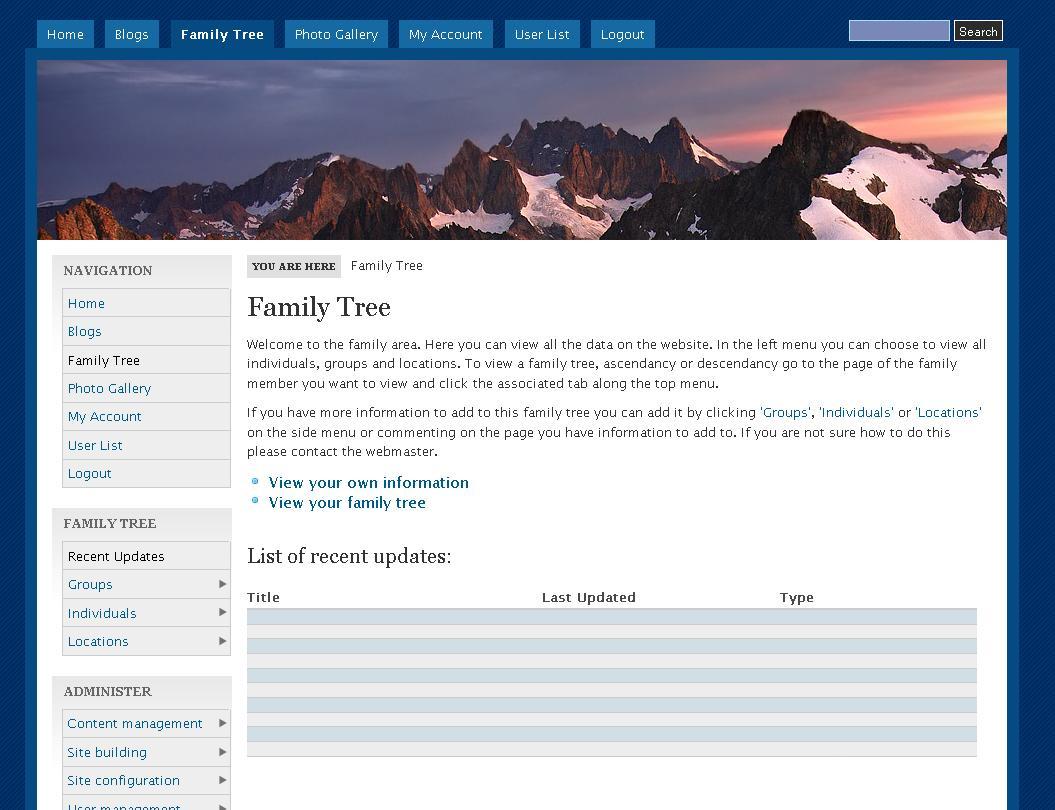
There are now links there that look like this (see attached example1.jpg)
The process for customizing the other pages (/family/individual/, etc) is basically the same, except that you'll want to make sure that when you edit the "Header" for each of the other pages, you click the "Override" button so that it uses whatever you put in the header for ONLY the /family/individual/ page - otherwise, it will update the default layout.
For example, on each of my other three pages (/family/individual/, /family/group/, and /family/location/) I added a link at the top to direct people to add a new individual, group, or location, like so:
And your result is as shown below (example2.jpg)
Comment #3
JohnColeman commentedHi djp
your suggestions were really helpful, and so is Family Tree 2, and Drupal.
Thanks a lot to everyone.
Comment #4
pyutaros commentedDocumentation pending. Unless someone else takes this up, I will not get to it for another couple months.