Closed (duplicate)
Project:
Location
Version:
6.x-3.x-dev
Component:
Code
Priority:
Critical
Category:
Bug report
Assigned:
Reporter:
Created:
15 Dec 2008 at 04:31 UTC
Updated:
17 Jul 2010 at 09:30 UTC
Jump to comment: Most recent file


Hello,
I'm relatively new to Drupal, so please bear with me:
I've created a Location CCK field for my "Event" content type, but when I create content, the location information does not appear on the node.
I get the "Location" header, but no data. As a last resort, I even whiped out my entire Drupal install and re-created the Event content type and it still doesn't work.
If anyone knows anything I can try, please let me know.




Comments
Comment #1
capellicHave you set your permissions?
Comment #2
FoolsRun commentedI have set permissions. The fields don't appear when I'm logged in as administrator, either.
Comment #3
capellicBe sure you have you display field setting to "default".
Also, go into your content type and click on "configure" for your location CCK field. Down near the bottom, you will see Display Settings. Expand taht and you will see a list of your fields that you can check to hide from your display. Be sure you don't have them all checked.
Comment #4
FoolsRun commentedI've double-checked those settings, they are set correctly, nothing is behind hidden or excluded from view.
Comment #5
bdragon commentedAttempting to reproduce...
Comment #6
bdragon commentedWhat version of CCK?
Comment #7
FoolsRun commentedThe latest, 6.x-2.1
Comment #8
bdragon commentedAre you previewing before saving the nodes?
Comment #9
FoolsRun commentedUsually, yes, but the CCK fields do not show up on the node regardless of whether they're previewed.
Comment #10
FoolsRun commentedThis seems to still be an issue.
Since the two commits mentioned in http://drupal.org/node/347094, the CCK Location fields stay populated when previewing a Node, but still don't actually show up in the Preview. Also, when I go to edit a node after saving it, the CCK Location fields are blank. It's as though the fields aren't saving.
Comment #11
likewhoa commentedI can confirm this bug in drupal-6.8, location cck fields will not show when saving, all entries are lost. The only way to have these fields saved is by enabling location in the content type but this still will not create the markers. gonna do more testing.
cck-6.x-2.1
location-6.x-3.x-dev
gmap-6.x-1.x-dev
Comment #12
ellanylea commentedConfirming bug in #11.
Subscribing.
Comment #13
keyone commentedI'm using just Location, not location CCK fields, and some fields are not showing up in node display. I have played around with the Display settings in the content type. I turned off display of coordinates. I want to see phone number, but it's not showing up.
Here is a sample node:
http://www.interstateeateries.com/content/wagon-wheel
The only fields I have checked to hide are Country, Country Name and Coordinates. All the rest are unchecked. When I go to edit the node, the phone number field IS filled in with my prior data, so it is saving. Just not displaying in the node. Also would like the map link to show :(
Just posting so I get notices on this thread.
Drupal 6.6
Location 6.x-3.0
Is there a reason to use the CCK location fields rather than simply the Location stuff?
Comment #14
likewhoa commentedthis is still an issue with drupal-6.8,location-6.x-3.x-dev & gmap-6.x-1.x-dev
the module is not producing any markers for any locations.
Comment #15
catweazle commentedI am seeing the same problem with drupal-6.8 & location-6.x-3.0
In other words, the CCK location field in the current releases are broken.
Comment #16
bdragon commentedCCK fields should be fixed now.
http://drupal.org/cvs?commit=162987
http://drupal.org/cvs?commit=162988
Comment #17
burleyc1 commentedI can confirm this bug, downloaded Location 6.x-3.0 yesterday Jan 6th, using Drupal 6.8, gmap 6.x-1.0, Seems you've fixed it at 10:54, maybe just after I downloaded.
Question: Sorry for being a nube, but which version do I need to download in order to get this latest patch?
Thanks a million bdragon(and Location crew) for creating this!
UPDATE: 10 minutes later, I downloaded and updated(uploaded new files to server) the 6.x-3 version(assuming from CVS commits) that is the version that was updated.
I then proceeded to create content in one of my content types with a field type Location. As an anonymous user I was not able to see Location data after hitting Preview button or Save button, nor did it save this data as an anonymous user(confirmed after viewing/editing as admin). As Admin, I was able to preview the data, see it, then save it, and see it stored on the site and in the database.
I've checked all user permissions and display settings as advised above, but believe it's out of my control now.
Comment #18
rootworkCCK-location (sub)fields are appearing with the latest dev version + D6.9, but the markers don't show up on the node map. Double-checked all permissions, collection and display options, and field display (set to default).
When editing the node, the GMap/coords ARE displaying and it seems to have been geocoded, but going to /map/node shows that no markers have been created (see screenshots, attached).
Comment #19
rootworkAh, OK -- I saw bdragon's comment on another thread about location-cck fields not allowing for node-level access (like the creation of markers on the node map). Switched to "old school" locative data on the content type itself and it's looking good.
Comment #20
sziggle commentedcan you link to that other thread comment?
is this a permanent or a temporary limitation? i am building a site right now and i would prefer to use the CCK location field if possible, but i need it to show markers on a gmap.
Comment #21
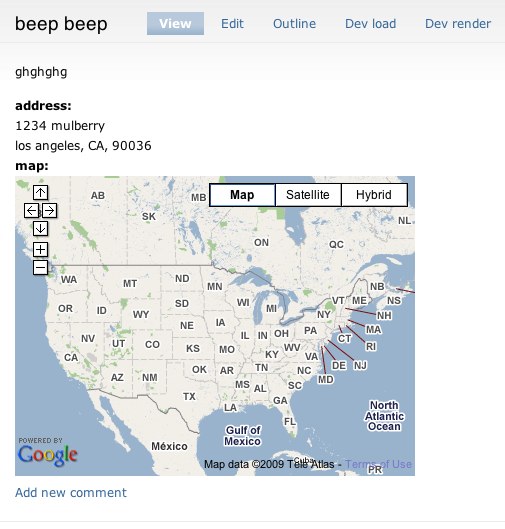
chazz commentedOk, I did about 3 hours test of this module and try to get this to work... and it almost do the job.... almost... because map is not displayed when viewing node.
When I try to add new node, I can set location point on map using interactive map, latitude, longtitude, city name etc. everythink is working fine in this point! But when I click save to publish my node, I can only see my location name and things like: 50° 15' 52.7616" N, 19° 1' 17.2344" E . I am sure that map should be just below or under this somewhere :) Any ideas how we can sort this out ?
Comment #22
rootworkHere's his comment and the discussion. Looks like subsequently some of this feature has been worked on.
Comment #23
SeanBannister commentedMarked #363690 as duplicate.
Comment #24
chazz commentedHow did you create location block that can be added to the page?
Comment #25
SeanBannister commentedI was just adding the "Location map" block that comes with the module, I presume this would show all locations and not just the one your viewing.
Comment #26
chazz commentedNooooo.... I just need to view the one that is included in each node... but I don't understand why I and other peoples can't see that map... module version is marked as stable
Comment #27
ckidow#chazz
go to admin/settings/location and enable this: "Use a Google Map to set latitude and longitude"Comment #28
SeanBannister commentedCKIDOW: take a look at #21, Chazz posted some screenshots, it's the same bug I'm having, it shows the map when you create the node but it doesnt show it when the node is displayed.
Chazz: There's obviously some pretty big bugs, I just installed the Dev version and it still doesn't show the maps.
Comment #29
chazz commentedCKIDOW, I have that option enabled. Please refer to my screenshots. Not only I have that issue... looks like SeanBannister have the same problem. I don't think is something with location_cck module but main location or gmap because it doesn't work even if you like to create location using the one in page node, not cck field
Comment #30
sziggle commentedi got the map to show up - although without the marker, so i don't know how useful it is. here's how:
1. go into the configuration for the location CCK field on your content type and uncheck "Disable Macro Input" if you have it checked, like i did. [screenshot 1] - save the form.
2. go right back into the same configuration form and enter a gmap macro in the Default : Map : GMap Macro field, (and then re-check the "disable macro input" checkbox if you want to). [screenshot 2] - save the form
3. [IMPORTANT] to see the result on EXISTING nodes, you have to edit the node. just go to the node with the location field, hit edit, then hit save.
4. bask in the glory. [screenshot 3]
---
there appears to be no way yet to show the marker on the map, because the CCK fields necessary to put the marker on that map are not exposed where you would need them to be [screenshot 4] but clearly the developer has plans to implement this.
Comment #31
chazz commentedThis is useless... unless you need only a map to be displayed but I can't see the point
Comment #32
SeanBannister commentedTrue
Comment #33
karens commentedThe patch at #363690: Can't see the map at all gets the CCK field maps showing up. Both this issue and that were related to some problems in the same location theme and were unrelated to anything specific about the CCK field. I don't know if that fix is the best one, but it does work to fix this problem, and if there is something different that needs to be done fixing that patch, however it goes in, should still fix this issue, so I'll mark this as a duplicate.
Comment #34
lolmaus commentedI've dug into the problem of missing map or missing marker on the map and found out the following. I hope this will be helpful.
There are two concurrent ways of assigning location to a node: via the 'Location' module and via the 'Location CCK' module. In the discussions of the problem, two ways are mixed and cause a lot of confusion.
Location CCK
.
The CCK way is THE WAY IT IS SUPPOSED TO BE DONE. But for now, only plain text coordinates display is implemented in the 'Location CCK' module. I don't know if they are going to develop a normal map display, but i hope they will.
How it works:
1) Enable the 'Location CCK' module.
2) Add a location field to your content type.
3) Go to Display Fields (admin/content/node-type//display) and select how the location should be presented to site visitors.
For now there are only two displays to choose from: show plain text coords and don't show location at all. I hope they will add a GMap-widget display soon.
Location (non-CCK)
This is the old-school way. It has no future because it is not based on the Views+CCK combination (which is THE approach in Drupal). Though, this method is developed enough for us to use it.
pacesolutions has posted a comprehensive guide how to use the non-CCK way to attach a location to a node:
http://drupal.org/node/363690#comment-1405782
Remove the CCK location field before trying it to make sure you use the correct place to enter location data.
Comment #35
benone commentedsubcribe
waiting for cck location showig a gmap :)
Comment #36
p4trizio commentedsubscribe
Comment #37
thekayra commentedsubscribe
Comment #38
aleagi commentedsubscribe
Comment #39
mattbk commentedSubscribing
Comment #40
Berliner-dupe commentedSubscribing
Comment #41
yesct commentedsince this is a duplicate, you will want to subscribe to the other issue instead of this one.
Comment #42
mattbk commented"Marked #363690 as duplicate" is pretty ambiguous, IMHO. Could have meant that the other one is a duplicate of this one, meaning we should all stay here.
Comment #43
yesct commentedAh, yes. It is hard to tell sometimes. An additional clue is that the "status" of this one is duplicate... Glad to see the interest here, just want to make sure all the people are pooling their interest in one spot. :) Thanks.
Comment #44
-j commentedNot sure if this post is in the right place because cck-location-gmaps issues are scattered around a bit. The obvious duplicate is tagged as non-cck so I've gone for this one.
Since the latest flurry of releases in June 2010, it's easy to use a CCK location field to display a Google map in a node. I've tried it and it seems to work really well – thanks guys!
So now I have legacy sites showing Google maps in the 'old-school' way described in #34 above. I'd like to migrate my data to a cck-location field because it's more flexible and probably more future-proof. Simple-minded approaches like adding a cck-location field to an existing content type with location data and hoping it will pick-up the data don't seem to work.
As far as I can see the only difference in the database is in the location_instance table. So one approach might be to run a SQL query and mod this table. But is there an easier/safer way that I'm missing?
Hope I'm not blind to some obvious answer but I guess lots of people will be wanting to do this and it may not be obvious to them either so any tips would be really good.
Comment #45
yesct commentedadding a cck location field to the content type, then writing a rule on save and executing php to copy the data to the new cck location field might work. I think you might be able to use VBO to then save every node of the content type. Once they are all saved, take out the old location on the content type. (Of course do this on a test site and do backups.)
I did something like this... looking for somewhere where I would have posted the code... #756316: Default value for CCK field disappears after saving the node its an old post. I dont remember if that was the final method I used... but it might give an idea of a possible way
Comment #46
yesct commented@-j we should probably look for another issue, or make one, and call it something like migrate from node location to cck location
Comment #47
-j commentedThanks YesCT. I'll check out the rules approach. I couldn't find a better home for this topic so I've created a new issue – #857000: Migrate from node location to cck location.