

Closed (fixed)
Project:
Apache Solr Search
Version:
6.x-1.0-rc1
Component:
User interface
Priority:
Normal
Category:
Support request
Assigned:
Unassigned
Reporter:
Created:
17 Dec 2008 at 14:59 UTC
Updated:
29 Nov 2011 at 18:38 UTC
Jump to comment: Most recent file


Comments
Comment #1
janusman commentedFor inspiration and guidance, some examples of other faceted search implementations dealing with this.
Please refer to the attached screenshots below.
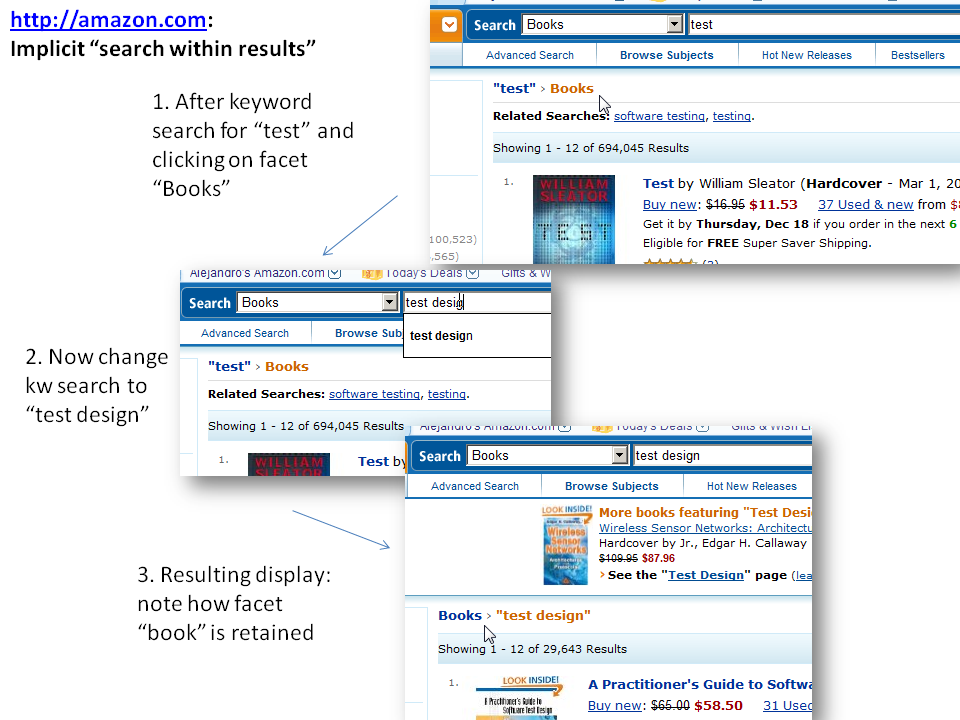
Note how Amazon does this implicitly (like we do now)-- the user adds keywords to the keyword search box, and active facets are retained (I don't think this would be what the user expects).
The Endeca example is my personal favorite, as the kw box is already filled in with the previous search (good feedback, expected behaviour), and treats the whole kw field as a single facet to remove later. Also, an explicit "Start over" link is in there =)
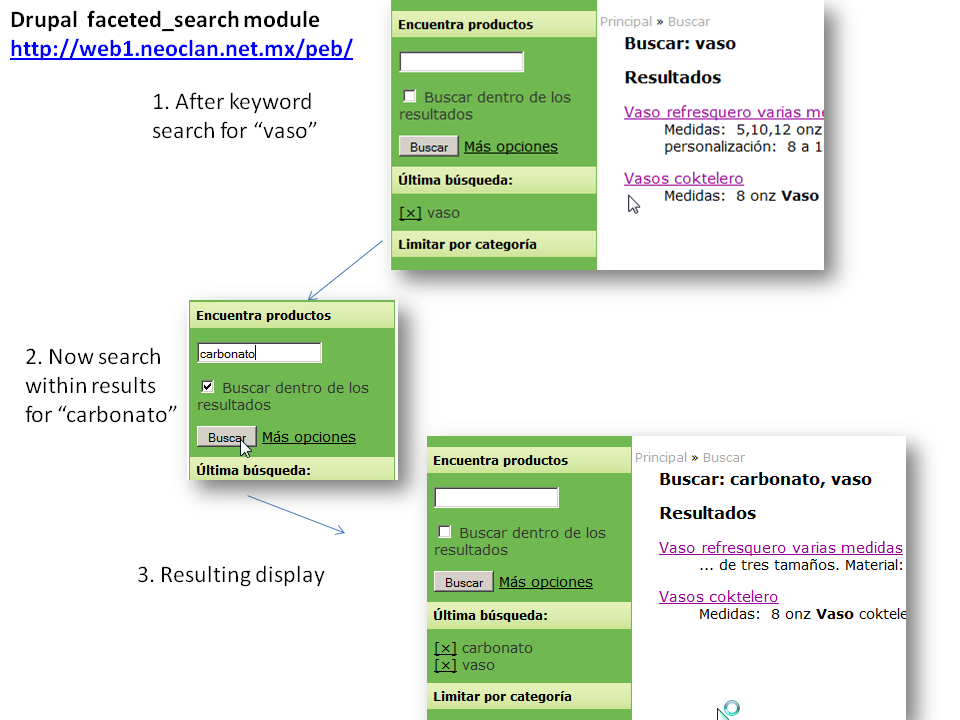
The faceted_search module for Drupal is similar, but the KW search box is not pre-filled with the current kw search.
For more examples, look at author Peter Morville´s Flickr set.
Comment #2
pwolanin commentedI don't think active facets are retained now in apacehsolr if you put in new keywords.
To do this retaining facets with a new set of keywords would not be that hard - we'd basically have to alter the validate/submit handler for the form.
Comment #3
janusman commentedJust a clarification: my three examples are different, Amazon does things this way, Endeca that way, etc.
If I were to root for one, I'd actually pick NCSU's Endeca implementation over Amazon.
My comment was just to kickstart the discussion =)
Comment #4
pwolanin commentedYes, this would be a good feature - probably a radio button to retain the current facets?
Comment #5
david lesieur commentedComment #6
janusman commentedYour patch applies but the "Search within results" doesn't always show, and also doesn't seem to actually do what it says (e.g. after a search for keyword "one" and filtering by content type "story", replacing that word inside the search box with "two" doesn't search for one AND two, it executes a search for "two" in keyword while retaining the content type facet).
Dave, which of the 3 behaviors from comment #1 (see attachments) are you trying to do? Could we probably discuss which one we're going to emulate first? I already gave my vote for NCSU's Endeca implementation =)
Comment #7
david lesieur commentedThe patch does not attempt to change the way search keys were already handled by the search form. However, it does preserve the current filters when Search within results is checked. Because of the way the search keys are currently handled, the checkbox is only shown when at least one filter is active (it is not useful otherwise).
NCSU's interface is also my favorite. I have tried what I have considered the least "disruptive" approach, but I can adjust the patch to mimic NCSU's interface more closely.
Comment #8
david lesieur commentedComment #9
janusman commentedTested, works! I really like this patch. =)
How it works:
It *might* be a bit confusing if the user just types "oranges" after "apples", since the search will become "apples apples oranges"... even though this is what happens in NCSU's Endeca catalog.
Comment #10
Noyz commentedNot sure that I'm entirely understanding without some type of visual. It may be that I'm being to literal with your write up, but you tell me...
If "Apples" is the current keyword search, and the user clicks to "search within" and then types "oranges", I would expect the search to reflect " 'Apples' 'oranges' " In contrast, if I didn't select to search within, and typed "oranges," I would expect the search to reflect "oranges"
Additionally, although " 'Apples' 'oranges' " is being used to drive the current set of results, I don't think the values should show in the keyword search field. Showing concatenated keywords is more of a traditional search paradigm. Faceted search is more exploratory, and therefor the concatenated value could get unwieldy. Faceted Search engines usually use a breadcrumb trail or in our case a "current search" block to manage the display. Flemenco is a highly tested model that shows this in action (http://orange.sims.berkeley.edu/cgi-bin/flamenco.cgi/nobel/Flamenco).
Is that what you were saying? You had said the final search would reflect "apples oranges" but that to me suggests you originally chose to search for "apples oranges" instead of appending one onto the other.
Comment #11
JacobSingh commentedI agree with Jeff here.
I tried the NCSU link, and it was pre-populated with a search for item. I checked off "search within results" and then hit enter. And now I searched for "item item", I did it again, and then I searched for "item item item item" :)
I'm not totally against concating the terms, but I think that if nothing else, by clicking the search within box, it should clear out the search box and put that value in a hidden field somewhere.
Comment #12
david lesieur commentedGiven that people as used to search tools as we are so easily end up with those "apples apples oranges" queries (and I couldn't help getting this repeatedly while trying my own patch!), that may be a good indication that we ought to change the interface to prevent this from happening. Flamenco does it nicely.
Comment #13
janusman commentedI also like Flamenco, but it depends on something we have as optional: a "your current search" section, where it displays the (perhaps many) keywords entered, each as a removable filter.
I still like the current patch over what we have now, despite the shortcomings. =)
Comment #14
pwolanin commentedWe could possibly track the past keywords - the cleanest (functionally) would be additional GET params so that a URL can be bookmarked. Does this issue mean the patch still needs work?
Comment #15
pwolanin commenteddoesn't apply.
Also, why are we using $_REQUEST? This also needs a little jQuery magic as suggested by Jacob.
Comment #16
pwolanin commentedOk, here's a new version, but still needs js that clears the search box when the checkbox is selected.
Comment #17
pwolanin commentedNow with JS
Comment #18
JacobSingh commentedTried it, and it works.
But the user experience was not that great. I take back my earlier comment about clearing the text box.
I think the faceted search module is actually the best pattern here. Just retain the current text search, and keep all the filters intact.
So for example:
1. I search for honda
2. I filter by Car Type: Civic
3. I click search in current results (perhaps rename to retain current filters)
4. The searchbox still says Honda. I add 1998 to the end of it.
5. I get results for Honda Civics using the word 1998 in the Document.
As mentioned earlier, the only way to pull off search for a string, and then search for another string is if we:
Passed the phrases with + infront of them and kept a breadcrumb of results, both of which are a pain the butt.
Comment #19
pwolanin commentedOk, this implements it the way Jacob suggests.
Comment #20
david lesieur commentedThis patch preserves the behavior implemented in #19, but only shows the "Retain current filters" checkbox when there are active filters.
The form_alter executes before the form is processed, hence the $_REQUEST.
This change moves the 'filters' form element out of the 'apachesolr_search' parent element to simplify the logic. Not sure how bad it is to lose the namespacing.
Comment #21
JacobSingh commentedCommitted to 6.x
Comment #22
pwolanin commentedI was using $form_state to avoid using $_REQUEST. I'd kind of prefer the name-space separating, but it's a simple enough form.
Comment #24
pips1 commentedI'm trying to understand what this new feature does. It doesn't seem to work for me?
This feature request had a great start with references to the "Faceted Navigation" design pattern (Peter Morville). However, the feature "Search within current set" got somewhat muddled in the course of the implementation / discussion?
Jeff's comments were spot on - the implementation by "Flamenco" works really well, from a user's perspective, IMO. But displaying a breadcrumb trail (in our case, "your current search" block) is crucial for the usability...
To be honest, I'm a bit at a loss about what try to achieve with this new feature / what you ended up with? How can you "retain filters", if the filters depend on the search term that is provided? The facets (filters) are dynamic, no? How can you retain them, if the new search contains additional search term(s)?
Any clarification much appreciated!
BTW, thanks a ton for Drupal Solr integration, it rocks!
Comment #25
JacobSingh commentedWhat this does is allow you to do a new keyword search while retaining chosen filters.
If you read the history of the issue again, we discussed various approaches, but decided that having the user's keywords end up in a breadcrumb after every search was unwieldy to develop and use.
The main use case here is most likely where you perform a search with only filters (which is possible now), and then want to drill down by keyword.
Best,
Jacob
Comment #26
pips1 commentedHi Jacob,
Thanks for that superfast reply!
I didn't realise it is possible to *search with only filters*?! (Since when)?
On my site, no filters are available if with an empty search string...
I also quickly checked http://drupal.org/search/apachesolr_search/, but there, I get prompted to "Please enter some keywords." if I klick the search button without providing a term.
Am I missing something?
Comment #27
janusman commentedpips1: in the latest DEV version go to admin/settings/apachesolr/settings and open "Advances Settings". Tell the module to use it for taxonomy links. Now go to a node that has taxonomy terms assigned to it, and click on a term that belongs to an enabled filter (which you configure in admin/settings/apachesolr/enabled-filters ) ... what happens is that you will get search results for "just" that taxonomy term.
This also works for other filters. In principle you can now start a search by just content type, or just by author, etc. See #358166: Search for just facet(s) for more info.
A related issue is: #457826: On empty search, show enabled filters to start a search
Closing this one out =)
Comment #28
scotjam commentedHi
Is there an easy way to make the default value for the 'retain-filters' set to TRUE?
cheers
scotjam
Problem solved... Using a form_alter function....
$form['basic']['apachesolr_search']['retain-filters']['#default_value'] = TRUE;
Thanks!
Comment #29
butler commentedRe: the "your current search" block mentioned in #13 above - the behavior of this block for my Apache Solr Search Integration 6.x-1.1 installation, is not as described above - keywords are not added as removable filters plural, but replace the most recent, single removable filter. I would greatly prefer the behavior mentioned above - am I missing a setting somewhere? Am I using the wrong version of Apache Solr Search Integration? Is there a patch somewhere? Or... ?
The Keywords are being displayed and referred to as filters - can anyone enlighten me - in terms of actual Apache SOLR syntax/query, are they filters? Facets? If it's possible to create facets from user (form) input in an additive way, I would hugely appreciate it if someone could point me in the right direction.
I've been working hard to understand the possibilities of Apache Solr Search Integration and related modules, and I think I'm ready (I have somewhat broad but not deep skills and experience) to start trying to write my first module if that's what it takes. But I could really use some pointers.
Thanks much.
Comment #30
kenorb commented#28: Related: #1116792: Should we add "retain-filters" param when in facet browsing mode?
Comment #31
pjcdawkins commented#28: this was my solution, it seems more correct as it checks the user's preference.